 Tapnod
The short answer
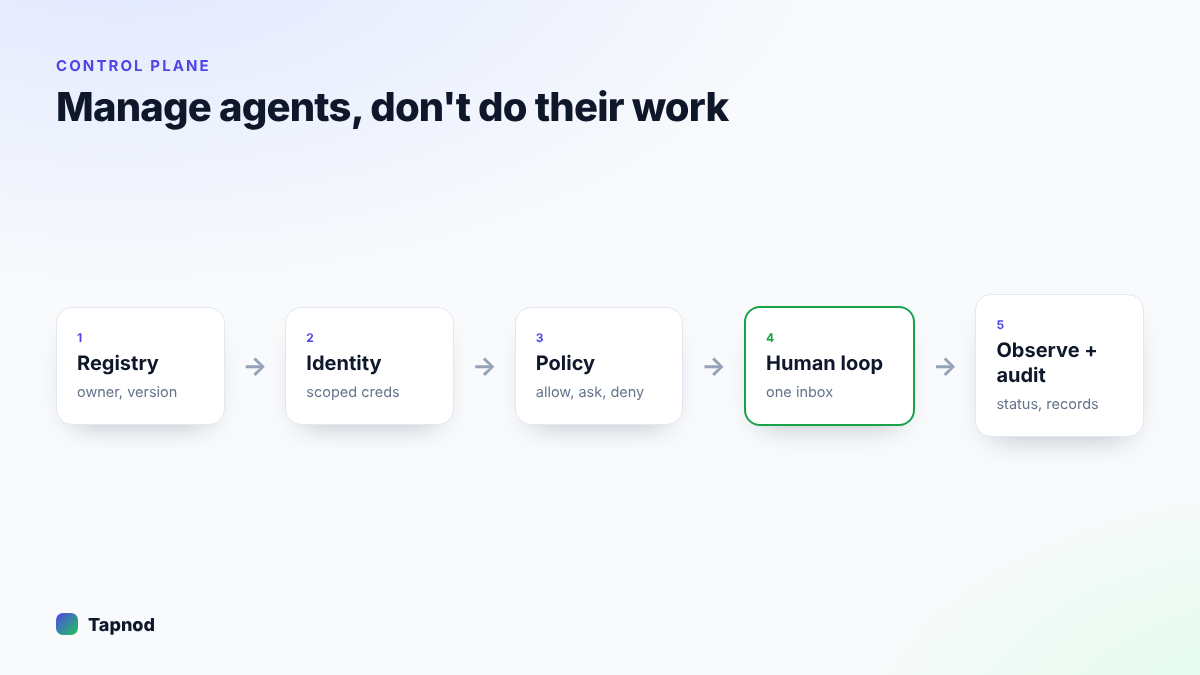
An agent control plane is the layer that manages AI agents rather than doing their work. Borrowing from networking and Kubernetes, the agents are the data plane: they call models, use tools and produce results. The control plane decides and records which agents exist, what they may do, who owns them, how they're doing and when a person must step in.
Its core components:
| Component | Job |
|---|---|
| Registry | Inventory of agents, owners, versions and where they run |
| Identity and credentials | Who each agent is and what it can access |
| Policy | Allow, ask and deny rules for tools and actions |
| Human loop | Approvals, questions and escalations |
| Observability | Status, last contact, traces, cost |
| Lifecycle | Deploy, pause, update, retire |
| Audit | Records of actions and decisions |
"agent control plane" gets about 210 US searches a month at a keyword difficulty of 39 (Semrush, November 2026). It's vendor language that's becoming architecture language, as companies find themselves with dozens of agents across tools.
Control plane vs data plane
| Data plane (agents) | Control plane | |
|---|---|---|
| Does | Tasks: code, replies, reports | Management: who, what, when, whether |
| Scale | Many, varied | One logical place |
| Changes | Often, per task | Deliberately, per policy |
| Failure impact | One task fails | Every agent loses guidance or limits |
| Built with | Frameworks, coding agents, automations | Registries, policy engines, inboxes, telemetry |
The split matters because agents come from many places: Claude Code on laptops, LangGraph services, n8n workflows, vendor agents inside SaaS. You can't make them all the same, but you can manage them the same way.
Components in practice
Registry
Every agent listed with owner, version, where it runs, its tools and its risk tier. Without a registry, the rest has nothing to attach to. A spreadsheet or a YAML file in a repository is enough to start; what matters is that it stays current.
Identity and credentials
Each agent gets its own identity and scoped, short-lived credentials, not a shared human token. That makes access reviewable and revocable per agent.
Policy
Rules that decide what each agent may do: tool permissions, data scopes, spending limits and which actions need a person. Policy can be enforced in several places: the agent host, a gateway in front of tools, or the framework. The control plane holds the source of truth.
Human loop
Approvals and questions from every agent go through one path to the right person, with timeouts and records. This is often the first piece teams centralize, because people can't check ten different places.
Observability
Status, last contact, errors, results, cost and traces per agent. The control plane needs at least the operational view: which agents are working, waiting, failing or silent.
Lifecycle
Deploy a new version, pause an agent, roll back, retire it and revoke its credentials.
Audit
A durable record of actions and human decisions, linked to agents and runs.
Vendor agents
Agents inside SaaS products count too. A CRM's built-in agent or a code host's review bot acts in your accounts. Put them in the registry, note what they can access, and know how to switch them off. You may not control their internals, but you control their access, and that is the part the control plane manages.
Signs you need one
- You can't list every agent running right now.
- Approvals arrive in terminals, Slack, email and dashboards.
- Agents share credentials with people.
- Nobody knows which agent changed a record.
- Pausing an agent means finding the machine it runs on.
Build vs buy vs assemble
| Approach | Fits |
|---|---|
| Build | Large platforms with unusual needs and a team to maintain it |
| Buy a single platform | Organizations standardizing on one vendor's agent stack |
| Assemble | Most teams: a registry, existing identity provider, framework policies, an agent inbox and a trace platform |
Assembling is common because agents come from many vendors. The key is one registry and one human loop, even if policy and telemetry are spread out.
A minimal control plane
You can start small:
# agents.yaml: the registry, kept in version control
- name: release-agent
  owner: m.chen
  backup: platform-oncall
  runs_on: ci
  version: 2026-11-20.3
  tools: [git, ci, deploy-api]
  risk_tier: 3
  approvals: [deploy_production]
  expected_contact: 10m
  credentials: vault://agents/release-agent
- name: support-drafts
  owner: a.ruiz
  runs_on: cloud
  tools: [zendesk-read, zendesk-draft]
  risk_tier: 2
  expected_contact: 15m
Add: every agent reports to one inbox for approvals, questions, results and errors; a job compares last contact to expected_contact; credentials come from a vault per agent. That's a working control plane for a small team.
Where enforcement happens
| Layer | Strength |
|---|---|
| Agent host permissions (e.g. Claude Code settings) | Close to the action; per tool and command |
| Tool gateway or proxy | Works for agents you didn't build |
| Framework approvals | Easy to add for your own agents |
| Identity and credential scope | Holds even if everything else fails |
Use several. The control plane keeps them consistent.
Who owns the control plane
Usually a platform or infrastructure team, with security owning identity and credentials. Agent owners keep their own agents' entries current. Treat the registry like code: changes go through review, and an agent that isn't in it doesn't get credentials. That single rule does more for control than any dashboard.
Measuring control
| Measure | Target |
|---|---|
| Agents running but not in the registry | Zero |
| Agents without an owner | Zero |
| Shared credentials | Zero |
| Time to pause any agent | Under five minutes |
| Approvals answered within their timeout | Over 90% |
Mistakes to avoid
- Starting with policy before inventory. You can't govern what you haven't listed.
- One giant platform for everything. Agents come from many places; force-fitting slows teams.
- Shared credentials. They make per-agent control impossible.
- Human loop as an afterthought. It's the piece people feel daily.
A worked example
Picture a 60-person company with 22 agents across coding tools, LangGraph services and Zapier. They start with a registry file and assign owners. Next, each agent gets its own credential from the existing secrets manager. Then approvals and errors from all agents route to one inbox, and last-contact alerts go to owners. Policy stays where it's enforced today, documented in the registry. Within a month, they can answer "what's running, who owns it, what's waiting" in one place.
Key takeaways
- The control plane manages agents; agents do the work.
- Core pieces: registry, identity, policy, human loop, observability, lifecycle and audit.
- Most teams assemble a control plane from existing tools plus a central registry and inbox.
- Start with inventory and a single human loop.
FAQ
What is an agent control plane?
The layer that manages AI agents, holding their registry, identities, policies, human approvals, observability, lifecycle and audit records, separate from the agents doing tasks.
How is a control plane different from an orchestration framework?
Orchestration coordinates how agents do a task together. A control plane manages agents across tasks: what exists, what's allowed and who's accountable.
Do small teams need an agent control plane?
A small version, yes: a registry of agents with owners, one place for approvals and alerts, and scoped credentials.
Can I use a single vendor's control plane?
If all your agents are on that vendor's stack. Most teams have agents from several sources, so they assemble one.
Where Tapnod fits
Tapnod covers the human loop and operational view of a control plane: approvals, questions, results, errors, last contact and active agents, across every agent. Start free.