 Tapnod
The short answer
Monitoring AI agents in production works like monitoring any service, with three additions. Set service level objectives for success rate, completion time and human response time. Alert on errors, silence, loops, cost spikes and overdue approvals. Route alerts to named owners on their phones. Then add what's specific to agents: tracking human decisions as part of the system, and treating actions already taken as part of every incident.
This runbook gives you the pieces to copy.
"production monitoring for ai agents" gets about 390 US searches a month, and "how to monitor ai agents in production" another 50 (Semrush, November 2026). The searchers have usually had a first production surprise and want a system, not a tool list.
Step 1: define SLOs
| SLO | Example target | Measured by |
|---|---|---|
| Task success rate | 90% of tasks succeed over 7 days | Outcome checks or evaluations |
| Completion time | 95% of tasks finish within 15 minutes | Run duration |
| Availability | Agent responds to new tasks within 5 minutes | Liveness and queue pickup |
| Human response | 90% of approvals answered within 30 minutes | Request store timestamps |
| Cost | Under $X per successful task | Cost per run / successes |
The human response SLO is unusual but important: in production, an agent waiting on a person is a service waiting on a dependency.
Step 2: set alerts
CRITICAL (push to owner's phone, escalate after 15 min)
- agent silent > 3x expected interval
- run-stopping error on a production agent
- approval pending past its timeout
- action denied by policy more than 5 times in 10 min   (possible confusion or injection)

WARNING (inbox, no push)
- tool error rate > 20% for 1 hour
- steps per run > 3x median
- daily spend > 2x 7-day average
- success rate below SLO for 24 hours
Start with these and tune after two weeks.
Why these alerts
Each critical alert covers a failure that otherwise stays hidden. Silence catches crashed processes, sleeping laptops and expired credentials that end a loop without an error. Run-stopping errors catch the obvious failures. Overdue approvals catch the human side: a request that reached nobody. Repeated policy denials catch an agent trying something it shouldn't, whether from confusion or from instructions planted in content it read. The warnings cover slower problems where an hour's delay costs little.
Severity levels
| Level | Meaning | Response |
|---|---|---|
| Critical | Work stopped or risk of harm | Push, acknowledge within 15 minutes |
| Warning | Degrading, not yet harmful | Inbox, look today |
| Info | Results and routine events | Inbox, no notification |
Keep critical rare. If more than a couple of critical alerts fire per agent per week, either the agent has a real problem or the threshold is wrong.
Step 3: dashboards
Three is enough:
| Dashboard | Content | Audience |
|---|---|---|
| Fleet | Every agent: status, last contact, pending decisions, errors today | Owners, leads; daily |
| SLOs | Success, completion time, human response, cost against targets | Leads; weekly |
| Traces | Search and inspect runs | Engineers; during incidents |
Step 4: on-call routing
- Each agent has an owner and a backup. Alerts go to the owner first.
- Critical alerts push to phones. Warnings land in an inbox.
- Escalation to the backup after 15 minutes without acknowledgement.
- Quiet hours for warnings; critical alerts always go through.
- One place to look: alerts and the agent's questions in the same inbox, so owners don't check three tools.
Step 5: incident response
| Step | Agent-specific detail |
|---|---|
| 1. Contain | Pause the agent or revoke its token; don't wait for root cause |
| 2. Assess impact | List actions taken since the problem began: messages sent, records changed, money moved |
| 3. Repair | Undo what can be undone; contact affected people |
| 4. Diagnose | Read traces from the first anomaly, not the last error |
| 5. Fix | Prompt, tool, permission or guardrail change, versioned |
| 6. Resume | Restart with tighter checkpoints at first |
| 7. Review | What should have caught it earlier? Add that alert or checkpoint |
Step 2 is the difference from normal incidents: agents act, so the blast radius lives in other systems. Your audit trail and traces are what make that list possible in minutes rather than days.
Pre-launch checklist for a new production agent
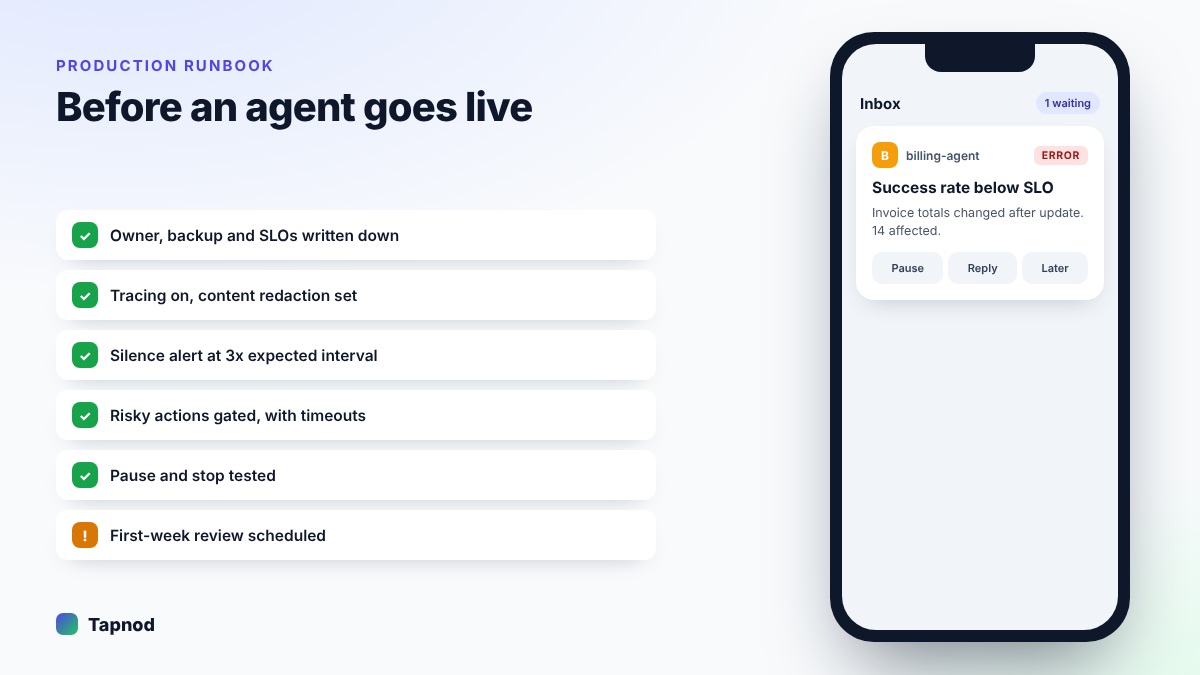
[ ] Owner and backup named
[ ] Agent version recorded on every run
[ ] Tracing enabled, content redaction configured
[ ] Liveness: expected interval set, silence alert on
[ ] Errors and results reported to the owner's inbox
[ ] Risky actions gated with approvals and timeouts
[ ] Permissions and credentials scoped; budget cap set
[ ] Pause / stop tested
[ ] SLOs written down
[ ] First-week review scheduled
Changes and releases
Most production incidents follow a change: a new prompt, model, tool or permission. Treat agent changes like deploys:
- Version everything and record the version on runs.
- Roll out gradually: a share of tasks, or one team first.
- Compare SLOs between old and new versions for a few days.
- Keep rollback ready, remembering it can't undo actions already taken.
Coding agents in production
Coding agents increasingly run unattended in CI, cloud sandboxes and scheduled jobs. Apply the same runbook: liveness for scheduled runs, errors and results reported through hooks or notify commands, permissions narrowed for headless mode, and approvals for pushes or deploys routed to phones. See Claude Code headless.
Capacity and limits
Production agents hit limits that test environments don't: model rate limits, tool API quotas, concurrency caps and budget ceilings. Track how close each agent runs to its limits, and alert at 80% rather than at 100%. When an agent hits a rate limit, it often retries in ways that make the problem worse, so cap retries and back off.
Weekly production review
Fifteen minutes, every week:
- SLOs against targets, by agent.
- Incidents and near misses.
- Top failure causes from traces.
- Approvals: overdue, rejected, always-approved.
- One change to make.
A worked example
Picture a company running a billing agent in production. One evening, a provider API change makes the agent's "update invoice" tool silently write the wrong field. The tool error rate stays at zero, but the success evaluation drops below SLO within the hour, triggering a warning; the owner sees it in her inbox at dinner and pauses the agent from her phone. Impact assessment finds 14 invoices changed. Finance fixes them the next morning. The review adds a check that compares invoice totals before and after each update.
Key takeaways
- Set SLOs for success, completion time, availability, human response and cost.
- Alert on silence, errors, overdue approvals and policy denials; warn on cost, loops and tool errors.
- Route alerts to owners' phones, with backups and escalation.
- In incidents, contain first and list every action the agent took.
FAQ
How do I monitor AI agents in production?
Define SLOs, alert on errors, silence, loops, cost spikes and overdue approvals, route alerts to named owners' phones, and keep fleet, SLO and trace dashboards.
What SLOs should AI agents have?
Task success rate, completion time, availability, human response time for approvals, and cost per successful task.
What is different about agent incidents?
Agents take actions in other systems, so incident response must list and repair those actions, not only fix the agent.
Should coding agents be monitored like other production agents?
Yes, when they run unattended: liveness, error and result reporting, scoped permissions and approvals for pushes or deploys.
Where Tapnod fits
Tapnod puts production signals and decisions in one inbox: last contact, active agents, errors, results and approvals on your phone. Start free.