 Tapnod
The short answer
Headless mode runs Claude Code without the interactive interface: claude -p "your prompt" does the task and prints the result, which makes it suitable for scripts, cron jobs and CI. The catch is permissions. Since v2.1.302, claude -p starts in manual mode unless you set one, and calls that need approval are denied unless you allow them. So a headless run needs a deliberate choice: which tools may run, which mode to use, and where a human steps in.
The safest pattern is a narrow allow list in dontAsk mode for routine jobs, with risky steps split out into a separate run that waits for a person.
"claude code headless" gets about 260 US searches a month at a keyword difficulty of 34 (Semrush, November 2026). The people searching it are moving Claude Code off their laptop and into automation, which is exactly when permissions stop being a nuisance and start being the whole design.
The basics
# one-shot task, result to stdout
claude -p "Summarize the changes in the last 10 commits"

# allow specific tools for this run
claude -p "Run the test suite and fix any failures in src/billing" \
  --allowedTools "Read" "Edit" "Bash(npm test *)"

# let the classifier decide instead of a fixed list
claude -p "Run the test suite and fix any failures" --permission-mode auto
For scripts that parse the result, request structured output with an output-format option such as JSON, and read the final result field rather than scraping text.
Why headless runs get denied
In an interactive session, a tool call that needs approval shows you a prompt. In headless mode there's no one to show it to. Recent versions start -p runs in manual mode, so those calls are denied unless an allow rule, a mode, a hook or a callback approves them. If your headless job "does nothing useful", check the denials first.
Tools that need terminal input, like multiple-choice questions and plan approval, are also turned off in non-interactive runs, so the session never waits forever.
Choosing a mode for unattended work
| Mode | Headless behavior | Use for |
|---|---|---|
default (manual) |
Approval-needing calls denied unless allowed | Most jobs, with an allow list |
dontAsk |
Anything that would prompt is denied, explicitly | Locked-down CI with a fixed tool surface |
acceptEdits |
File edits in scope run; other calls need rules | Code-changing jobs you review as a PR |
auto |
A classifier allows or blocks each action | Longer tasks where a fixed list is too tight |
bypassPermissions |
Nearly everything runs | Disposable sandboxes only |
dontAsk plus an allow list is the clearest contract: the job can do exactly what you listed and nothing else, and every denial is visible in the output.
Human checkpoints in automation
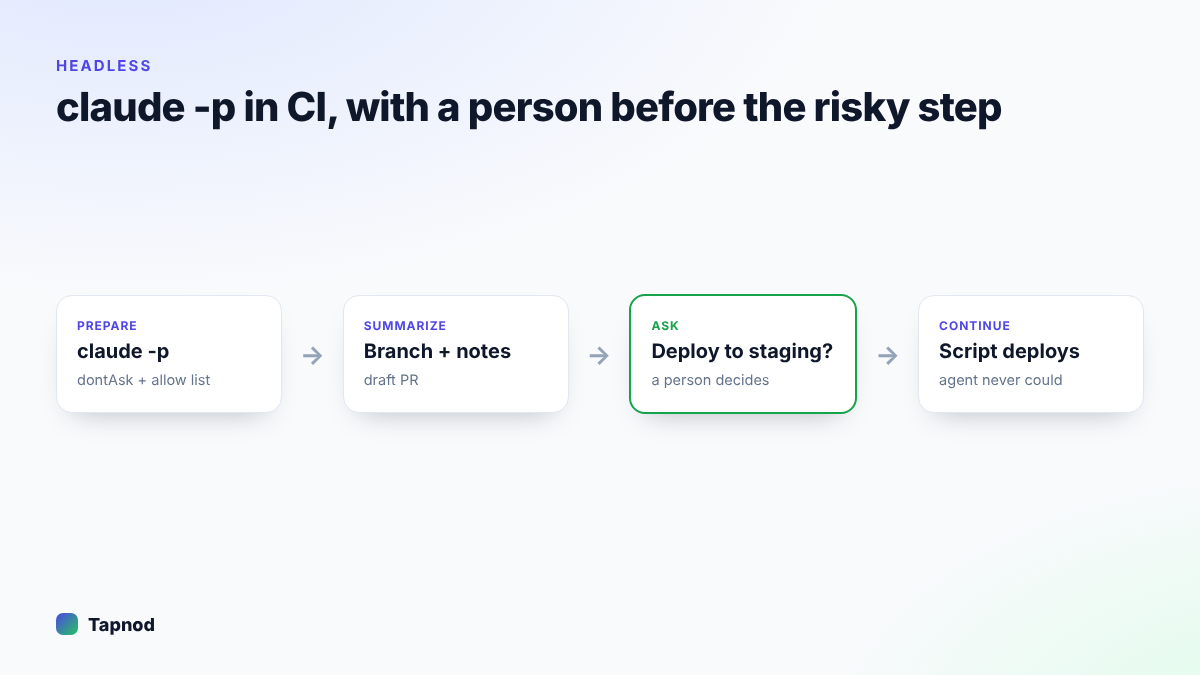
Headless doesn't have to mean unsupervised. Split jobs at the point where a human should decide:
- Prepare. A headless run does the work on a branch and writes a summary.
- Ask. A script posts the summary and the proposed next step, such as "deploy to staging?", to a person.
- Continue. When the person approves, a second headless run, or a plain script, does the risky step.
This keeps the risky action outside the agent's tool list entirely. The agent can't deploy, because deploying isn't something it's allowed to do; a person triggers it.
A CI example
Here's the shape of a nightly job that fixes lint errors and opens a PR, without ever pushing to main:
#!/usr/bin/env bash
set -euo pipefail
git checkout -b "chore/lint-$(date +%Y%m%d)"

claude -p "Fix all ESLint errors in src/. Do not change behavior. Write a summary to LINT_NOTES.md." \
  --permission-mode dontAsk \
  --allowedTools "Read" "Edit" "Bash(npx eslint *)" \
  > claude-output.txt

if git diff --quiet; then echo "Nothing to fix"; exit 0; fi
git add -A && git commit -m "chore: nightly lint fixes"
git push origin HEAD          # the script pushes, not Claude
gh pr create --fill --draft
Claude edits files and runs ESLint; the script handles git and GitHub with a token scoped to branches and draft PRs.
Prompts that behave well headless
An unattended prompt must carry everything you'd normally say during the session. Four parts cover it:
- Goal and finish line: "Fix all ESLint errors in
src/and stop whennpx eslint srcexits cleanly." - Boundaries: "Do not change behavior. Do not edit test files or config."
- Output: "Write a summary to
LINT_NOTES.mdwith files changed and anything skipped." - What to do when stuck: "If a fix would change behavior, skip it and list it in the summary."
The last line replaces the question Claude would ask a person in an interactive session. Without it, a headless run either guesses or stops at a denied tool call with no explanation.
Getting results to people
A headless job that fails at 3 a.m. should tell someone, and one that needs a decision should ask someone. Send three kinds of event out of your scripts: finished with a summary, failed with the error, and waiting for approval. Hooks still run in headless mode, so a Stop hook can post the final message, and your wrapper script can post failures. Route them to one place people check from their phones.
Security notes for servers
- Use API keys scoped to the job, stored in your CI secret store, not in the repository.
- Deny reads of secret files even when you think they aren't present.
- Restrict outbound network where you can; deny
curlandwgetif the job doesn't need them, and remember Bash rules match commands as written. - Don't run as root. Bypass mode refuses it, and other modes shouldn't need it.
- Log what ran. A
PreToolUsehook onBashgives you an audit trail for every job.
A worked example
Picture a nightly dependency-update job. At 01:00 a headless run upgrades minor versions, runs tests, and fixes small breaks, in dontAsk mode with an allow list of the package manager's update command, the test command and file edits. At 01:40 the wrapper script opens a draft PR and posts a card: "12 packages updated, tests passing, 1 breaking change fixed in date formatting. Merge to staging?" In the morning someone reads it on their phone, taps approve, and a separate deploy script runs. The agent never had deploy rights.
Key takeaways
claude -pruns Claude Code headless for scripts, cron and CI.- Recent versions deny approval-needing calls in
-punless you allow them. dontAskwith an allow list is the clearest contract for unattended jobs.- Keep risky steps out of the agent's tools and let a person trigger them.
FAQ
What is Claude Code headless mode?
Running Claude Code non-interactively with claude -p "prompt", so it completes a task and returns the result without the interactive interface.
Why are tools denied in claude -p?
Since v2.1.302, headless runs start in manual mode, and calls that need approval are denied unless an allow rule, mode, hook or callback approves them.
Which permission mode is best for CI?
dontAsk with an explicit --allowedTools list gives a fixed, predictable tool surface. Use auto for longer tasks where a fixed list is too narrow.
Can a headless job ask a human for approval?
Not through terminal prompts. Split the job: let the agent prepare and summarize, have your script ask a person, and run the risky step separately once approved. See AI agent approval workflows.
Where Tapnod fits
Headless jobs can send their "done", "failed" and "approve this?" moments to Tapnod, so a person answers from a phone and the pipeline continues. Start free.