 Tapnod
The short answer
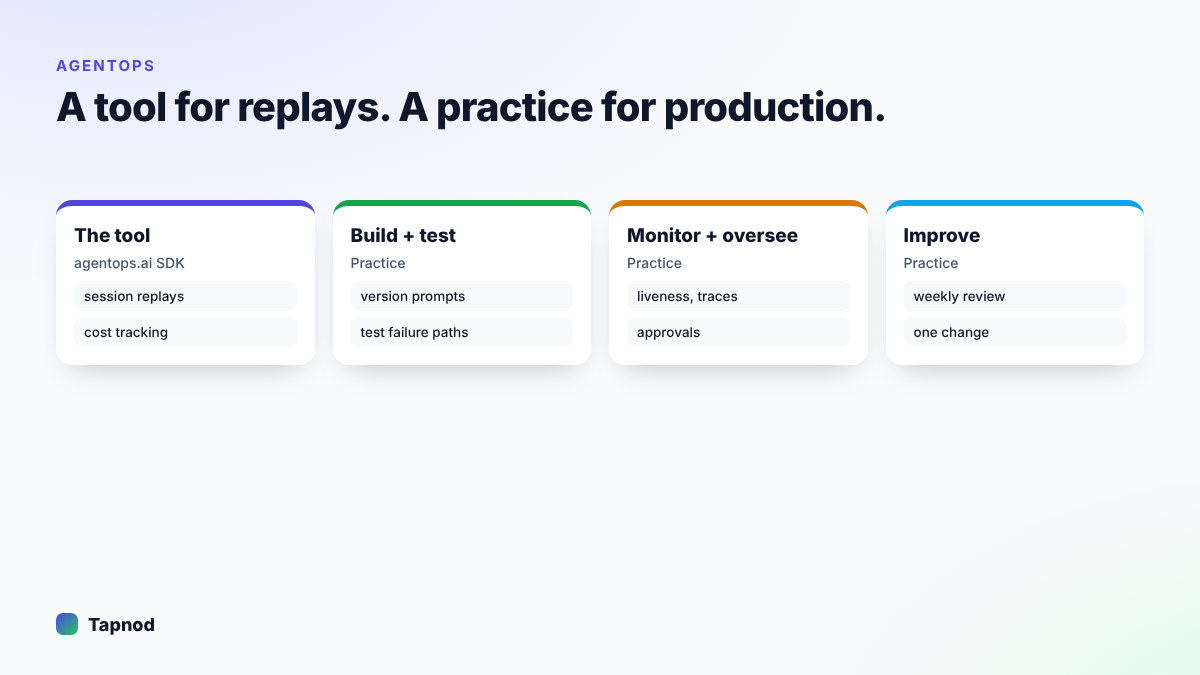
"AgentOps" refers to two things:
- AgentOps, the product: an observability platform for AI agents at agentops.ai, with a Python SDK that records LLM calls, tool calls and multi-agent interactions, a dashboard that replays sessions step by step, and cost tracking. The app is open source and can be self-hosted; a hosted version has a free tier.
- AgentOps, the practice: the discipline of running agents in production, the way DevOps and MLOps describe running software and models. It covers deployment, monitoring, human oversight, cost control and incident response.
This review covers both: what the tool does well and where it fits, and what the practice involves beyond any one tool.
"agentops" gets about 590 US searches a month at a keyword difficulty of 42 (Semrush, November 2026), split between people looking for the product and people learning the discipline.
Part 1: AgentOps the product
What it does
| Feature | What you get |
|---|---|
| Session replays | Step through an agent run in order, including tool calls and model calls |
| Cost tracking | Token usage and spend per session and across sessions |
| Multi-agent views | See interactions between agents in one session |
| Framework integrations | CrewAI, OpenAI Agents SDK, AutoGen/AG2, LangChain, LlamaIndex and more |
| Failure detection | Errors, failed tools and unusual sessions surfaced in the dashboard |
| Open source | App and SDK on GitHub, self-hostable |
Setup
The pitch is a couple of lines of code:
import agentops
agentops.init()  # reads AGENTOPS_API_KEY from the environment

# run your agent as usual; supported frameworks are instrumented automatically
crew.kickoff()
For supported frameworks, LLM calls and tool calls are captured without extra code. Custom tools and steps can be decorated to show up in the replay.
Strengths
- Session-centred view. Agents are easier to understand as sessions than as isolated requests.
- Fast start. Useful data within minutes for supported frameworks.
- Broad framework support, which suits teams experimenting with several.
- Open source with a self-hosting path.
Limits to check
- Free tier event limits: agent runs produce many events; estimate your volume before relying on the free tier.
- Language support: Python is the main SDK; check the status of other languages if you need them.
- Prompt management and evaluation: lighter than platforms built around those features.
- Operational signals: like most trace tools, it shows sessions that ran, not agents that silently stopped.
Who it suits
Teams building with CrewAI, AutoGen or the OpenAI Agents SDK who want to see what their agents did, step by step, without much setup. It is especially handy early on, when you are still learning how your agents behave on real tasks. Teams that need deep evaluation workflows or prompt management may pair it with another tool or choose Langfuse, LangSmith or Phoenix. See AI agent observability tools.
Part 2: AgentOps the practice
AgentOps as a discipline asks: how do you run agents reliably, safely and affordably once they're doing real work? It borrows from DevOps but adds problems unique to agents.
The lifecycle
| Stage | Key practices |
|---|---|
| Build | Version prompts, tools and configuration together |
| Test | Evaluate on realistic tasks; test failure paths and permissions |
| Deploy | Roll out gradually; keep the previous version ready |
| Monitor | Traces, cost, errors, liveness and waiting decisions |
| Oversee | Human approvals, questions and stop controls |
| Improve | Learn from failures, rejections and evaluations |
What's different from DevOps
| DevOps | AgentOps |
|---|---|
| Code is deterministic | Behaviour varies run to run |
| Failures throw errors | Failures can look like success, or like silence |
| Humans review code before deploy | Humans also review actions during runs |
| Cost scales with traffic | Cost scales with reasoning, loops and context |
| Rollback restores behaviour | Rollback may not undo actions already taken |
Core practices
- Inventory and ownership: every agent listed with an owner.
- Versioning: prompts, tools and model choices versioned together, recorded on every trace.
- Guardrails: permissions, sandboxes and budgets.
- Human in the loop: approvals for high-impact actions, routed to owners' phones.
- Observability: traces, metrics, evaluations.
- Liveness: last contact per agent, alerts on silence.
- Incident response: pause, investigate with traces, fix, review.
- Cost management: per-agent budgets and alerts.
More in agent ops.
Common AgentOps anti-patterns
- Shipping without an owner. Nobody notices when the agent drifts.
- Watching traces, ignoring silence. Dead agents produce no traces.
- Unversioned prompts. You can't tell which change broke things.
- Approvals in a terminal. Agents wait hours for someone to look.
- No budget limits. A loop at 3am becomes a bill at 9am.
How the tool fits the practice
AgentOps the product covers part of the monitoring stage well: traces, replays and cost. The practice needs more: ownership, guardrails, human approvals, liveness and incident response. Most teams assemble the practice from several tools.
| Practice area | AgentOps product | Other tools |
|---|---|---|
| Traces and replays | Yes | Langfuse, LangSmith, Phoenix |
| Cost per session | Yes | LLM platforms, provider consoles |
| Evaluations | Basic | Braintrust, LangSmith, Phoenix |
| Liveness and silence | No | Heartbeats, agent inboxes |
| Approvals and questions | No | Framework features, agent inboxes |
| Incident paging | No | PagerDuty, chat alerts |
Getting started with the practice
If you're new to AgentOps as a practice, start small:
- List your agents and give each an owner.
- Add tracing to the busiest agent.
- Add liveness tracking for every agent.
- Gate the riskiest action with a human approval.
- Hold a 20-minute weekly review of failures, cost and rejected actions.
That covers the basics in a week. Add evaluations, budgets and formal incident response as agents take on more important work.
Verdict
AgentOps the product is a quick, agent-focused way to see what your agents did, especially across popular multi-agent frameworks. It's not a full operations stack, and doesn't claim to be. Use it, or something like it, for the "what happened" question, and add tools for the "what's happening now" and "what needs me" questions.
A worked example
Picture a team running a CrewAI research crew. They add the AgentOps SDK and, the same afternoon, spot through a replay that the researcher agent calls the same search tool eight times with near-identical queries. They fix the prompt, cutting cost per run by about a third. Later, they add an agent inbox for approvals before the crew publishes, and liveness alerts after a scheduled run silently failed to start.
Key takeaways
- AgentOps is both a product (session replays, cost tracking) and a practice (running agents in production).
- The product is quick to set up and strong for multi-agent debugging.
- The practice also needs ownership, guardrails, approvals, liveness and incident response.
- Pair a trace tool with operational monitoring and human-in-the-loop tooling.
FAQ
What is AgentOps?
Either the AgentOps observability platform for AI agents, or the broader practice of operating agents in production, similar to DevOps for software.
Is AgentOps open source?
The AgentOps app and SDK are on GitHub, and the app can be self-hosted. A hosted version is also available with a free tier.
What frameworks does AgentOps support?
Many, including CrewAI, the OpenAI Agents SDK, AutoGen/AG2, LangChain and LlamaIndex. Check its docs for the current list.
What are AgentOps alternatives?
Langfuse, LangSmith, Arize Phoenix, Braintrust and Comet Opik for traces and evals, plus agent inboxes for liveness, approvals and questions.
Where Tapnod fits
Tapnod covers the parts of AgentOps practice trace tools leave out: active agents, last contact, waiting decisions and approvals from your phone. Start free.