 Tapnod
The short answer
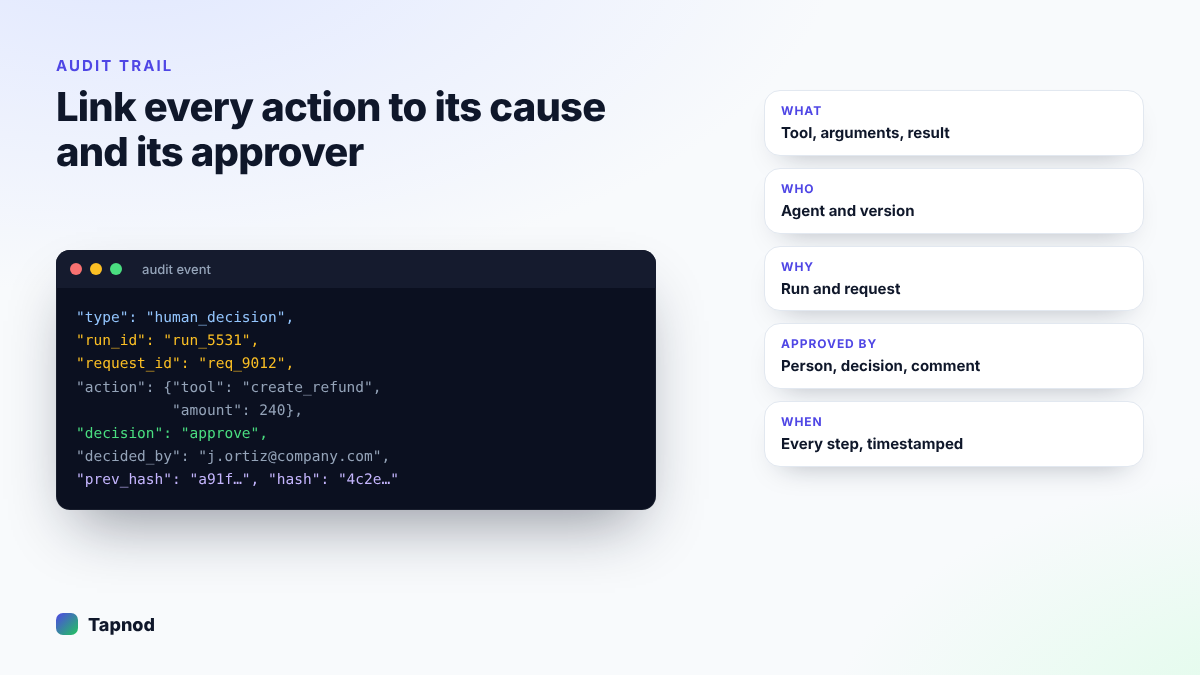
An AI agent audit trail is a record of what your agents did, why, and who approved it. A useful one answers five questions about any action:
- What happened: the tool call or action, with its inputs and result.
- Who acted: which agent, on whose behalf.
- Why: the task or request that led to it.
- Who approved: the person, their decision and comment, if a human was in the loop.
- When: timestamps for each step.
Record runs, tool calls, human requests and decisions, and errors, linked by IDs so you can follow any action back to its cause.
"ai agent audit trail" gets about 50 US searches a month (Semrush, November 2026). The people searching usually have a concrete trigger: a security review, a customer question or an incident.
Why agents need audit trails
Agents act with delegated authority. When something goes wrong, or simply when someone asks "why did the agent do that?", you need to reconstruct the chain: the request, the plan, the tool calls, the human decisions and the outcome. Traces from observability tools help with debugging, but an audit trail has a different job: a durable, trustworthy record of decisions and actions.
| Observability traces | Audit trail | |
|---|---|---|
| Purpose | Debug and improve | Accountability and review |
| Detail | Every step, tokens, latency | Actions, decisions, outcomes |
| Retention | Days to weeks | Months to years |
| Audience | Engineers | Engineers, security, compliance, customers |
| Integrity | Best effort | Protected from edits |
What to record
| Event | Key fields |
|---|---|
| Run started | Run ID, agent, task, requester, start time, agent version |
| Plan proposed | Run ID, plan summary, request ID if approval needed |
| Tool call | Run ID, tool, arguments (redacted), result summary, time |
| Human request | Request ID, run ID, type, title, proposal, assignee, sent time |
| Human decision | Request ID, decision, person, comment, decided time |
| Policy decision | Rule matched, allow/ask/deny, time |
| Error | Run ID, error, what was tried, escalated to |
| Run finished | Run ID, outcome, summary, end time |
A simple schema
{
  "event_id": "evt_77120",
  "type": "human_decision",
  "run_id": "run_5531",
  "agent": "billing-agent@v1.8",
  "request_id": "req_9012",
  "action": {"tool": "create_refund", "args": {"order": "55812", "amount": 240}},
  "decision": "approve",
  "decided_by": "j.ortiz@company.com",
  "comment": "Photo confirms damage",
  "requested_at": "2026-11-26T09:02:11Z",
  "decided_at": "2026-11-26T09:06:40Z",
  "prev_hash": "a91f...",
  "hash": "4c2e..."
}
The run_id and request_id link everything together. Hash chaining (each event storing the previous event's hash) makes tampering detectable without special infrastructure.
Redaction
Audit trails shouldn't become a second copy of every secret and personal detail your agents touch:
- Redact secrets such as tokens and passwords before writing.
- Minimize personal data: store IDs and summaries, not full documents.
- Reference large artifacts like diffs or files by link and hash instead of embedding them.
- Control access: audit logs are sensitive; limit who can read them.
Storage and retention
| Choice | Guidance |
|---|---|
| Storage | Append-only table or log store; separate from the agent's own writable storage |
| Integrity | Hash chaining, write-once storage or both |
| Retention | Set by your legal, contract and regulatory needs; often months to years |
| Access | Read-only for most; write only by the logging service |
| Export | Ability to export a run's full history for a reviewer |
Human decisions are the heart of it
For accountability, the most important events are human requests and decisions. Record what the person saw, not only what they chose. If the request said "Refund $240" and the agent later refunded $420, the trail should show the mismatch. Bind approvals to the exact proposal, and record both.
Reviews that use the trail
An audit trail nobody reads only helps after incidents. Put it to work:
- Weekly: rejected actions and errors, looking for patterns.
- Monthly: approvals by type, to tune checkpoints.
- Per incident: reconstruct the full chain, from request to outcome.
- For customers: export the history of actions on their account when asked.
Who reads the trail
Different readers need different views of the same events:
| Reader | What they look for |
|---|---|
| Agent owner | Errors, rejected actions, unusual tool use |
| Security | Permission denials, credential use, actions outside scope |
| Compliance | Human decisions for regulated actions, retention |
| Support | The history of actions on one customer's account |
| Leadership | Volume, incidents and trends |
Build saved filters or simple reports for each, so the trail is useful without writing queries every time.
Starting small
You don't need a full audit platform on day one. Start by logging human requests and decisions with run IDs to an append-only table. Add tool calls for your riskiest tools next, then policy decisions. That covers the questions people ask most often: who approved this, and what exactly did they approve.
Common gaps
- No link between tool calls and approvals. You know a refund happened and someone approved something, but not that they're the same.
- Agent version missing. You can't tell which instructions or code made a decision.
- Logs stored where agents can write. A misbehaving agent could alter its own record.
- Free-text approvals without context. "OK" from a person isn't meaningful without what they saw.
- Retention by accident. Logs deleted by default settings before anyone needed them.
Testing the trail
Pick a recent action at random and try to reconstruct it from the trail alone: the request that started the run, the plan, the tool calls, any approvals and the outcome. If any link is missing, fix the logging before an incident forces you to. Do this monthly; it takes minutes and keeps the trail honest.
Coding agents
Coding agents create their own trail through git: commits, branches and pull requests. Add the pieces git doesn't capture: permission prompts and their answers, commands run outside the repository, and the questions the agent asked. Hooks in tools like Claude Code can send these events to your log, or to an inbox that keeps them.
A worked example
Picture a fintech team with a payments agent. Every run, tool call, policy decision and human approval goes to an append-only log with hash chaining. A customer disputes a refund three months later. The team exports the run: the support request, the agent's proposed refund, the approval request showing $240 and the reason, the approver's name and comment, the refund API call and its success. The review takes ten minutes instead of a day.
Key takeaways
- Record runs, tool calls, human requests and decisions, policy decisions and errors.
- Link events with run and request IDs, and include agent versions.
- Redact secrets, minimize personal data and protect the log from edits.
- Review the trail regularly, not only after incidents.
FAQ
What is an AI agent audit trail?
A durable record of an agent's actions, the reasons for them and the human decisions involved, linked so any action can be traced to its cause.
How is an audit trail different from tracing?
Tracing captures detailed steps for debugging and is kept briefly. An audit trail captures actions and decisions for accountability and is kept longer, with protection against edits.
What should be logged for human approvals?
The request as shown to the person, their decision, comment, identity and the time, linked to the run and the resulting action.
How long should AI agent logs be kept?
As long as your legal, contractual and regulatory needs require. Decide deliberately rather than relying on default settings.
Where Tapnod fits
Tapnod keeps the human side of the trail together: each agent's questions, plans, results and errors, and who approved, commented or replied. Start free.