 Tapnod
The short answer
AI agent oversight is the set of practices that let people know what their agents are doing and change course when needed. It comes down to three abilities:
- See: which agents are running, what they're doing, when they last checked in, and what they're waiting on.
- Steer: answer questions, approve or reject plans and actions, and give feedback.
- Stop: pause or cancel an agent quickly, and change what it's allowed to do.
If you can do all three from wherever you are, within minutes, you have oversight. If any one depends on being at a specific desk, you have gaps.
"ai agent oversight" gets about 20 US searches a month, and "ai agent control" about 10 (Semrush, November 2026). Few people search the phrase, but every team running agents eventually needs what it describes.
See
Visibility is the base of oversight. For each agent, you want:
| Signal | Why it matters |
|---|---|
| Status: working, waiting, idle, error | Know where attention is needed |
| Last contact time | Spot agents that went silent |
| Current task | Know what it's doing right now |
| Waiting decisions | See what's blocked on you |
| Recent results and errors | Understand outcomes without digging |
| Spend and usage | Catch runaway costs |
The hardest signal to get is silence. An agent that crashed doesn't send an error. Track last contact and alert when it's older than expected. See AI agent monitoring.
Steer
Steering is how you shape work without doing it yourself:
- Approve plans before long tasks begin.
- Answer questions the agent can't resolve.
- Approve or reject actions above a risk line.
- Comment on results to guide the next run.
- Defer decisions you can't make yet, with a reminder.
Steering only works if requests reach you quickly and are easy to answer. That usually means a phone, with one-tap answers and enough context in each request to decide.
Stop
Every agent needs a reliable way to stop:
| Stop control | Example |
|---|---|
| Pause | Hold the run; resume later |
| Cancel | End the run; keep its state and logs |
| Revoke | Remove a permission or token so the action can't happen |
| Kill switch | Stop all agents in a scope at once |
Test stop controls before you need them. A stop button that takes ten minutes to find isn't one.
Who oversees what
| Role | Oversees |
|---|---|
| Agent owner | Day-to-day questions, approvals and results for their agents |
| Team lead | Workload, waiting decisions and errors across the team |
| Platform or security | Permissions, tokens, sandboxes and kill switches |
| Leadership | Risk, incidents and where agents are allowed to operate |
Every agent should have a named owner. "The team" is not an owner.
Defer without dropping
Not every request can be answered right away. Oversight tools should let you defer a decision with a reminder, rather than leaving it unread. A deferred item is a decision with a time attached; an unread item is a risk nobody owns.
Oversight cadence
| When | What |
|---|---|
| Real time | Approvals, blocking questions, errors |
| Daily | Results, agents that went quiet, waiting items |
| Weekly | Approval patterns, rejected actions, spend |
| Monthly | Permissions review, retired checkpoints, incidents |
Oversight across many agents
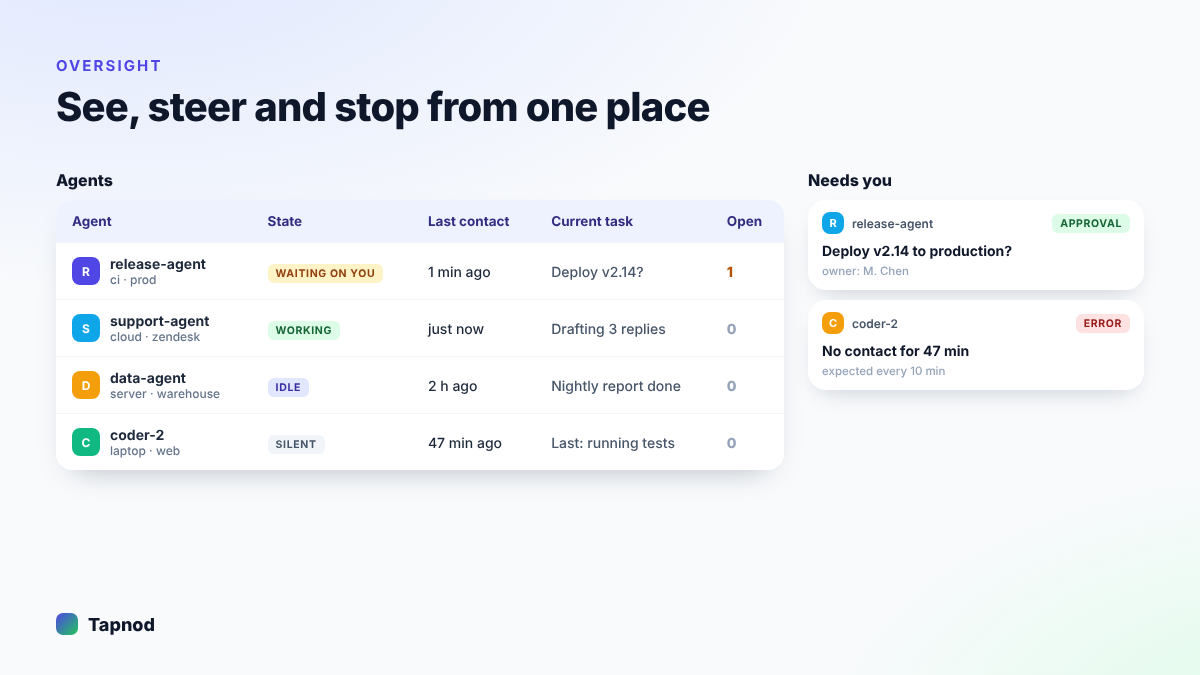
With one agent, you can watch its terminal. With ten across laptops, servers and cloud sandboxes, you can't. Oversight at that scale needs one view: every agent's status, last contact and waiting decisions in the same place, with notifications for what needs you. Without it, you're overseeing whichever agent you happen to look at.
What good requests look like
Steering depends on the quality of what agents send you. A request that says "Approve tool call?" forces you to open a terminal or a log to decide. A request that says "Deploy api v2.14 to production? 12 commits, checks passed, no migration" lets you decide from a lock screen. Set a standard format for every agent: a one-line decision, two or three facts, the exact proposal, the options, and what happens if you don't answer.
Oversight for vendors' agents
Not every agent is one you built. SaaS tools ship agents that act inside your accounts, and contractors may run agents on your code. Include them: put them in your inventory, know what they can access, and make sure you can revoke that access quickly. If a vendor's agent can't report what it did, treat it as higher risk.
Signs of weak oversight
- You learn about agent failures from customers or teammates.
- Agents wait hours for answers that take seconds.
- Nobody can say how many agents are running right now.
- Permissions were set once and never reviewed.
- There's no record of who approved a past action.
A one-page oversight checklist
[ ] Every agent has a named owner and a backup
[ ] Status and last contact visible for every agent in one place
[ ] Alert when an agent is silent longer than its normal interval
[ ] Questions and approvals reach the owner's phone
[ ] Requests include a one-line decision, context and options
[ ] Timeouts defined for every approval type
[ ] Pause, cancel and revoke tested this quarter
[ ] Decisions logged with who, what, when
[ ] Permissions reviewed monthly
[ ] Incidents reviewed, checkpoints adjusted
Oversight and regulation
For high-risk uses, laws like the EU AI Act expect people to be able to understand, monitor, override and stop AI systems. See, steer and stop line up closely with those expectations. Even where no law applies, customers and auditors ask the same questions. See EU AI Act human oversight.
Balancing oversight and autonomy
Too little oversight risks expensive mistakes. Too much defeats the reason for agents. Start with tighter oversight on new agents and new tools, then relax it as track records build. Keep tight oversight permanently on irreversible actions, money and anything customers see. Use numbers to decide: how often approvals are unchanged, how often errors happen, how quickly people respond.
A worked example
Picture a ten-person product team running eight agents: four coding agents, two support agents, a data agent and a release agent. Each has an owner. A shared inbox shows every agent's status and last contact. Approvals and questions go to owners' phones; errors go to the owner and the team lead. The release agent can be paused from the inbox, and platform engineering holds a kill switch that revokes all agent tokens. On Fridays, the team spends 15 minutes on the week's approvals and errors and adjusts two permissions.
Key takeaways
- Oversight means being able to see, steer and stop your agents.
- Track last contact so silent failures surface.
- Get requests to owners' phones with enough context to answer quickly.
- Test stop controls, name owners and review permissions on a schedule.
FAQ
What is AI agent oversight?
The practices and tools that let people see what agents are doing, steer them with answers and approvals, and stop them when needed.
How is oversight different from monitoring?
Monitoring is the "see" part. Oversight adds the ability to act: steering and stopping.
How do I oversee agents when I'm not at my computer?
Use a single view of all agents that works on your phone, with notifications for approvals, questions and errors, and controls to pause or stop.
How much oversight do AI agents need?
Enough to catch costly mistakes before they land. Start tight, then relax checkpoints that are always approved unchanged, but keep oversight on irreversible actions.
Where Tapnod fits
Tapnod puts see and steer in one place: agent monitoring with last contact and waiting decisions, plus approvals and replies from your phone. Start free.