 Tapnod
The short answer
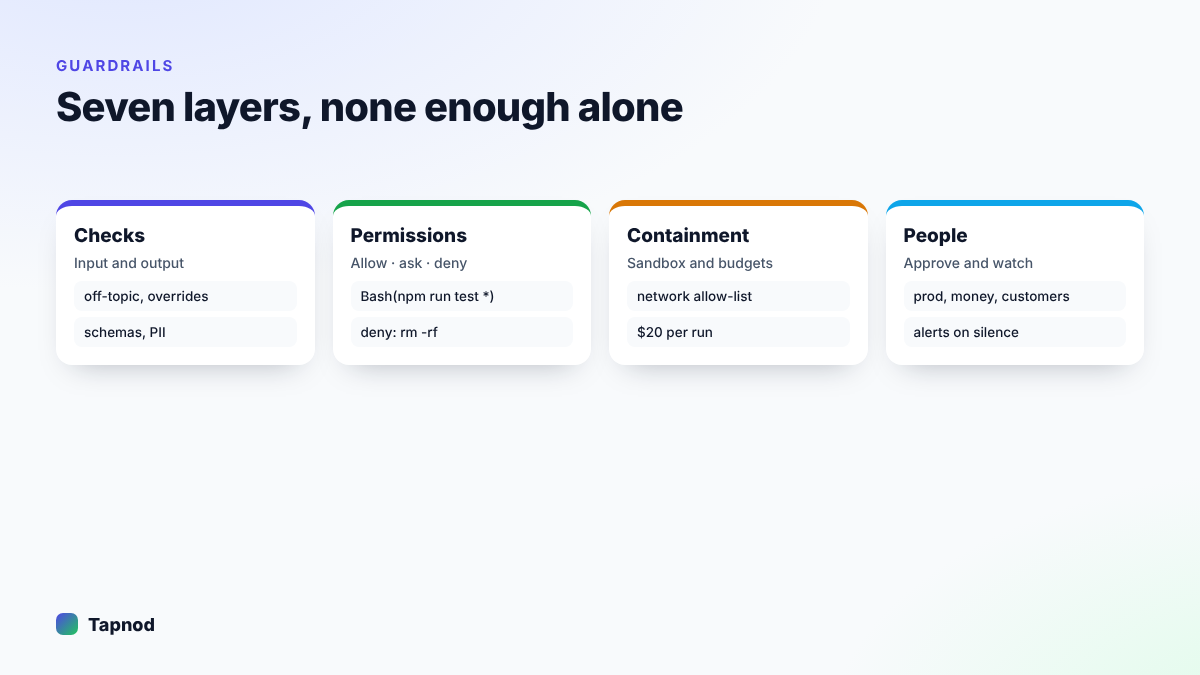
AI agent guardrails are the limits that keep an agent's behaviour within what you intend. For agents, which act as well as talk, guardrails work in layers:
- Input checks: block or flag harmful or off-topic requests.
- Output checks: validate what the agent says or produces.
- Tool permissions: allow, ask or deny each tool and argument pattern.
- Sandboxing: limit what the agent's environment can reach.
- Budgets and rate limits: cap spending, calls and run time.
- Human approvals: require a person for high-impact actions.
- Monitoring: watch activity and alert on anomalies.
No single layer is enough. Prompts can be ignored, checks can be bypassed and people can miss things. Together they make failures rare and small.
"ai agent guardrails" gets about 140 US searches a month at a keyword difficulty of 50 (Semrush, November 2026). Many searchers come from security or platform teams asked to approve an agent rollout.
Layer 1: input checks
Screen what goes into the agent. Typical checks: off-topic requests, attempts to override instructions, sensitive data that shouldn't be processed, and content policy violations. The OpenAI Agents SDK, for example, supports input guardrails that can stop a run before the main agent acts. Open-source libraries like NeMo Guardrails and Guardrails AI offer similar checks for other stacks.
Input checks reduce noise but can't catch everything, especially instructions hidden in documents or web pages the agent reads later.
Layer 2: output checks
Validate what the agent produces before anyone relies on it:
- Schema validation for structured outputs.
- Policy checks for tone, claims and sensitive content.
- Fact checks against your own data where possible.
- PII detection before content leaves your system.
Layer 3: tool permissions
This is the most important layer for agents, because tools are how they change the world. Use three outcomes: allow, ask and deny.
{
  "permissions": {
    "allow": ["Bash(npm run test *)", "Bash(git status)", "Read", "mcp__github__get_*"],
    "ask":   ["Bash(npm install *)", "Bash(git push *)", "mcp__github__create_pull_request"],
    "deny":  ["Bash(rm -rf *)", "Bash(curl *)", "Read(./.env)", "mcp__github__delete_*"]
  }
}
That's Claude Code's settings format, but the idea applies anywhere. Deny rules should win over allow rules, and patterns should be as narrow as you can make them.
Layer 4: sandboxing
Limit what the agent's environment can reach, regardless of what it tries:
- Filesystem: only the working directory.
- Network: allow-listed hosts only.
- Credentials: scoped tokens with minimal permissions and short lifetimes.
- Isolation: containers, VMs or cloud sandboxes for untrusted work.
Sandboxing is the guardrail that still works when the others fail. Cloud sandboxes for coding agents are a good default for long unattended runs, since a mistake stays inside a disposable environment.
Layer 5: budgets and limits
| Limit | Example |
|---|---|
| Spend | $20 per run, $200 per day |
| Calls | 100 tool calls per run |
| Time | 60 minutes per task |
| Rate | 10 emails per hour |
| Scope | One repository, one customer account |
Limits turn a runaway agent from a disaster into an annoyance.
Layer 6: human approvals
Some actions are too consequential for any automated check: production changes, payments, deletions, messages to customers. Require a person. Make approvals fast by routing them to the owner's phone with a clear, one-line decision. See AI approval workflow.
Layer 7: monitoring
Guardrails need feedback. Watch:
- Activity: what each agent is doing and when it last checked in.
- Denials and rejections: spikes suggest a confused or compromised agent.
- Spend and call counts against limits.
- Errors and repeated retries.
Alert a person when patterns look wrong. See AI agent monitoring.
Prompt injection and guardrails
Agents that read web pages, emails or documents can meet instructions planted there. Input checks help, but the reliable defenses are the lower layers: tools denied by policy can't be called whatever the model believes, sandboxes can't reach what they don't have, and approvals put a person between the injected instruction and the action. Treat any content the agent reads as data, not commands.
Who owns guardrails
Guardrails fail when nobody owns them. Assign an owner for each layer: platform or security teams usually own sandboxes, credentials and budgets; the team running the agent owns tool permissions, approvals and monitoring. Review the policy whenever an agent gets a new tool or a wider scope, and after any incident. Keep the policy in version control next to the agent's code, so changes are reviewed like any other change.
Testing guardrails
Test guardrails the way an attacker or a confused agent would. Ask the agent to do something denied and confirm the denial holds. Plant a harmless instruction in a document it reads and check that nothing happens beyond reading it. Push it past its budget in a test environment and confirm it stops. Each test takes minutes, and each one finds problems that reading the configuration won't.
A starter guardrail policy
| Layer | Starting point |
|---|---|
| Input | Block instruction-override attempts and sensitive data you don't process |
| Output | Validate schemas; scan for secrets and PII |
| Tools | Allow reads; ask for installs, pushes, external messages; deny destructive commands |
| Sandbox | Working directory only; network allow-list; scoped tokens |
| Budgets | Per-run spend and call caps |
| Approvals | Production, money, deletion, customers |
| Monitoring | Last contact, denials, spend; alert on silence and spikes |
Guardrails for coding agents
Coding agents need extra care because they run shell commands. Narrow allow rules to specific commands, deny network tools unless the task needs them, keep secrets files unreadable, and run long unattended sessions in a container or cloud sandbox. Use hooks to send permission prompts and errors to your phone, so asking doesn't mean waiting until you're back at your desk.
Common mistakes
- Relying on the system prompt. Instructions are guidance, not enforcement.
- Broad allow rules.
Bash(*)defeats the point. - Long-lived, powerful tokens. Scope and rotate.
- Approvals without context. People approve what they can't evaluate.
- No monitoring. Guardrails that fail silently give false comfort.
A worked example
Picture an operations agent that restarts services and rotates logs. Input checks reject requests unrelated to operations. Tool permissions allow status checks, ask before restarts and deny anything touching databases. It runs in a container with access to one cluster's API through a scoped token. It can't make more than five restarts an hour. Restarts on production need the on-call engineer's approval from their phone. Monitoring alerts if the agent goes quiet for 30 minutes or hits its restart limit.
Key takeaways
- Guardrails for agents work in layers; no single layer is enough.
- Tool permissions and sandboxing are the strongest controls.
- Budgets and limits keep failures small.
- Human approvals cover high-impact actions, and monitoring keeps everything honest.
FAQ
What are AI agent guardrails?
Controls that keep an agent's actions and outputs within intended limits, including input and output checks, tool permissions, sandboxing, budgets, human approvals and monitoring.
Are guardrails the same as human in the loop?
No. Human approval is one guardrail layer. Others, like permissions and sandboxes, work automatically.
Do prompts count as guardrails?
They help shape behaviour but don't enforce anything. Enforce limits in code, configuration and infrastructure.
How do guardrails help against prompt injection?
Denied tools, sandboxes and required approvals limit what an injected instruction can actually do, even if the model follows it.
Where Tapnod fits
Tapnod covers the approval and monitoring layers: agents ask before high-impact actions, and you see last contact and waiting decisions in one place. Try it free.