 Tapnod
The short answer
AI agent management is the day-to-day work of running agents so they produce useful results: deciding what each agent does, giving it clear tasks, checking in, reviewing its output, giving feedback and retiring it when it's no longer needed. It borrows from managing people (clear goals, check-ins, feedback) and from running services (monitoring, permissions, incidents).
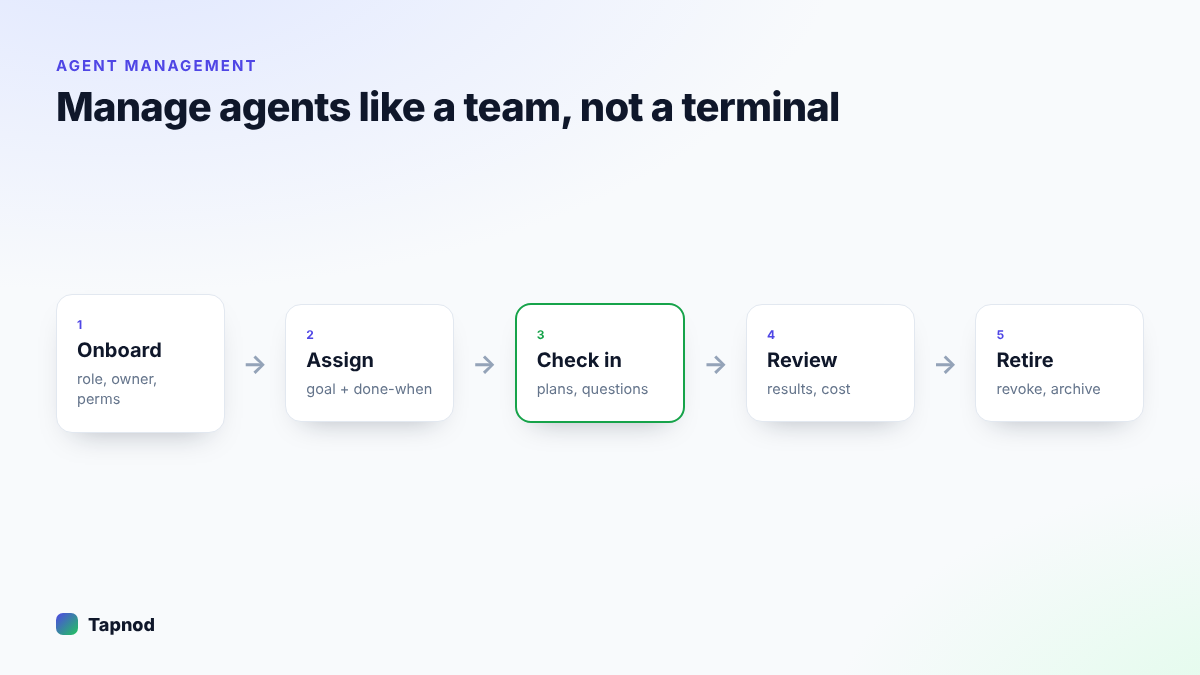
A manageable setup has five habits:
- Onboard each agent with a role, tools, permissions and an owner.
- Assign work with a clear goal and a definition of done.
- Check in through questions, plans and status, not by watching terminals.
- Review results and give feedback that changes future runs.
- Retire agents that no longer earn their place.
"ai agent management" gets about 260 US searches a month at a keyword difficulty of 36 (Semrush, November 2026). The phrase is spreading as teams find they have more agents than anyone planned.
Onboard
| Item | Example |
|---|---|
| Role | "Fixes failing tests in the web repo" |
| Owner | One named person, plus a backup |
| Tools | Repo access, test runner, CI logs |
| Permissions | Edit on branches; ask before installs; no pushes to main |
| Reporting | Questions and approvals to owner's phone; results to the inbox |
| Expected cadence | Checks in every 10 minutes while working |
Write it down. An agent without a written role drifts as people add tasks to it.
Assign
Good agent tasks look like good tickets:
- Goal: what should be true when it's done.
- Scope: what's in and out.
- Done when: a checkable condition, like tests passing.
- Constraints: time, budget, files not to touch.
- Escalation: when to stop and ask.
"Fix the flaky checkout test; done when it passes 20 runs in a row; don't change the payment module; ask if you need a new dependency" will outperform "fix flaky tests".
Check in
Managers don't watch employees type. Agents shouldn't need watching either. Instead:
| Check-in | What you see |
|---|---|
| Plan | What the agent intends to do, before it starts |
| Questions | Ambiguities it can't resolve |
| Approvals | Risky actions waiting on you |
| Status | Working, waiting, idle, error, silent |
| Last contact | When it last reported |
The point is to be interrupted for decisions, not for progress.
Instructions as a living document
Each agent's instructions should grow from experience. Keep them in the repository next to the code, with a short changelog. When a review finds a recurring mistake, add one clear rule. When a rule stops mattering, remove it, since long instructions dilute the ones that count. Teams that treat instructions like code, reviewed and versioned, see steadier agents than teams that edit prompts in a UI and forget what changed.
Review
Review results on a rhythm:
- Every result: a glance at the summary, deeper review for anything shipped or customer-facing.
- Weekly: success rate, cost, rejected actions, repeated questions.
- Monthly: does this agent still earn its place?
Give feedback
Feedback for agents means changing something durable:
| Problem | Feedback |
|---|---|
| Asks the same question repeatedly | Add the answer to its instructions or project notes |
| Makes the same mistake | Add a rule, a test or a tool that prevents it |
| Asks for routine approvals | Allow that action in permissions |
| Takes risky shortcuts | Deny the action, or require approval |
| Wanders on vague tasks | Improve the task template |
Comments on results are useful only if someone turns them into one of these changes.
Retire
Agents accumulate. Retire one when it's unused for a month, replaced by a better approach, or costing more than it saves. Retirement means revoking credentials, removing permissions, archiving logs and removing it from the registry.
Delegation levels
Not every agent gets the same freedom. Borrow the idea of delegation levels from managing people:
| Level | Agent may | Example |
|---|---|---|
| 1 · Propose | Suggest; a person acts | Draft replies for review |
| 2 · Act with approval | Act after a yes | Deploy after approval |
| 3 · Act and report | Act, then tell you | Fix lint errors, post a result |
| 4 · Act silently | Act; visible only in logs | Rotate logs, refresh caches |
Move agents up a level when their track record earns it, and down after mistakes. Write the level into each agent's role.
Managing many agents
| Number of agents | What changes |
|---|---|
| 1 to 3 | You can keep track in your head and a terminal or two |
| 4 to 10 | You need one place for questions, approvals and status |
| 10+ | You need a registry, owners, routing and a weekly review |
| Across a team | You need shared views, assignment and clear ownership |
Metrics for managers
Keep it to four numbers per agent: tasks completed, success rate, cost per successful task and questions or approvals per task. Rising questions per task usually mean unclear instructions; falling success after a change points to the change. Compare agents doing similar work to spot one that needs attention.
Common mistakes
- Babysitting. Watching agents work instead of designing check-ins.
- Unclear tasks. Vague goals produce wandering runs and many questions.
- Feedback that evaporates. Comments that never change instructions or permissions.
- No owner. Agents shared by "the team" get ignored.
- Never retiring. Old agents with live credentials are a risk.
When an agent underperforms
Treat it like a performance conversation, with data. Pull its last twenty tasks and sort failures by cause: unclear task, missing tool, wrong permission, model limit, bad input data. Most causes are fixable by the manager, not the model. If failures stay high after two rounds of changes, narrow the agent's role or retire it.
A weekly management routine
Monday    15 min  Assign the week's agent work with goals and done-conditions
Daily      5 min  Clear the inbox: approvals, questions, errors
Friday    20 min  Review results, cost, rejections; make one durable change
Monthly   30 min  Retire, re-scope or add agents; review permissions
A worked example
Picture an engineering manager with six agents across her team: two test fixers, a dependency updater, a docs agent, a release agent and a triage bot. She writes a one-paragraph role for each and assigns owners. Agents send plans and approvals to a shared inbox; owners answer from their phones. In the Friday review she notices the dependency updater asks the same question about major versions every week, so she adds the rule to its instructions. Questions drop by half.
Key takeaways
- Manage agents through onboarding, clear tasks, check-ins, reviews, feedback and retirement.
- Write tasks with goals, scope, done-conditions and escalation rules.
- Check in through plans, questions and status, not by watching.
- Turn feedback into durable changes to instructions, permissions or tools.
FAQ
What is AI agent management?
The practice of running AI agents day to day: defining their roles, assigning tasks, checking in, reviewing results, giving feedback and retiring them.
How do I manage multiple AI agents?
Give each a written role and owner, route their questions and approvals to one place, track status and last contact, and review results weekly.
How is managing agents like managing people?
Both need clear goals, check-ins and feedback. Unlike people, agents need feedback turned into explicit instructions, rules or permissions.
What tools help with AI agent management?
A registry of agents, an inbox for questions and approvals, monitoring for status and cost, and traces for debugging.
Where Tapnod fits
Tapnod is a management inbox for agents: plans, questions, results and errors in one place, with Tasks views and monitoring. Start free.