 Tapnod
The short answer
AI agent task management is tracking work that moves between agents and people: an agent starts a task, asks a person a question, waits for approval, finishes, and hands results back. Traditional task tools track people's work; agent tasks need three extra things:
- Agent-ready task descriptions: goal, scope, done-condition and when to ask.
- A clear holder at every moment: the agent, or a specific person it's waiting on.
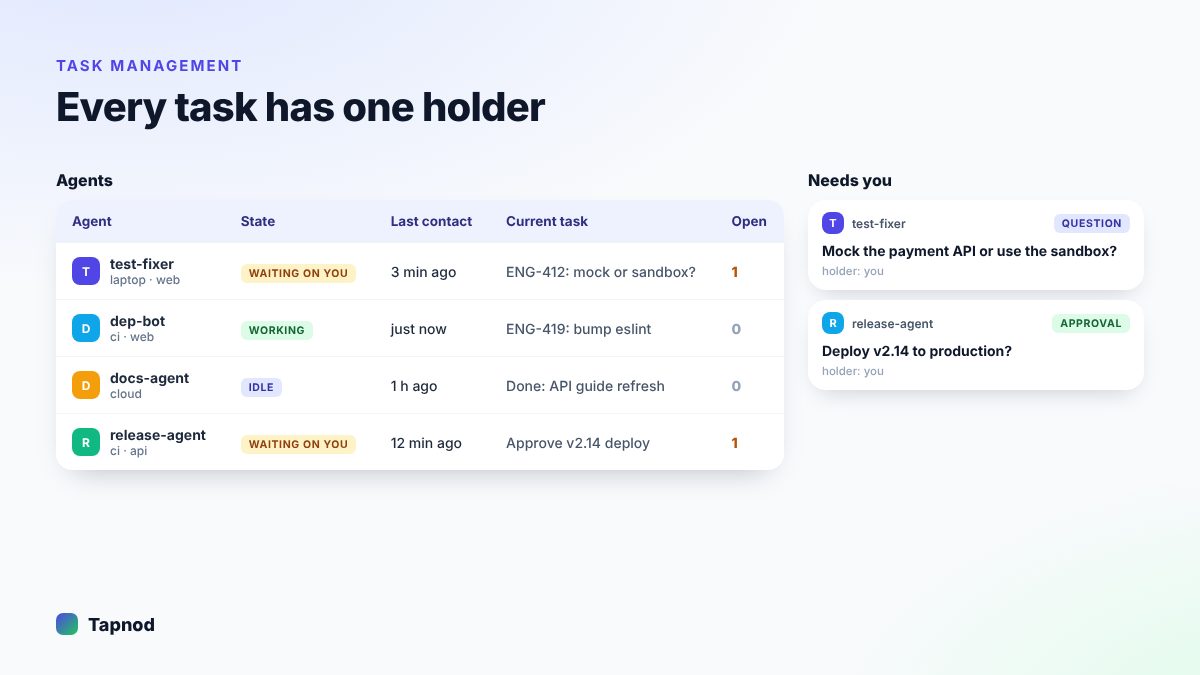
- Views by holder: what's on me, what each agent is doing, what's done.
The most useful view is "my tasks": everything agents are waiting on you for, in one list.
"ai agent task management" gets about 20 US searches a month (Semrush, November 2026). Low volume, but it describes a problem every team with several agents runs into: work stuck between an agent and a person, with nobody sure who has it.
Agent-ready tasks
| Field | Example |
|---|---|
| Goal | Checkout test passes reliably |
| Scope | tests/checkout/*, no changes to payment module |
| Done when | Test passes 20 consecutive runs in CI |
| Constraints | Under 30 minutes, under $2 |
| Ask when | A new dependency is needed, or the fix touches production code |
| Report | Result with a link to the PR; errors to the owner |
Tasks written this way get fewer questions and better results. Keep a template, and update it whenever a review shows agents asking the same kind of question again and again.
Who holds the task
At any moment, a task is held by one party:
| State | Holder | Example |
|---|---|---|
| Queued | Nobody yet | Waiting for an agent to pick it up |
| Working | Agent | Running tests, editing files |
| Waiting on person | Named person | Approval to install a package |
| Blocked | Agent or person, with reason | CI is down |
| Done | Nobody | Result delivered |
| Failed | Owner | Needs a decision: retry, change, drop |
"Waiting on person" must name the person. "Waiting on the team" is how tasks stall for days, because everyone assumes someone else has it.
Three views that keep work moving
| View | Shows | Used for |
|---|---|---|
| My tasks | Everything waiting on you, oldest first | Clearing your queue |
| Agents | Each agent with its current task, status and last contact | Spotting stuck or silent agents |
| Done | Finished work with results | Review and history |
Most people live in "My tasks". Leads check "Agents". Everyone uses "Done" when someone asks what happened.
Handoffs between agents and people
A handoff is where tasks get lost. Make each one explicit:
- Agent to person: a request with a title, context, options and a timeout.
- Person to agent: an answer, plus any comment that changes the task.
- Agent to agent: a structured brief, not a transcript.
- Person to person: reassign with a note, not a forwarded message.
Task size
Agents do best with tasks they can finish in one run, usually minutes to an hour. Larger tasks should be split into a plan and several steps, each with its own done-condition, so progress is visible and a failure doesn't throw away hours of work. If an agent regularly runs out of budget or time on a task type, the tasks are too big.
Integrating with your existing task tool
You don't have to replace Jira, Linear or GitHub Issues. Common setups:
| Pattern | How |
|---|---|
| Issues as the source | Agents pick up labelled issues and update them via MCP |
| Inbox for in-flight decisions | Questions and approvals live in an agent inbox while the agent works |
| Results back to the issue | The agent comments with the result and links the PR |
The issue tracker holds the plan; the inbox holds the live back-and-forth.
Linear issue ENG-412 "Fix flaky checkout test"  (label: agent)
  -> agent picks up, status: In progress
  -> inbox: [Question] "Mock the payment API or use the sandbox?"   holder: you
  -> you answer "sandbox" from your phone
  -> agent opens PR #881, comments on ENG-412, status: In review
  -> inbox: [Result] "PR #881 ready, 20/20 green runs"               holder: none
Splitting work between agents and people
Some tasks suit agents end to end; others work best split. A useful rule: agents take the repetitive, well-defined parts, and people take judgment calls, relationships and anything with unclear goals. When splitting, write down which part each side owns and what the handoff looks like, so the task doesn't bounce back and forth.
Prioritizing what's waiting on you
When several requests wait, answer in this order:
- Blocking approvals for work in progress.
- Questions that block an agent.
- Errors that need a decision.
- Plans for upcoming work.
- Results to review.
Defer anything you can't answer now, with a time, so it doesn't sit unread.
Recurring and scheduled tasks
Some agent work repeats: nightly dependency checks, weekly reports, daily triage. Treat each run as a task with its own result, not as background noise. Track whether each scheduled run happened, what it produced and whether it needed a person. A missed scheduled run is easy to overlook unless "Done" shows a gap where it should be.
Ownership when people are away
Tasks waiting on someone who's on leave stall quietly. Give each owner a backup, and reassign waiting tasks automatically after a set time. When someone returns, they should see what was handled in their absence in "Done", rather than a pile of stale requests.
Metrics
| Metric | Healthy sign |
|---|---|
| Time waiting on people | Minutes, not hours |
| Tasks without a holder | Zero |
| Tasks failed without a decision | Zero after one day |
| Questions per task | Falling as task templates improve |
Common mistakes
- Tasks too vague for agents. "Improve tests" leads to wandering runs.
- No named holder when waiting. Work stalls with nobody aware.
- Decisions buried in chat. Answers can't be found later.
- Results nobody reviews. Done isn't done until someone checks it.
A worked example
Picture a team of four with seven agents. They label issues for agents in Linear. Agents send questions and approvals to a shared inbox, where each request names its holder. Every morning, each person clears "My tasks" in a few minutes. The lead checks "Agents" for anything silent or stuck. On Fridays, the team skims "Done" for results worth a closer look. Tasks waiting on people drop from a median of four hours to twenty minutes.
Key takeaways
- Write agent-ready tasks with goal, scope, done-condition and when to ask.
- Every task has one holder; waiting tasks name the person.
- Use three views: My tasks, Agents and Done.
- Keep your issue tracker for plans and an inbox for live decisions.
FAQ
What is AI agent task management?
Tracking work that moves between AI agents and people, including who holds each task, what's waiting on whom, and what's done.
How do I write tasks for AI agents?
Include a goal, scope, a checkable done-condition, constraints, when to ask a person, and how to report results.
Can I use Jira or Linear for agent tasks?
Yes, for planning and status. Pair them with an inbox for questions and approvals while agents work.
How do I stop agent tasks from stalling?
Name the person holding every waiting task, notify them on their phone, and review tasks waiting longest each morning.
Where Tapnod fits
Tapnod's Tasks view has My tasks, Agents and Done, so you see what's waiting on you, what each agent is doing and what's finished. Start free.