 Tapnod
The short answer
An AI approval workflow is the path an AI agent's proposed action takes before it runs: from the agent, to the right person, to a decision, and back. A workflow your team will use has six parts:
- A short list of gated actions, chosen by risk.
- Routing to the person who owns each kind of action.
- A request format people can decide from in seconds.
- Delivery to where reviewers actually are, usually their phones.
- Timeouts with a safe default.
- A record of every decision.
"ai approval workflow" gets about 30 US searches a month, and "ai agent approval workflow" another 10 (Semrush, November 2026). The searchers are usually past the prototype stage, with an agent that's ready to act and a team that isn't ready to let it act alone.
Step 1: decide what needs approval
List every action your agents can take, then sort them:
| Category | Examples | Approval |
|---|---|---|
| Read-only | Search, read files, query analytics | Never |
| Reversible and private | Edit a branch, draft a document | Rarely |
| Visible to others | Post a message, comment on a ticket, open a PR | Sometimes, by audience |
| Costly or external | Send customer email, buy, call paid APIs | Usually, by amount |
| Irreversible | Delete data, production migrations, payments | Always |
Keep the "always" list short and specific. "Any database write" is too broad; "deletes and schema changes on production" is about right.
Step 2: route to an owner
Approvals should go to the person accountable for the outcome:
| Action | Owner |
|---|---|
| Production deploys | On-call engineer for that service |
| Customer refunds | Support lead, finance above a threshold |
| Public posts | Marketing lead |
| Dependency installs | Repository owner |
| Spending on paid APIs | Budget owner |
Add a backup for each, and an escalation path when neither answers.
Step 3: write requests people can decide from
The request is the interface. A good one has:
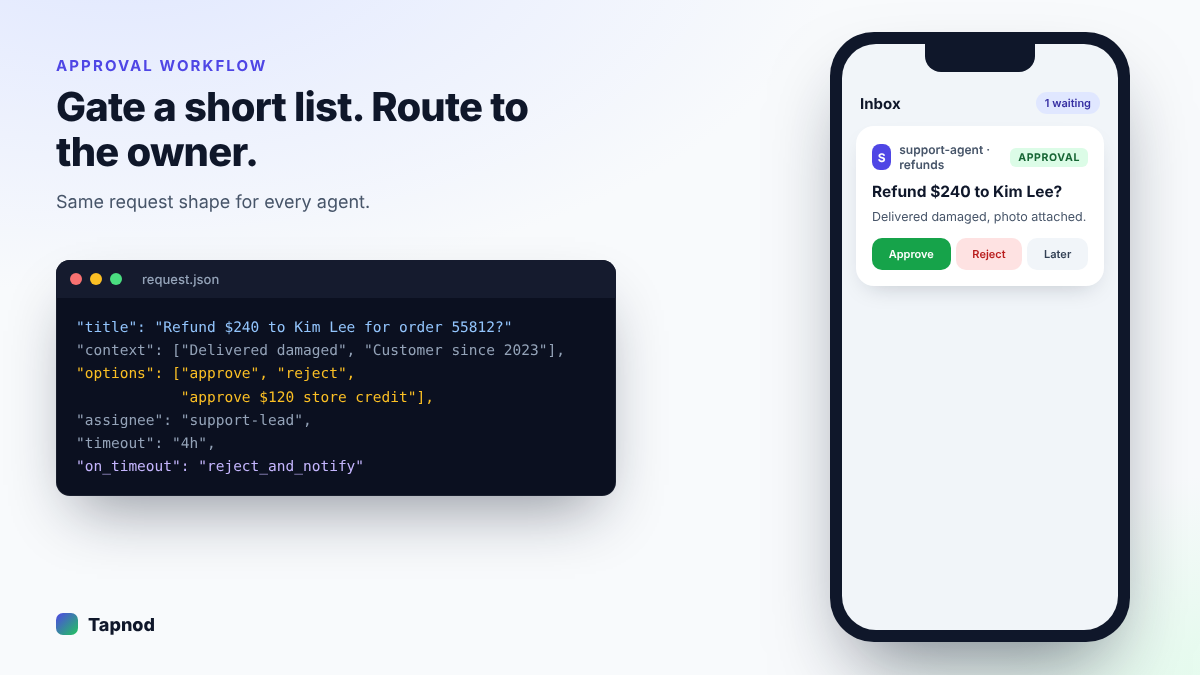
- Title: the decision in one line. "Refund $240 to Kim Lee for order 55812?"
- Context: two or three facts. "Delivered damaged, photo attached. Customer for 3 years."
- Proposal: the exact action.
- Consequence: "Refund issues immediately on approve."
- Options: approve, reject, and where useful, edit or a third choice.
{
  "type": "approval",
  "title": "Refund $240 to Kim Lee for order 55812?",
  "context": ["Delivered damaged, photo attached", "Customer since 2023", "Over $200: needs support lead"],
  "proposal": {"action": "refund", "order": "55812", "amount": 240},
  "options": ["approve", "reject", "approve $120 store credit"],
  "assignee": "support-lead",
  "timeout": "4h",
  "on_timeout": "reject_and_notify_customer_team"
}
Step 4: deliver where people are
Approvals that only appear in a terminal, a dashboard or a busy channel wait. Approvals that arrive as a push notification get answered in minutes. Match the channel to urgency: blocking approvals go to phones; results and low-priority notices go to an inbox people check a few times a day.
Step 5: set timeouts
Every approval needs a defined outcome on silence:
| Approval | On timeout |
|---|---|
| Risky action | Don't do it; report it was skipped |
| Customer-facing reply | Escalate to backup reviewer |
| Routine action with low risk | Proceed with the default and note it |
| Plan for a long task | Remind, then escalate |
Step 6: keep a record
Log the request, the decision, who made it, when, any comment, and what happened after. Link the record to the agent's run. When a customer, auditor or teammate asks why something happened, you'll have the answer in one place. See AI agent audit trail.
Approvals with edits and partial yes
Approve and reject cover most cases, but real decisions are often "yes, but". Offer a third option when it's common: approve a smaller refund, approve the deploy for tomorrow morning, send the email with a softer line. Structured alternatives are better than free text, because the agent can act on them without guessing. When you do allow free-text comments, tell the agent to treat them as instructions for its next step, and to ask again if a comment is unclear.
Who sees what
Not everyone should see every approval. Customer data, salaries and security issues need narrower audiences. Decide visibility per action type: the assignee, their backup, and anyone with audit duties. In a team inbox, use separate queues or filters so sensitive requests don't appear in a shared view by accident.
Rolling it out
- Start with one agent and one gated action. Prove the loop works end to end.
- Run for a week. Measure time to decision and outcomes.
- Adjust. Tighten requests that took long to answer; relax gates that were always approved unchanged.
- Add the next agent. Reuse the same request format and inbox.
Approval workflow vs permissions
Permissions and approvals work together. Permissions decide what the agent can do at all; approvals decide what it can do only with a person's yes. A good setup denies dangerous actions outright, allows routine ones, and sends the middle band to the approval workflow. If an action keeps getting rejected, consider denying it in permissions instead.
Metrics
| Metric | Healthy sign |
|---|---|
| Median time to decision | Minutes, not hours |
| Unchanged approval rate | High but not 100%, or the gate may be unnecessary |
| Rejections with comments | Comments help the agent improve |
| Expired requests | Rare |
| Incidents past the gate | Zero for gated actions |
Common mistakes
- Gating too much. Reviewers stop reading.
- No owner. Requests go to a channel and nobody answers.
- Approving one thing, running another. Bind the approval to the exact proposal.
- No timeout. Agents wait forever, or worse, proceed silently.
- Approvals scattered across tools. Each agent has its own place to check, so people miss requests.
Approvals across many agents
Most teams end up with agents in several places: coding agents in terminals, framework agents on servers, automations in Zapier or n8n. Each has its own approval mechanism. Keep those local mechanisms as safety floors, and route the requests people need to see into one inbox, so the workflow stays the same regardless of which agent is asking.
A worked example
Picture a five-person startup with three agents: a coding agent, a support agent and a billing automation. They gate production deploys (owner: CTO), refunds over $100 (owner: support lead) and dependency installs (owner: repo owner). Every request uses the same JSON shape and lands in one inbox with phone notifications. Timeouts reject risky actions and escalate customer replies. After a month, median time to decision is four minutes, and they've relaxed refunds under $150 to auto-approve with daily sampling.
Key takeaways
- Gate a short list of risky actions, chosen by reversibility and audience.
- Route each approval to the owner, with a backup.
- Use a consistent request format with title, context, proposal and options.
- Deliver to phones, set timeouts and log every decision.
FAQ
What is an AI approval workflow?
The process that routes an AI agent's proposed action to a person for approval, collects the decision and passes it back so the agent acts or stops.
Which AI actions should need approval?
Irreversible, costly, external or public actions: deletions, payments, production changes and messages to customers.
How do I approve AI actions from my phone?
Route approval requests to an inbox with push notifications and mobile answers, connected to your agents by MCP, webhooks or polling.
What if nobody approves in time?
Define a timeout per approval type: skip risky actions, escalate customer-facing ones, and proceed with safe defaults only for low-risk actions.
Where Tapnod fits
Tapnod is one inbox for your agents' approvals, questions, results and errors, with notifications on Android and the web. Start free.