 Tapnod
The short answer
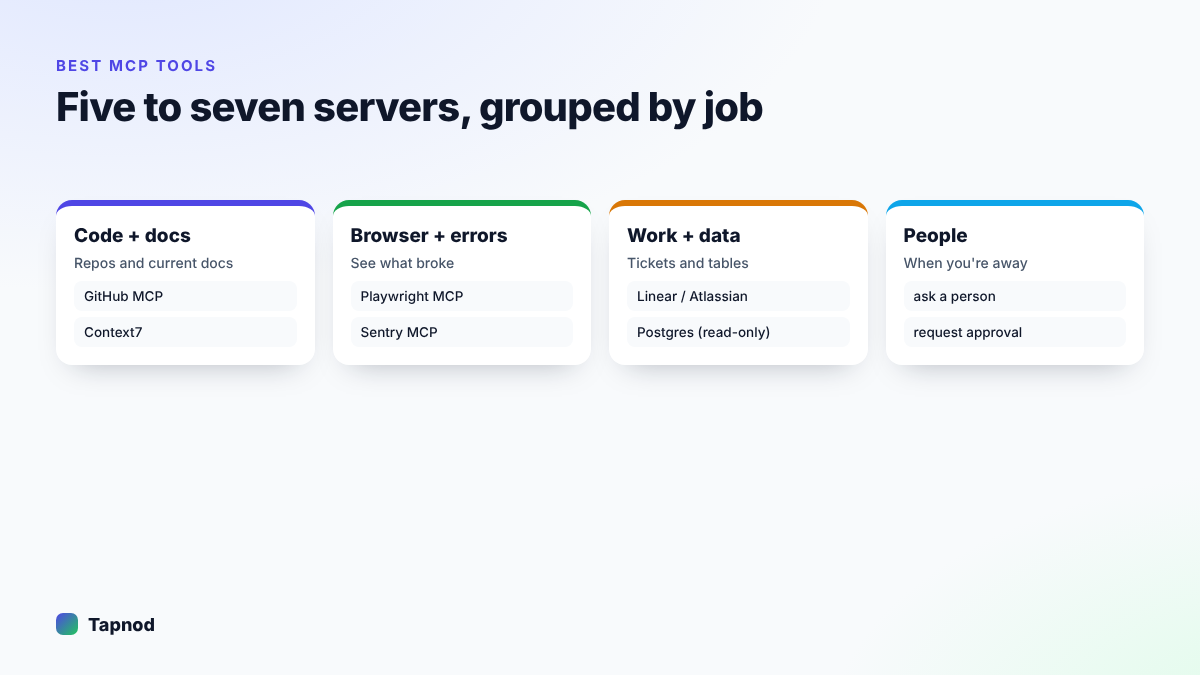
Most developers need five to seven MCP servers, not fifty. A strong starting set:
| Job | Server | Maintained by |
|---|---|---|
| Repositories, issues, PRs | GitHub MCP | GitHub |
| Current library docs | Context7 | Upstash |
| Browser automation and UI checks | Playwright MCP | Microsoft |
| Errors from production | Sentry MCP | Sentry |
| Tickets | Linear (or Jira via Atlassian) | Vendor |
| Database (read-only first) | Supabase or Postgres | Vendor or reference |
| Reaching you when you're away | A human-in-the-loop server | Various |
Prefer servers maintained by the company whose product they connect to, use remote endpoints where offered, and start every server with narrow permissions. Add more only when a real task needs them.
"best mcp tools" gets about 20 US searches a month (Semrush, November 2026), but it's one of many phrasings for the same question as MCP use spreads across coding agents.
Code: GitHub MCP
GitHub's official server gives agents repository context: issues, pull requests, code search, Actions runs. A hosted remote endpoint exposes a focused set of tools; a self-hosted version exposes more.
- Use for: reading issues, opening PRs, checking CI.
- Permission tip: allow reads, ask for PR creation and comments, deny destructive repository actions.
Docs: Context7
Context7 supplies current documentation for libraries, which cuts down on agents using outdated APIs. It's one of the most commonly recommended first installs.
- Use for: any work on fast-moving libraries.
- Permission tip: read-only by nature; usually safe to allow.
Browser: Playwright MCP
Microsoft's Playwright server lets agents drive a real browser: load pages, click, fill forms, take snapshots.
- Use for: verifying UI changes, reproducing bugs, end-to-end checks.
- Permission tip: point it at local or staging environments; be careful with logged-in production sessions.
Errors: Sentry MCP
Sentry's server gives agents access to issues and stack traces from production.
- Use for: "fix the top error from yesterday" tasks.
- Permission tip: allow reads; ask before resolving or assigning issues.
Tickets: Linear or Atlassian
Official servers for Linear and for Jira and Confluence let agents read and update work items.
- Use for: pulling task context and updating status after work.
- Permission tip: ask before creating or changing tickets other people own.
Data: Supabase or Postgres
Database servers let agents inspect schemas and run queries.
- Use for: debugging data issues, writing migrations with real schema context.
- Permission tip: connect read-only first, to non-production data. Treat write access as a separate, deliberate decision.
People: human-in-the-loop servers
Agents also need a way to reach you when they're blocked: a question, a plan to approve, a result to report. A human-in-the-loop MCP server exposes tools like "ask a person" or "request approval" and delivers them to wherever you are, returning the answer. This matters most for long or unattended runs. See MCP human in the loop.
Setting them up in Claude Code
claude mcp add --transport http github https://api.githubcopilot.com/mcp/
claude mcp add --transport http context7 https://mcp.context7.com/mcp
claude mcp add playwright -- npx @playwright/mcp@latest
claude mcp add --transport http sentry https://mcp.sentry.dev/mcp
Then narrow what each can do in settings:
{
  "permissions": {
    "allow": ["mcp__context7__*", "mcp__github__get_*", "mcp__github__list_*", "mcp__sentry__get_*"],
    "ask":   ["mcp__github__create_pull_request", "mcp__github__add_issue_comment"],
    "deny":  ["mcp__github__delete_*"]
  }
}
Check each server's docs for its current URL and tool names; they change. More in Claude Code remote MCP.
Tools beyond coding
Coding agents aren't the only MCP clients. Teams also connect servers for design (Figma), documentation (Notion, Confluence), payments (Stripe, in test mode first) and infrastructure (Cloudflare and other cloud providers). The same rules apply: official servers first, narrow tokens, and approvals for anything that writes or spends.
Local vs remote servers
| Local (stdio) | Remote (HTTP) | |
|---|---|---|
| Runs | On your machine | On the vendor's servers |
| Auth | Tokens in your environment | Often OAuth in the browser |
| Updates | You update the package | Vendor updates |
| Good for | Filesystems, browsers, local databases | SaaS products like GitHub, Sentry, Linear |
Remote servers are easier to keep current; local servers are better for anything on your own machine.
How many is too many
Every server adds tool definitions to the agent's context. Dozens of tools make the model slower to choose and more likely to choose wrong, and some clients cap the number of tools. Keep a small default set, and enable task-specific servers only when needed. Remote endpoints that expose trimmed tool sets help.
Security checklist
[ ] Prefer vendor-maintained servers over unknown forks
[ ] Read tool descriptions before enabling a server
[ ] Scope tokens to the minimum (read-only where possible)
[ ] Separate production and non-production credentials
[ ] Allow reads, ask for writes, deny destructive tools
[ ] Review enabled servers monthly; remove unused ones
[ ] Treat content returned by tools as data, not instructions
The last line matters: an issue body, a web page or a document can contain text aimed at the agent. Permissions and approvals limit what that text can make the agent do.
Testing a new server
Before adding a server to your default set, run a short test. Ask the agent to list the server's tools and read their descriptions yourself. Try a few read-only tasks and check the results. Then try one write action with approval required, and confirm the prompt shows exactly what will change. Ten minutes of testing catches most surprises, such as tools that do more than their names suggest.
Servers to skip
- Abandoned community forks of servers that have an official version.
- Servers asking for broad tokens they don't need.
- Overlapping servers that expose the same tools twice.
- Anything you can't identify the maintainer of.
Picking by role
| Role | Start with |
|---|---|
| Frontend developer | GitHub, Context7, Playwright, Figma |
| Backend developer | GitHub, Context7, Sentry, Postgres (read-only) |
| Full-stack on Supabase | GitHub, Context7, Supabase, Playwright |
| Team lead | GitHub, Linear or Jira, a human-in-the-loop server |
A worked example
Picture a developer setting up Claude Code for a Next.js app. Day one: GitHub, Context7 and Playwright, with reads allowed and PR creation set to ask. Week two: Sentry, so the agent can pick up production errors. Week three: she starts long refactors that run while she's in meetings and adds a human-in-the-loop server, so plan approvals and questions reach her phone. She skipped a popular database server because it asked for a write-enabled connection string.
Key takeaways
- Start with GitHub, Context7 and Playwright; add Sentry, tickets and data as needed.
- Prefer vendor-maintained servers and remote endpoints with trimmed tool sets.
- Allow reads, ask for writes, deny destructive tools.
- Add a human-in-the-loop server for long or unattended runs.
FAQ
What are the best MCP tools for developers?
Commonly recommended servers include GitHub, Context7, Playwright, Sentry, Linear or Atlassian, and Supabase or Postgres, plus a human-in-the-loop server for unattended runs.
How many MCP servers should I install?
Usually five to seven. More tools in context can slow the agent and lead to wrong tool choices.
Are MCP servers safe?
They're as safe as their maintainer, the token you give them and the permissions you set. Prefer official servers, scope tokens and require approval for writes.
Which MCP servers work with Claude Code and Codex?
Most do, since both support MCP. Remote HTTP servers and local stdio servers can both be added.
Where Tapnod fits
Tapnod connects over MCP as your human-in-the-loop server: agents send questions, plans, results and errors, and you answer from your phone. Connect free.