 Tapnod
The short answer
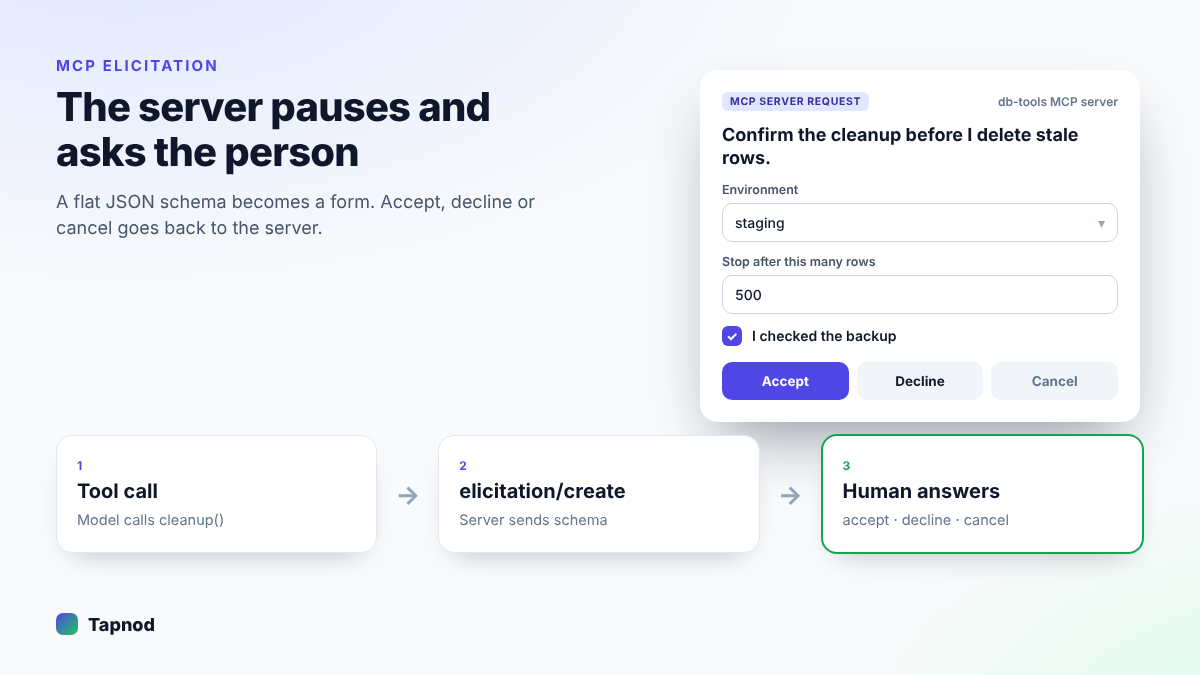
MCP elicitation is the part of the Model Context Protocol that lets a server stop in the middle of a task and ask the user for something. The server sends an elicitation/create request with a message and, in form mode, a small JSON schema. The client shows a form, the user fills it in or says no, and the answer goes back to the server so the tool call can finish.
It arrived in the 2025-06-18 version of the spec. The 2025-11-25 version added a second mode, URL mode, for sensitive steps that should never pass through the client at all.
Interest is growing fast for a spec feature. "mcp elicitation" gets around 480 US searches a month with a keyword difficulty of 28 (Semrush, November 2026), which tells you a lot of people are building MCP servers that need a human somewhere in the flow.
Why elicitation exists
Before elicitation, an MCP tool that was missing information had two bad options. It could fail and hope the model asked the user in chat, or it could guess. Both break down for anything that matters, like picking which of three production databases to migrate or confirming the exact amount on a refund.
Elicitation gives the server a structured way to say "I need this one thing from a person before I continue". Because the request carries a schema, the client can render a proper form with the right field types instead of a free-text chat turn the model has to parse.
How the flow works
- The model calls a tool on your MCP server.
- The server realizes it needs input and sends
elicitation/createto the client. - The client shows the message and the form, and makes it clear which server is asking.
- The user accepts with data, declines, or cancels.
- The server gets the response and finishes, adjusts, or stops the tool call.
Clients that support this have to declare an elicitation capability when they initialize. An empty object counts as support for form mode only. A server must not send a mode the client didn't declare.
A form-mode request
Here is what a server sends when it wants the user to choose a target environment and confirm a row count:
{
  "jsonrpc": "2.0",
  "id": 7,
  "method": "elicitation/create",
  "params": {
    "mode": "form",
    "message": "Confirm the cleanup before I delete stale rows.",
    "requestedSchema": {
      "type": "object",
      "properties": {
        "environment": {
          "type": "string",
          "enum": ["staging", "production"],
          "description": "Where to run the cleanup"
        },
        "max_rows": {
          "type": "number",
          "description": "Stop after this many rows",
          "default": 500
        },
        "confirm": { "type": "boolean", "description": "I checked the backup" }
      },
      "required": ["environment", "confirm"]
    }
  }
}
The schema is deliberately flat. You get strings, numbers, booleans and enums, each with optional defaults. Nested objects and arrays of objects are not supported, because the spec wants every client to be able to draw a simple form.
The three possible answers
| Response | What the user did | What your server should do |
|---|---|---|
accept with content |
Filled in the form and submitted | Validate the data against the schema, then continue |
decline |
Explicitly said no | Stop the action and tell the model it was refused |
cancel |
Closed the dialog without choosing | Treat as "not now", don't retry in a loop |
Handle decline and cancel as normal outcomes. A tool that throws an error on decline teaches the model to ask again, which is exactly the nagging you wanted to avoid.
Form mode vs URL mode
| Form mode | URL mode | |
|---|---|---|
| Added in | 2025-06-18 | 2025-11-25 |
| Data passes through the client | Yes | No |
| Use it for | Choices, confirmations, small values | Payments, credentials, OAuth to a third party |
| Client's job | Render and validate a form | Show the target domain, get consent, open the URL |
URL mode sends the user to a page you control, and the client never sees what they type there. The spec is explicit that URL mode is not for authorizing the client's own access to your server; that's what MCP authorization is for. For URL mode the client only learns the outcome if your server sends a completion notification.
One more note for people who track the spec closely: newer revisions change the delivery mechanics, with input requests returned inside an InputRequiredResult. The message and schema shape stay familiar, but check which protocol version your SDK targets before you copy older examples.
Which clients show elicitation forms
Support depends on the client, not your server. Claude Code supports it: its hooks even have notification matchers called elicitation_dialog and elicitation_url_dialog that fire when a form has been open for a few seconds without input. That makes it easy to get a desktop or phone alert when a server is waiting on you. See Claude Code notifications for the setup.
Before you depend on elicitation, test it in every client your users actually run. If a client didn't declare the capability, your server has to fall back to something else, such as returning a clear tool result that asks the model to get the value from the user in chat.
Good elicitation design
- Ask once, ask late. Gather everything you need in one form at the moment you need it, not three forms spread across a task.
- Make the safe answer the default. Pre-fill
max_rows: 500, notmax_rows: 1000000. - Say what happens next. "Confirm the cleanup before I delete stale rows" beats "Input required".
- Never ask for secrets in form mode. Passwords and API keys go through URL mode or proper auth.
- Log the answer. Record who answered, what they chose and when, so you have an audit trail for agent decisions.
The gap elicitation doesn't cover
Elicitation assumes a person is sitting at the client when the server asks. That holds for an IDE session. It doesn't hold for an agent running overnight on a server, a cron job that calls an LLM, or five coding agents spread across machines. If nobody is looking at that client, the form sits there unanswered.
That's where a separate decision channel helps. Instead of relying on the client UI, the agent sends a question or approval to an inbox you carry with you, and picks up the answer when you give it. Tapnod does this over MCP, signed webhooks or simple polling, so it works for agents that have no screen at all. We walk through the pattern in human in the loop for MCP.
| Situation | Elicitation | External inbox |
|---|---|---|
| You're in the IDE watching the task | Great fit | Optional |
| Agent runs headless or overnight | Nobody sees the form | Good fit |
| Many agents across tools | One client at a time | One queue for all |
| Need answers from a teammate | Only the person at that client | Shared workspace |
FAQ
What is MCP elicitation in one sentence?
It's a protocol request, elicitation/create, that lets an MCP server ask the user for structured input or send them to a URL in the middle of a tool call, then continue with their answer.
Is MCP elicitation the same as human in the loop?
It's one way to do human in the loop. It covers the case where a person is at the client. For approvals across many agents or while you're away, teams add an inbox or approval service on top.
Can elicitation collect passwords?
Not in form mode. Sensitive data should go through URL mode, where the user enters it on your own page and it never passes through the MCP client.
What happens if the client doesn't support elicitation?
The server must not send the request. Check the client's declared capabilities and fall back to returning a tool result that tells the model what you need.
Where Tapnod fits
When your MCP agents need a human who isn't at the keyboard, Tapnod gives them one inbox for questions and approvals, on the web and on your phone. Start free with two agents.