 Tapnod
The short answer
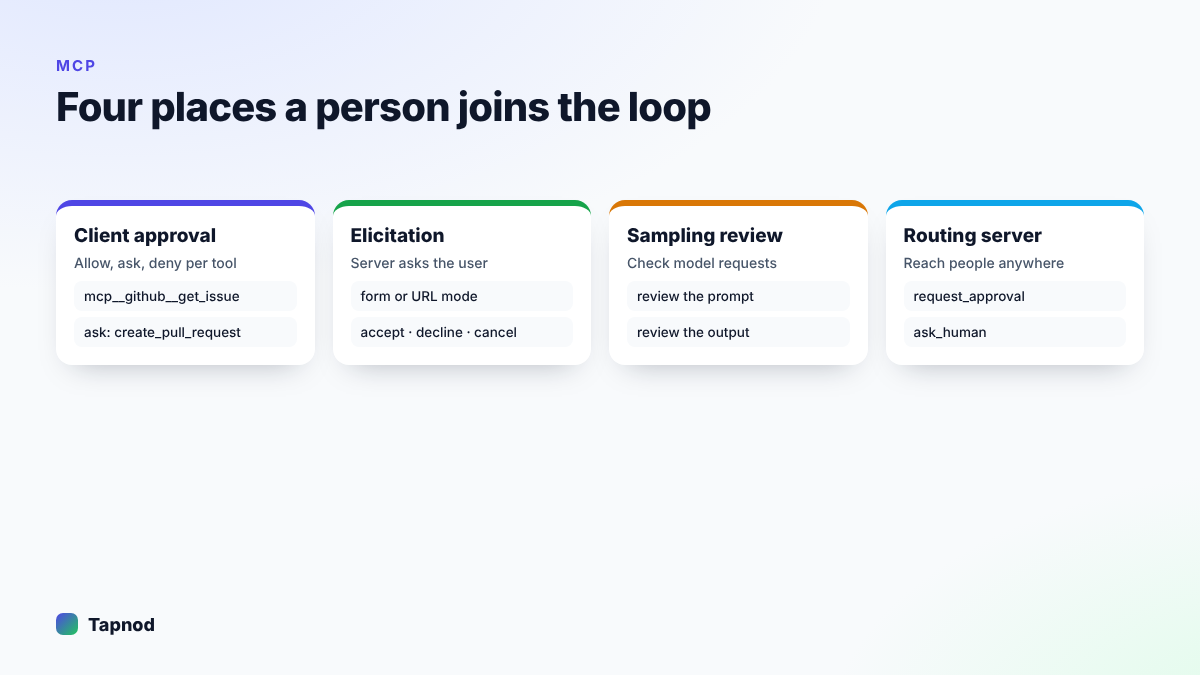
There are four places a person can enter an MCP-based agent's work:
- Tool approval in the client. Hosts like Claude Code, Cursor or Claude Desktop ask before calling MCP tools, based on permission settings.
- Elicitation. An MCP server asks the user a question mid-task through the client, with a form or a URL, and gets back accept, decline or cancel.
- Sampling review. When a server asks the client's model to generate text, the spec expects a person to be able to review the request and the result.
- Human-routing servers. An MCP server whose tools are "ask a person" or "request approval", sending the question to an inbox, chat app or phone and returning the answer.
The first three are protocol and client features. The fourth is a design pattern you can use with any client.
"mcp human in the loop" and "human in the loop mcp" each get about 20 US searches a month (Semrush, November 2026). Small, but growing alongside MCP adoption.
1. Tool approval in the client
The MCP spec says tools can be invoked by models, and that there should always be a human able to deny a tool call. Clients implement that differently:
| Client | How approval works |
|---|---|
| Claude Code | Permission rules (allow, ask, deny) per tool, including mcp__server__tool names |
| Claude Desktop | Prompts before tool use, with options to allow for the conversation |
| Cursor | Tool approval settings, with an option to auto-run |
Claude Code's rules let you be precise:
{
  "permissions": {
    "allow": ["mcp__github__get_issue", "mcp__github__list_pull_requests"],
    "ask": ["mcp__github__create_pull_request"],
    "deny": ["mcp__github__delete_repository"]
  }
}
Reads run freely, PR creation asks, and deletion is blocked. More in Claude Code permissions.
2. Elicitation
Elicitation lets a server ask the user for input during a tool call. The 2025-06-18 spec added form mode, where the server sends a message and a simple JSON schema; the 2025-11-25 revision added URL mode, for flows like sign-in or payment that shouldn't pass through the client. The user responds with accept (plus data), decline or cancel.
Use it when a server needs information it can't infer: which environment to deploy to, a confirmation of a large change, a missing field. Full detail in MCP elicitation.
3. Sampling review
Sampling lets a server ask the client's model to generate a completion. The spec recommends that clients let a person see and approve sampling requests and review the output before it goes back to the server. In practice, client support varies, so check yours before relying on it.
4. Human-routing MCP servers
Client prompts only work when someone is watching that client. For agents running in the background, or several agents across machines, a human-routing server is the practical pattern. It exposes tools like:
| Tool | Purpose |
|---|---|
ask_human |
Send a question and wait for, or poll for, an answer |
request_approval |
Send a plan or action for approve or reject |
report_result |
Post a summary when work is done |
report_error |
Flag a failure that needs a person |
The agent calls these like any tool. The server delivers the question to wherever people are, such as an inbox, Slack or a phone, and returns the answer. Because it's plain MCP, the same server works with Claude Code, Codex, Cursor and custom agents.
Choosing between them
| Need | Best pattern |
|---|---|
| Stop risky tool calls while you watch | Client tool approval |
| A server needs input mid-task | Elicitation |
| Check model output a server requested | Sampling review |
| Agents running while you're away | Human-routing server |
| Many agents, one place to answer | Human-routing server with an inbox |
Most teams combine two: client permissions as a safety floor, and a human-routing server for questions and approvals that come up when no one is at the screen.
Designing ask-a-human tools
If you build or choose a human-routing server, a few design choices matter:
- Blocking vs polling. A tool that blocks until answered is simple but ties up the agent. Returning a request ID and polling lets the agent do other work.
- Structured answers. Offer options when you can, so the agent doesn't parse free text.
- Timeouts. Return a clear "no answer yet" after a set time, with guidance on what to do.
- Context. Send the title, the plan or diff, and what happens on approve.
An ask-a-human tool in practice
Here is a sketch of how an agent's call and the server's reply might look with a polling design:
agent  -> request_approval(title="Rename public API field user_id to account_id",
                           details="Touches 3 endpoints, 41 call sites. Breaking for v1 clients.",
                           options=["approve", "reject", "approve for v2 only"])
server -> {"request_id": "r_8812", "status": "pending"}

... agent keeps working on non-blocking tasks ...

agent  -> get_answer(request_id="r_8812")
server -> {"status": "answered", "choice": "approve for v2 only",
           "comment": "Keep user_id in v1, add account_id alongside."}
The agent never waited idle, the person answered when convenient, and the answer arrived with a comment the agent can act on.
What to route to a person
Not every tool call deserves a human. A workable split for most teams:
- Never ask: reads, searches, listing files, running tests.
- Ask in the client while you're there: edits to files in the working directory, local commands.
- Route to a person wherever they are: plans for large changes, anything touching production, messages to other people, spending money, and questions the agent can't answer from the codebase.
- Always report: finished results and errors, so nobody has to check a terminal to learn what happened.
Security notes
Human-in-the-loop patterns are also safety controls, so treat them that way:
- Don't auto-approve destructive MCP tools, even in trusted servers.
- Review new servers' tools before enabling them; tool descriptions influence model behaviour.
- Never send secrets through elicitation forms; the spec reserves URL mode for sensitive flows.
- Keep a log of approvals and answers. See AI agent audit trails.
A worked example
Picture a developer running three agents: Claude Code refactoring a service, Codex fixing tests in another repo, and a custom agent triaging issues. Each connects to the same human-routing MCP server. Claude Code's local permissions still block destructive commands. When the refactor needs a decision on an API change, it calls request_approval with the diff summary. The developer, at lunch, gets a notification, approves from her phone, and the agent picks up the answer on its next poll.
Key takeaways
- MCP keeps humans in the loop through client approvals, elicitation and sampling review.
- Client prompts only help when someone is watching that client.
- Human-routing MCP servers bring questions to people wherever they are.
- Combine client permissions with a routing server for background agents.
FAQ
Does MCP support human in the loop?
Yes. The spec expects people to be able to deny tool calls, defines elicitation for asking users questions, and recommends review of sampling requests.
What is MCP elicitation?
A way for an MCP server to ask the user for input during a task, through a form or a URL, with accept, decline or cancel as responses.
How do I approve MCP tool calls from my phone?
Use a human-routing MCP server whose approval tool sends the request to a mobile inbox and returns the answer to the agent.
Can one MCP server handle approvals for several agents?
Yes. Any MCP-capable agent can call the same server, which is how teams collect approvals from many agents in one place.
Where Tapnod fits
Tapnod works as that human-routing layer: agents connect over MCP, and their questions, plans and errors arrive as cards on your phone. Connect an agent free.