 Tapnod
The short answer
The Claude Code statusline is a bar at the bottom of the interface that runs a shell script you choose. Claude Code passes session data to the script as JSON on stdin, and the bar shows whatever the script prints. The quickest setup is to describe what you want:
/statusline show model name, git branch, context percentage with a bar, and session cost
Claude Code writes a script to ~/.claude/ and updates your settings. Or configure it by hand with a statusLine entry in ~/.claude/settings.json.
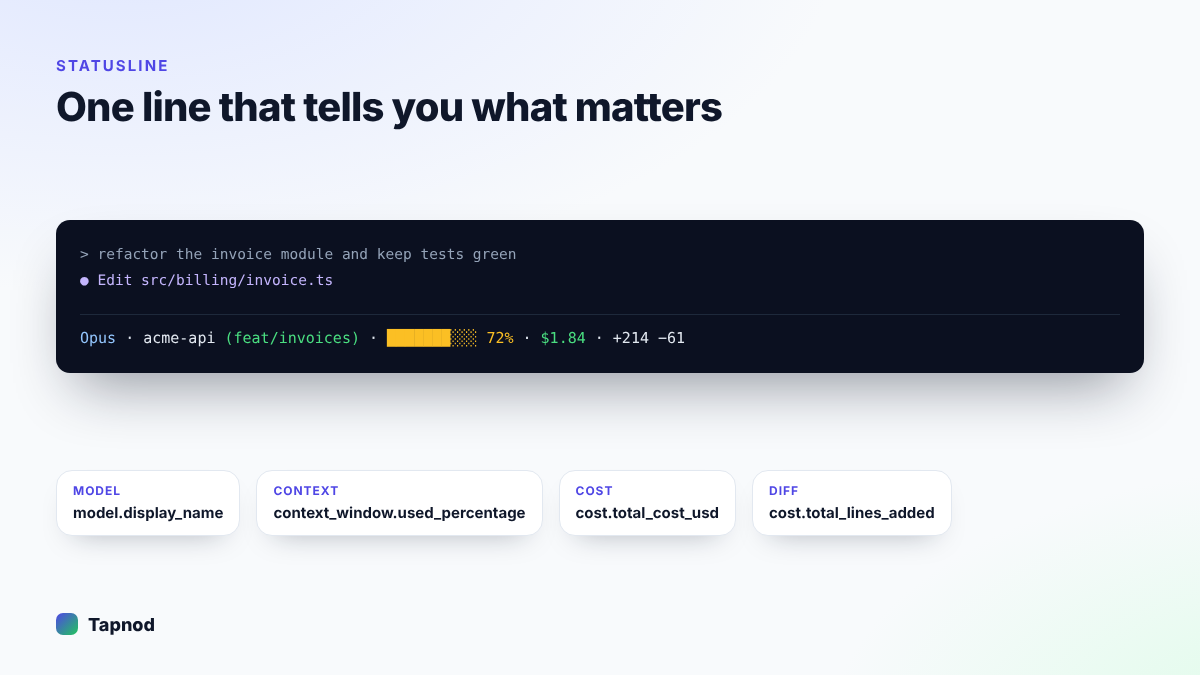
"claude code statusline" gets about 1,300 US searches a month at a keyword difficulty of 43 (Semrush, November 2026). That's a lot for a configuration feature, and it says something about how people use Claude Code: long sessions where context and cost matter.
The fields you'll use most
| Field | What it holds |
|---|---|
model.display_name |
The current model's display name |
workspace.current_dir |
Current working directory |
workspace.project_dir |
Where Claude Code was launched |
workspace.git_worktree |
Worktree name, when you're in a linked worktree |
context_window.used_percentage |
How full the context window is |
cost.total_cost_usd |
Estimated session cost at list price |
cost.total_duration_ms |
Wall-clock time of the session |
cost.total_lines_added, cost.total_lines_removed |
Lines changed |
The cost figure is computed on your machine at list price, so it can differ from your actual bill. It resets when /clear starts a new session.
A script you can copy
Save this as ~/.claude/statusline.sh and run chmod +x on it:
#!/usr/bin/env bash
input=$(cat)
model=$(jq -r '.model.display_name' <<<"$input")
dir=$(basename "$(jq -r '.workspace.current_dir' <<<"$input")")
pct=$(jq -r '.context_window.used_percentage // 0' <<<"$input" | cut -d. -f1)
cost=$(jq -r '.cost.total_cost_usd // 0' <<<"$input")
branch=$(git -C "$(jq -r '.workspace.current_dir' <<<"$input")" branch --show-current 2>/dev/null)

filled=$((pct / 10)); bar=""
for i in $(seq 1 10); do [ "$i" -le "$filled" ] && bar+="█" || bar+="░"; done

printf "%s · %s%s · %s %s%% · \$%.2f" "$model" "$dir" "${branch:+ ($branch)}" "$bar" "$pct" "$cost"
Then point your settings at it:
{
  "statusLine": {
    "type": "command",
    "command": "~/.claude/statusline.sh",
    "padding": 1
  }
}
padding adds horizontal spacing in characters. refreshInterval re-runs the script every N seconds, which you only need for time-based data like a clock.
How updates work
The statusline updates on events, such as new messages and tool activity, and Claude Code debounces those updates at 300 ms so bursts of changes run the script once. If a new update arrives while your script is still running, the old run is cancelled. Keep the script fast: git calls and jq are fine, network calls are not.
When the main session is idle, for example while waiting on background subagents, event-driven updates can go quiet. That's when refreshInterval helps.
What to show, and why
| Segment | Why it earns its space |
|---|---|
| Context percentage | Tells you when compaction is coming, so you can wrap up or /clear on your terms |
| Cost | Keeps long sessions honest, especially on API billing |
| Branch or worktree | Prevents "which session is this?" when running several |
| Model | Confirms which model you're on after switching |
| Lines changed | A quick sense of how big the diff is getting |
Color the context segment: green under 50%, yellow to 80%, red above. It's the one number that changes how you work.
Statusline vs monitoring
A statusline is great inside one session you're looking at. It can't tell you about the session in another tab that's been waiting on a permission prompt for 40 minutes, or the one on your server. For that, use agent view (claude agents) for background sessions on one machine, and Notification hooks that send waiting and idle events to one place across machines. We put the pieces together in how to monitor Claude Code sessions.
Multi-line statuslines
Your script can print more than one line, for example git info on the first line and a context bar with cost on the second. Keep it to two lines at most. The statusline renders above the footer's built-in badges, and with a custom statusline Claude Code hides most of the footer's keyboard hints, such as esc to interrupt, so make sure you still know them.
A worked example
Picture someone running three Claude Code sessions in three worktrees. Each statusline shows the worktree name, branch, a context bar and cost. When one bar turns red at 82%, they ask that session to write a short summary to NOTES.md before compaction. When cost on another passes a few dollars on a task that should've been small, they check what it's doing and find it re-reading a huge log file. The statusline didn't fix either problem; it made both visible early.
Ideas worth stealing
Beyond the basics, a few segments repay the space they take:
- Time since your last message. Read
cost.total_duration_msand show how long the session has run. A long-running session with no recent input from you might be waiting on something. - Repository identity.
workspace.repo.ownerandworkspace.repo.namehelp when you work across forks and similar-looking clones. - Added directories.
workspace.added_dirsreminds you when a session can see more than the project folder, which matters for what it can read and edit. - A context warning word. Instead of only a percentage, print "compact soon" above 80%. Words catch the eye faster than numbers.
- A spend ceiling. Compare cost to a number you set and turn the segment red when you pass it.
Keep the total short. A statusline that wraps across the terminal is harder to read than none at all.
Performance tips
The script runs often, so slow commands add up. Prefer reading the JSON you're given over calling out to other tools. If you need git status, use git branch --show-current or git status --porcelain with a short timeout rather than full git status, and skip it outside repositories. Avoid network calls entirely; if you want something from an API, have a separate job write it to a file and let the statusline read the file. On large monorepos, cache expensive values in a temp file keyed by directory and refresh them only every few seconds.
Remove or change it
Run /statusline and ask it to remove or clear the statusline, or delete the statusLine field from your settings. To change it, describe the new version to /statusline or edit your script; changes appear the next time an update runs it.
Key takeaways
- Run
/statuslinewith a description, or pointstatusLineat your own script. - Context percentage is the segment most worth adding.
- Keep the script fast, with no network calls.
- The cost figure is an estimate at list price.
FAQ
How do I add a statusline to Claude Code?
Run /statusline with a description of what you want, or add a statusLine entry with "type": "command" and your script's path to ~/.claude/settings.json.
How do I show context usage in the Claude Code statusline?
Print context_window.used_percentage from the JSON your script receives on stdin.
Is the statusline cost accurate?
It's an estimate at list price computed on your machine, so it can differ from your bill.
Why isn't my statusline updating?
Updates are event-driven and debounced at 300 ms. When the session is idle, set refreshInterval to re-run the script on a timer.
Where Tapnod fits
A statusline covers the session in front of you. Tapnod's agent monitoring shows the others: last contact, what's running and what's waiting on you. Start free.