 Tapnod
The short answer
claude --dangerously-skip-permissions starts Claude Code in bypassPermissions mode, the same mode you get with --permission-mode bypassPermissions. Claude stops asking before it edits files or runs commands. Deny rules you've written still apply, but everything else runs without a prompt.
Anthropic's guidance is to use it only in an isolated environment, such as a container or VM without internet access. On a normal laptop with your SSH keys, cloud credentials and browser cookies, the flag turns one bad instruction into real damage. For most people the better move is one of the in-between options below.
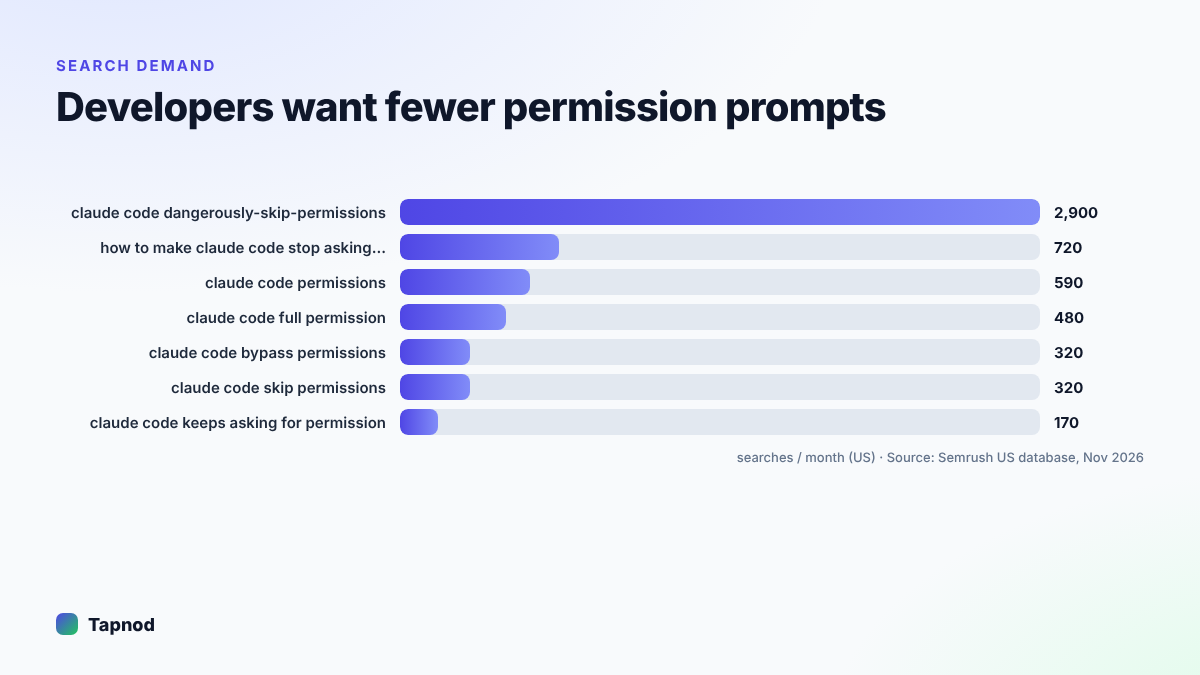
The flag is one of the most searched Claude Code topics there is. "claude code dangerously-skip-permissions" gets about 2,900 US searches a month, and close variants such as "claude code bypass permissions" (320) and "claude code skip permissions" (320) add more (Semrush, November 2026). People want fewer prompts. The question is how to get there without handing over the keys.
What the flag actually changes
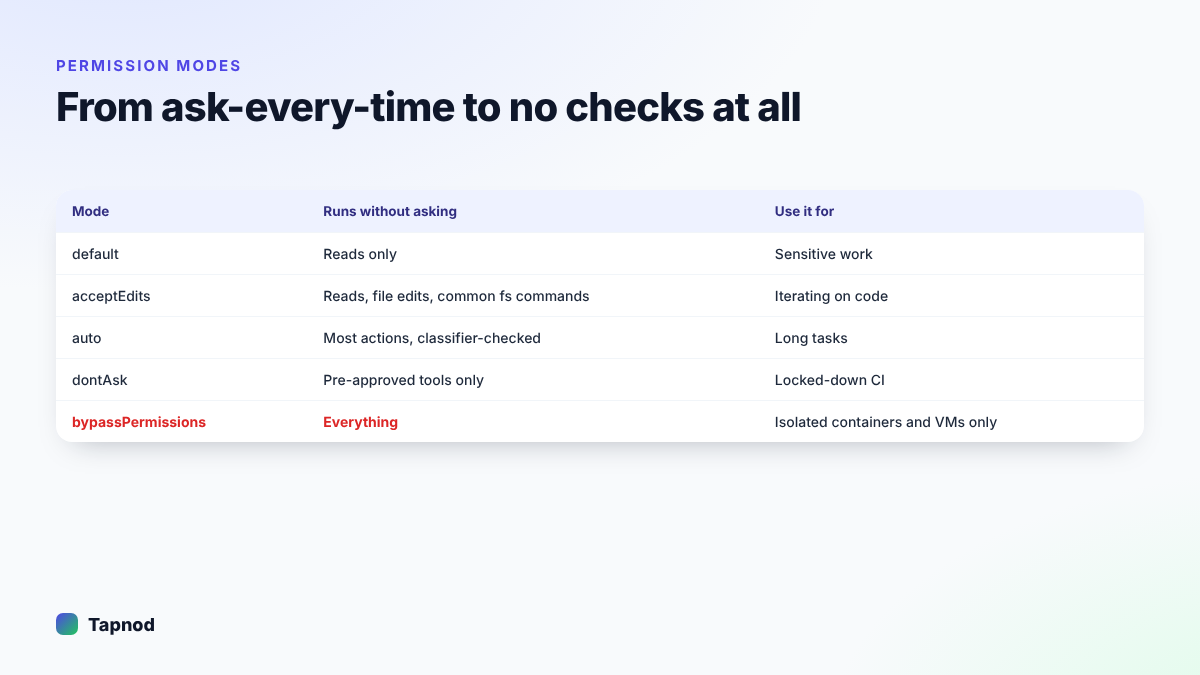
Claude Code has several permission modes. Bypass sits at the far end.
| Mode | What runs without asking | Intended for |
|---|---|---|
default (manual) |
Reads only | Sensitive work, reviewing every step |
acceptEdits |
Reads, file edits, common filesystem commands | Iterating on code you'll review |
plan |
Reads, plus classifier-approved commands where auto mode is available | Exploring before acting |
auto |
Most actions, checked by a separate classifier | Long tasks with fewer prompts |
dontAsk |
Pre-approved tools only, the rest is denied | Locked-down CI and scripts |
bypassPermissions |
Everything | Isolated containers and VMs only |
A few details people miss:
- Deny rules still win. A
denyrule in your settings applies in every mode, bypass included. - It refuses root. On Linux and macOS, Claude Code won't run in this mode as root or under sudo, outside a recognized sandbox.
- Admins can turn it off. Organizations can set
permissions.disableBypassPermissionsModein managed settings. - Project files can't force it. A checked-in
.claude/settings.jsoncan't setbypassPermissionsas the default mode.
The real risks
The danger isn't that Claude is malicious. It's that Claude reads a lot of text you didn't write: issue descriptions, web pages, dependency READMEs, log files, MCP tool output. Any of it can contain instructions.
| Risk | What it looks like | Why bypass makes it worse |
|---|---|---|
| Prompt injection | A README tells the agent to run a script or upload a file | Nothing stops the command |
| Secret leakage | .env, ~/.aws, ~/.ssh read and sent somewhere |
No prompt before the network call |
| Destructive mistakes | Wrong directory, wrong rm, force push |
No chance to catch it |
| Broad MCP tools | A tool with write access to prod data | Every call goes through |
Anthropic's devcontainer docs are frank about the limit here: when run with this flag, a devcontainer does not stop a malicious project from exfiltrating anything inside the container, including Claude Code's own credentials. Isolation reduces the blast radius; it doesn't remove it.
When it's reasonable
The flag has honest uses. It fits when all of these hold:
- The environment is disposable: a fresh container or VM you can throw away.
- There are no secrets inside beyond what the task needs, ideally short-lived tokens.
- Network access is restricted to an allowlist, or cut off entirely.
- The task is scoped, such as "make the failing tests in
billing/pass", not "improve the codebase". - You review the result before anything leaves the sandbox, such as a PR rather than a direct push.
A typical setup runs Claude inside the reference devcontainer or a throwaway Docker image:
docker run --rm -it \
  --network my-allowlisted-net \
  -v "$PWD":/workspace -w /workspace \
  my-claude-image \
  claude --dangerously-skip-permissions -p "Fix the failing tests in billing/ and stop"
Safer ways to get fewer prompts
Most people reaching for the flag want one of these outcomes instead.
| You want | Try | How |
|---|---|---|
| Stop approving routine commands | Allow rules | Add Bash(npm test), Bash(git status) and similar to permissions.allow |
| Stop approving file edits | acceptEdits mode |
claude --permission-mode acceptEdits or Shift+Tab |
| Long tasks with few prompts | auto mode |
A classifier blocks risky actions like force pushes and production deploys |
| Never block in CI | dontAsk mode |
Only pre-approved tools run; the rest is denied |
| Keep going while you're away | Remote approvals | Answer prompts from your phone instead of removing them |
Auto mode deserves a closer look. A separate classifier reviews actions before they run and blocks ones that go beyond your request, target unknown infrastructure, or look driven by hostile content. Force pushes, production deploys, curl | bash and mass cloud deletions are blocked by default. It still isn't a guarantee, but it's a big step up from no checks. We compare all the options in how to make Claude Code stop asking for permission.
The option most people overlook: answer prompts remotely
A lot of bypass use comes from one situation: "I'm leaving for an hour and I don't want it stuck on a prompt". That's a reachability problem, not a permissions problem.
You can solve it by making prompts reach you:
- Remote Control forwards permission prompts to the Claude app and keeps them open until you answer. See Claude Code Remote Control.
- A
Notificationhook with thepermission_promptmatcher can ping your phone after a prompt has waited a few seconds. - A
PermissionRequesthook can answer prompts for you. It can returnallowfor a narrow set of tools you trust and send everything else to a human.
The last one is powerful and easy to misuse. A PermissionRequest hook with an empty matcher that always returns allow is bypass mode with extra steps. Keep the matcher tight. More examples in Claude Code hooks examples.
If a bypass session went wrong
Things do go wrong, and the first hour matters. If you suspect a bypassed session did something it shouldn't have:
- Stop the session and disconnect the machine or container from the network if secrets may be involved.
- Check what ran. Claude Code keeps the conversation, and a logging hook on
Bashgives you a plain list of commands. If you didn't have one, add it now for next time. - Rotate anything that was readable: API keys in
.env, cloud credentials, tokens in shell history. - Review git history and remotes for unexpected commits, branches or pushed files.
- Write down the trigger. Note whether it came from a web page, an issue or a dependency, because that tells you which tool or input to restrict.
A sane default setup
For a solo developer on a laptop, this combination covers most days:
- Run in
acceptEditsorautomode inside the project directory. - Allow your test, lint and build commands explicitly.
- Deny reads of
.env*,~/.sshand cloud credential folders. - Send
permission_promptnotifications to your phone. - Keep bypass for throwaway containers and scoped tasks.
FAQ
Is --dangerously-skip-permissions the same as bypassPermissions?
Yes. The flag starts the session in bypassPermissions mode, the same as --permission-mode bypassPermissions.
Do deny rules still work with --dangerously-skip-permissions?
Yes. Deny rules apply in every permission mode, including bypass. They're a useful backstop for credential folders and destructive commands.
Is it safe in a devcontainer?
Safer, not safe. A devcontainer limits what the agent can reach, but Anthropic notes it does not stop a malicious project from exfiltrating whatever is inside the container. Keep secrets out and restrict the network.
What's the safest way to stop permission prompts?
Use allow rules for commands you trust, acceptEdits or auto mode for the rest, and remote approvals for the prompts that remain. That keeps a human on the risky actions without blocking routine work.
Where Tapnod fits
Instead of switching checks off, let your agents ask and answer from your phone: Tapnod collects approvals from Claude Code and your other agents in one inbox. Try it free.