 Tapnod
The short answer
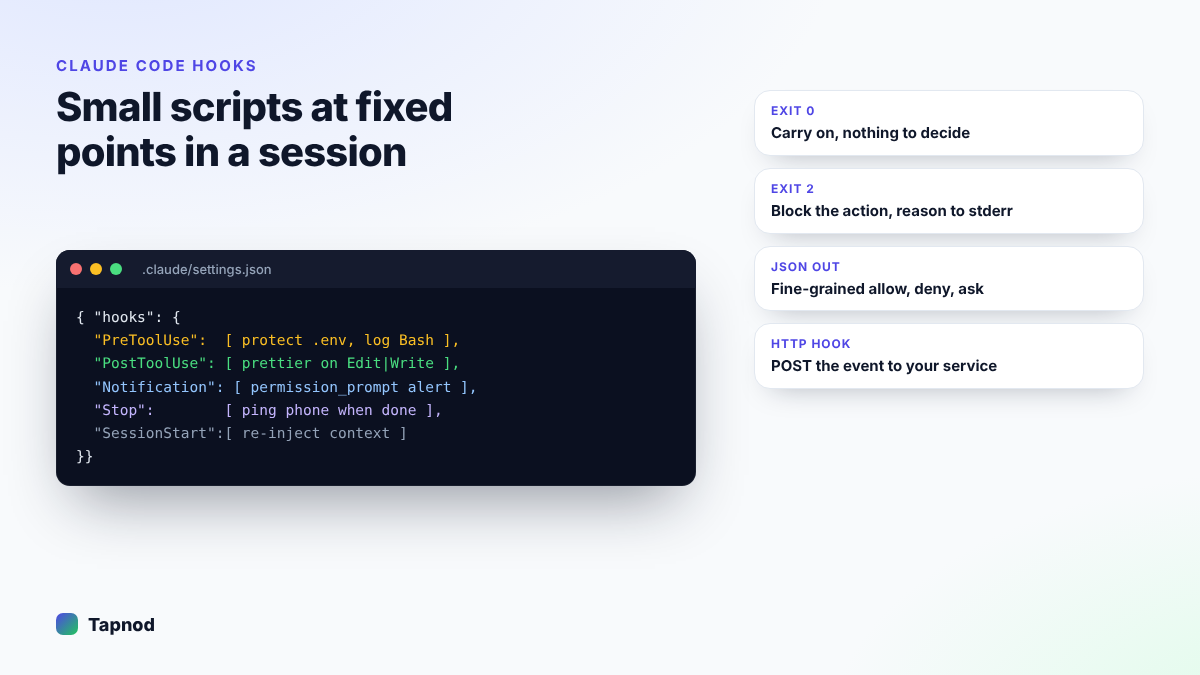
Claude Code hooks are shell commands, HTTP calls or model prompts that run at fixed points in a session: before a tool runs, after it runs, when Claude needs you, when a turn ends, and more. You define them under a hooks key in a settings file, ~/.claude/settings.json for yourself or .claude/settings.json for a project.
Below are twelve examples we'd actually use, grouped by what they do. Each one is small enough to paste in and adapt.
"claude code hooks" gets about 2,900 US searches a month, and the more specific "claude code hooks examples" sits at 90 with a keyword difficulty of 10 (Semrush, November 2026). The second number is small, but it's the searcher who wants something to paste, which is what this page is for.
How hooks talk back
Before the examples, the one rule that explains most of them. A command hook receives the event as JSON on stdin and answers with its exit code, stdout and stderr.
| Exit code | Effect |
|---|---|
| 0 | No decision; the normal flow continues. Some events add stdout to Claude's context |
| 2 | Block the action. For PreToolUse, the tool call is denied and stderr is shown to Claude |
| Other | A non-blocking error |
For finer control, a hook can print JSON, such as a permissionDecision of deny with a reason. When several hooks answer the same PreToolUse event, the most restrictive answer wins.
Get told when Claude needs you
1. Desktop alert on permission prompts (macOS). Fires when a permission prompt has waited about six seconds.
{
  "hooks": {
    "Notification": [
      {
        "matcher": "permission_prompt",
        "hooks": [
          { "type": "command", "command": "osascript -e 'display notification \"Waiting for your approval\" with title \"Claude Code\"'" }
        ]
      }
    ]
  }
}
2. Same thing on Linux. Swap the command for notify-send 'Claude Code' 'Waiting for your approval'. It needs a desktop notification daemon, so it won't work over plain SSH.
3. Ping when a session goes idle. Use the idle_prompt matcher, which fires about 60 seconds after Claude finishes and you haven't typed. Good for "it's done, come back".
4. Phone push from any machine. Point a Notification hook at a script that posts the event's message to a push service or webhook. This works on servers and with API-key logins where Remote Control isn't available. The full script is in Claude Code notifications.
Keep code clean automatically
5. Format every file Claude edits. A PostToolUse hook with matcher Edit|Write reads the edited path and runs Prettier on it.
{
  "hooks": {
    "PostToolUse": [
      {
        "matcher": "Edit|Write",
        "hooks": [
          { "type": "command", "command": "jq -r '.tool_input.file_path' | xargs npx prettier --write" }
        ]
      }
    ]
  }
}
6. Run the linter after edits and feed errors back. Same matcher, but run your linter on the file and exit 2 with the lint output on stderr when it fails. Claude sees the errors and fixes them in the same turn.
Block what you never want touched
7. Protect sensitive files. A PreToolUse hook on Edit|Write runs a script that checks the target path and exits 2 for anything matching .env, secrets/ or your lockfile.
#!/usr/bin/env bash
# .claude/hooks/protect-files.sh
path=$(jq -r '.tool_input.file_path // empty')
case "$path" in
  *.env*|*/secrets/*|*package-lock.json)
    echo "Blocked: $path is protected. Ask the user to change it." >&2
    exit 2 ;;
esac
exit 0
Register it with "command": "\"$CLAUDE_PROJECT_DIR\"/.claude/hooks/protect-files.sh" and run chmod +x on the script, or Claude Code can't execute it.
8. Steer commands instead of blocking them. A PreToolUse hook on Bash can return a deny decision with a reason, for example telling Claude to use rg instead of grep. Claude reads the reason and retries the better way.
Keep a record
9. Log every shell command. A PreToolUse hook on Bash with jq -r .tool_input.command >> ~/.claude/bash.log gives you a plain-text history of everything Claude ran. Logging hooks exit 0, so they never block.
10. Send tool events to your own service. Use an HTTP hook to POST each event to an endpoint. Headers can read environment variables, but only ones you list in allowedEnvVars.
{
  "hooks": {
    "PostToolUse": [
      {
        "hooks": [
          {
            "type": "http",
            "url": "https://hooks.example.com/claude/tool-use",
            "headers": { "Authorization": "Bearer $AUDIT_TOKEN" },
            "allowedEnvVars": ["AUDIT_TOKEN"]
          }
        ]
      }
    ]
  }
}
If the endpoint fails or returns a non-2xx status, Claude Code reports a non-blocking error and continues, unless you set onFailure: "block".
Smarter sessions
11. Re-inject key context after compaction. A SessionStart hook with the compact matcher runs after Claude summarizes a long conversation. Anything it prints to stdout goes back into context, such as "We use pnpm, never npm. The current task is the billing refactor in PR #212."
12. Auto-approve one safe prompt. A PermissionRequest hook can answer a prompt for you by printing a decision with "behavior": "allow". Anthropic's own example scopes it to ExitPlanMode only, so leaving plan mode doesn't need a click. Keep the matcher that narrow. An empty matcher that always allows approves every file write and shell command, which is bypass mode by another name.
Which event for which job
| You want to | Event | Matcher |
|---|---|---|
| Know Claude is waiting on you | Notification |
permission_prompt, idle_prompt |
| Act when a turn ends | Stop |
none |
| Change or block a tool call | PreToolUse |
tool name, such as Bash or Edit|Write |
| React after a tool ran | PostToolUse |
tool name |
| Answer permission prompts | PermissionRequest |
tool name, as narrow as possible |
| Restore context | SessionStart |
compact |
Hook mistakes we see most
A handful of mistakes explain most "my hook doesn't work" threads.
- Forgetting
chmod +x. Claude Code can't run a script that isn't executable, and the failure is easy to miss. - Relative paths. A hook that calls
./scripts/check.shbreaks as soon as Claude changes directory. Use$CLAUDE_PROJECT_DIRin project hooks. - Matchers that are too wide. An empty matcher on
PreToolUseruns your script before every single tool call, which slows sessions down and floods logs. - Blocking hooks that are slow. A
PreToolUsehook that takes several seconds runs before every matching call. Keep blocking hooks fast and move heavy work toPostToolUseor an async hook. - Printing chatter to stdout. For some events, stdout goes into Claude's context. Debug prints there waste tokens and confuse the model; send them to stderr or a log file.
- Secrets in settings files. Put tokens in environment variables and reference them, especially in project settings that get committed.
Testing your hooks
- Type
/hooksin Claude Code and confirm the hook is listed under the right event. - Run the command yourself in a terminal with sample JSON piped in.
- Check that scripts are executable.
- Start narrow. Add a matcher before you add a second hook.
For the bigger picture, including prompt-based and agent-based hooks, read our Claude Code hooks guide. For end-of-task actions, see the Stop hook.
FAQ
Where do Claude Code hooks go?
In a settings file under a top-level hooks key: ~/.claude/settings.json for all your projects, .claude/settings.json for one project, or .claude/settings.local.json for local-only settings.
How do I block a command with a hook?
Use a PreToolUse hook and exit with code 2, writing the reason to stderr, or print a JSON permissionDecision of deny with a reason.
Can a hook approve permission prompts?
Yes, a PermissionRequest hook can return allow. Scope it to one specific tool, or you've removed your safety checks.
Can hooks call a web service?
Yes. Use "type": "http" to POST the event JSON to a URL, with headers that can reference allowed environment variables.
Where Tapnod fits
Connect Claude Code to Tapnod with one ready-made prompt, and its questions, results and errors become cards you can answer from your phone, alongside your other agents. Connect an agent free.