 Tapnod
The short answer
AG-UI (Agent-User Interaction) is an open protocol from CopilotKit for streaming events between an agent backend and a frontend. Human in the loop in AG-UI usually works through frontend tools: your app registers a tool such as approve_plan, the agent calls it, the run pauses at that tool call, your UI renders an approval card, and the user's choice returns to the agent as the tool result. A newer interrupt-aware run lifecycle adds a standard way for a run to finish with an "interrupt" outcome and resume later.
The result: approvals live inside your product, next to the work, rather than in a separate tool.
"ag ui human in the loop" gets about 40 US searches a month at a keyword difficulty of 2 (Semrush, November 2026), one of the easiest terms in this space. The audience is developers building agent features into their own apps.
Two ways to pause
| Pattern | Who decides to pause | Typical use |
|---|---|---|
| Human-in-the-loop tool | The agent, by calling a frontend tool | Approve a plan, choose an option, confirm an action |
| Framework interrupt | The backend, through its own pause mechanism | LangGraph interrupt(), workflow suspend and resume |
The tool pattern is the common one today. The interrupt pattern maps a framework's native pause onto AG-UI so the frontend can handle it the same way regardless of backend.
The frontend tool pattern
In a React app with CopilotKit, you register a human-in-the-loop tool and render it:
import { useHumanInTheLoop } from "@copilotkit/react-core";

useHumanInTheLoop({
  name: "approve_deploy",
  description: "Ask the user to approve a deployment plan",
  parameters: [{ name: "plan", type: "string", required: true }],
  render: ({ args, status, respond }) =>
    status === "executing" ? (
      <ApprovalCard
        plan={args.plan}
        onApprove={() => respond({ approved: true })}
        onReject={(reason) => respond({ approved: false, reason })}
      />
    ) : null,
});
While status is "executing", the agent is paused and waiting. respond() resumes it with the user's answer. Hook names differ between CopilotKit versions and frameworks (Angular has its own registration function), so check your version's docs.
The interrupt-aware lifecycle
AG-UI has a draft proposal for interrupts at the run level. Instead of only success or error, a run can finish with an outcome of "interrupt", carrying an interrupt object with an ID and a reason such as human approval, upload required or a policy hold. The client resumes by starting a new run that references the interrupt and includes the answer.
That matters for long waits. A tool call that waits in an open stream suits a user who is looking at the screen. A run that finishes with an interrupt can wait for hours, because nothing is held open.
Backends that support it
| Backend | How it connects |
|---|---|
| LangGraph | Interrupts surface through AG-UI to the frontend |
| CrewAI Flows | Frontend-registered actions are added to the model's tools; the run pauses at the call |
| Mastra, Pydantic AI, others | Supported through AG-UI integrations, varying by version |
CrewAI's docs describe the pattern clearly: the Flow binds the actions the frontend registered, the run halts when the model calls one, and the user's answer returns as a tool result that the next turn acts on.
Designing approval cards
An approval card inside your product can show far more than a chat message:
- The plan as a checklist, where the user can enable or disable steps.
- A diff for code or document changes.
- A preview of an email or a post.
- Editable fields, such as an amount or a date.
- Clear consequences: "Deploys to production on approve."
Return structured data from respond(), rather than a bare yes or no, so the agent knows exactly what was approved.
What the event stream looks like
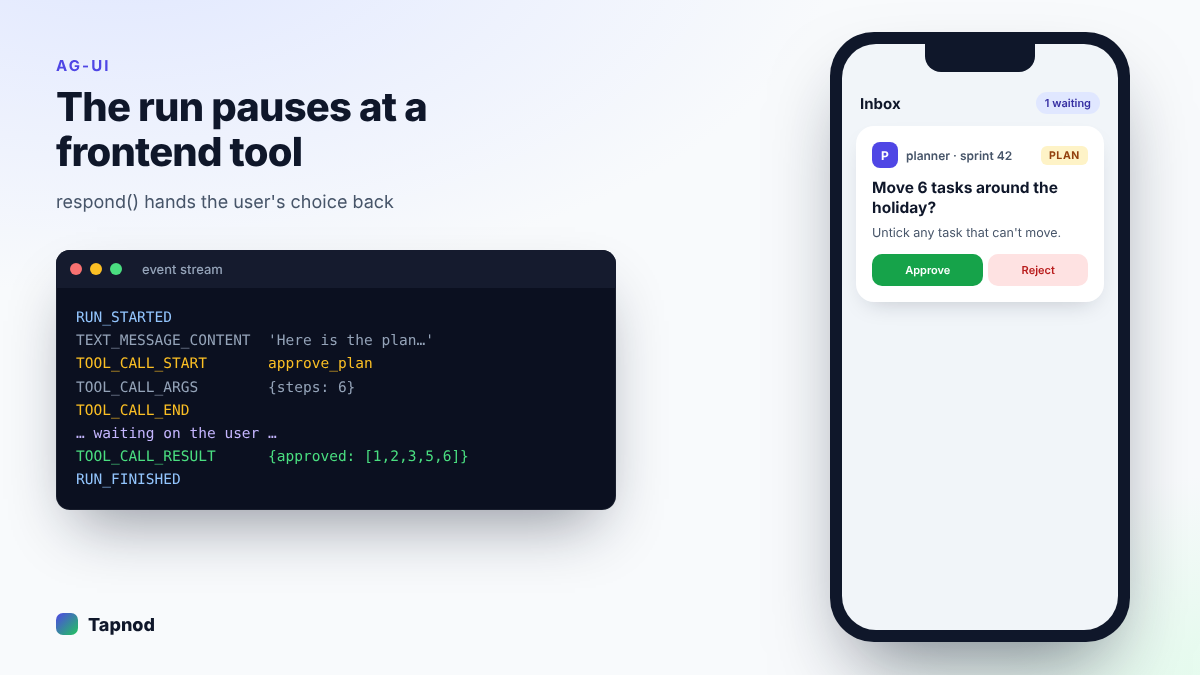
AG-UI runs on a stream of typed events over HTTP, usually server-sent events. A run starts with a run-started event, streams text message events and tool call events as the agent works, and ends with a run-finished or run-error event. A human-in-the-loop tool appears in that stream as an ordinary tool call: start, arguments, end. The difference is that the frontend, not the backend, owns the tool, so the backend waits until the frontend sends the result.
Because every step is an event, you can log the whole stream and replay a session later. That's useful for debugging approvals: you can see exactly what the agent proposed, what the card showed, and what the user chose.
Security and trust
Approvals in the frontend are only as trustworthy as the backend that enforces them. Keep three rules:
- Enforce on the server. The backend should refuse to perform a gated action unless it received an approval result for that call. Don't rely on the UI hiding a button.
- Bind approvals to the exact proposal. If the user approved a plan with five steps, the agent shouldn't run six. Echo the approved data back and execute only that.
- Check who approved. In multi-user apps, confirm the responding user has the right to approve that action.
Handling users who leave
Users close tabs. If a run is paused on a frontend tool and the user leaves, decide what happens. Short waits can simply time out and cancel. Longer flows should save state and resume when the user returns, or hand the decision to an inbox so someone else can answer.
When AG-UI is the right layer
| Situation | Fit |
|---|---|
| End users approve actions in your app | Strong |
| The agent works alongside a user in a session | Strong |
| Operators approve background agents overnight | Weak; nobody has the app open |
| Approvals from several agents and tools in one place | Weak; each app has its own cards |
For background agents, approvals need to reach a person wherever they are. That's where an inbox with push notifications fits better. See AI approval workflows.
A worked example
Picture a project tool with an AI planner. A user asks it to reschedule a sprint around a holiday. The agent drafts a plan and calls approve_plan. The UI renders the plan as a checklist with each moved task. The user unticks one task that can't move and approves. The agent receives the approved steps as structured data and applies only those. Nothing changed until the user said so, and they never left the page.
Mistakes to avoid
- Free-text approvals. Return structured choices so the agent can't misread "sure, mostly".
- Holding streams open for hours. Use the interrupt lifecycle or a background approval channel for long waits.
- Unclear consequences. Say what approve will do before the user clicks.
- No cancel path. Let users reject with a reason so the agent can adjust.
Key takeaways
- AG-UI streams events between agents and frontends, including pauses for people.
- The common pattern is a frontend tool that pauses the run until
respond()is called. - An interrupt-aware run lifecycle supports longer waits without holding connections.
- Use it for in-app approvals; use an inbox for background agents.
FAQ
What is AG-UI?
An open, event-based protocol from CopilotKit that connects agent backends to user interfaces, streaming messages, tool calls and state.
How does AG-UI handle human in the loop?
Through frontend tools that pause the run until the user responds, and through a proposed interrupt-aware run lifecycle for framework-native pauses.
Does AG-UI work with LangGraph and CrewAI?
Yes. Both have AG-UI integrations, so their pauses can render as approval components in your frontend.
Is AG-UI the same as MCP?
No. MCP connects agents to tools and data; AG-UI connects agents to user interfaces. They can be used together.
Where Tapnod fits
For agents that run in the background, Tapnod gives approvals a home outside any one app, with notifications on your phone. Start free.