 Tapnod
The short answer
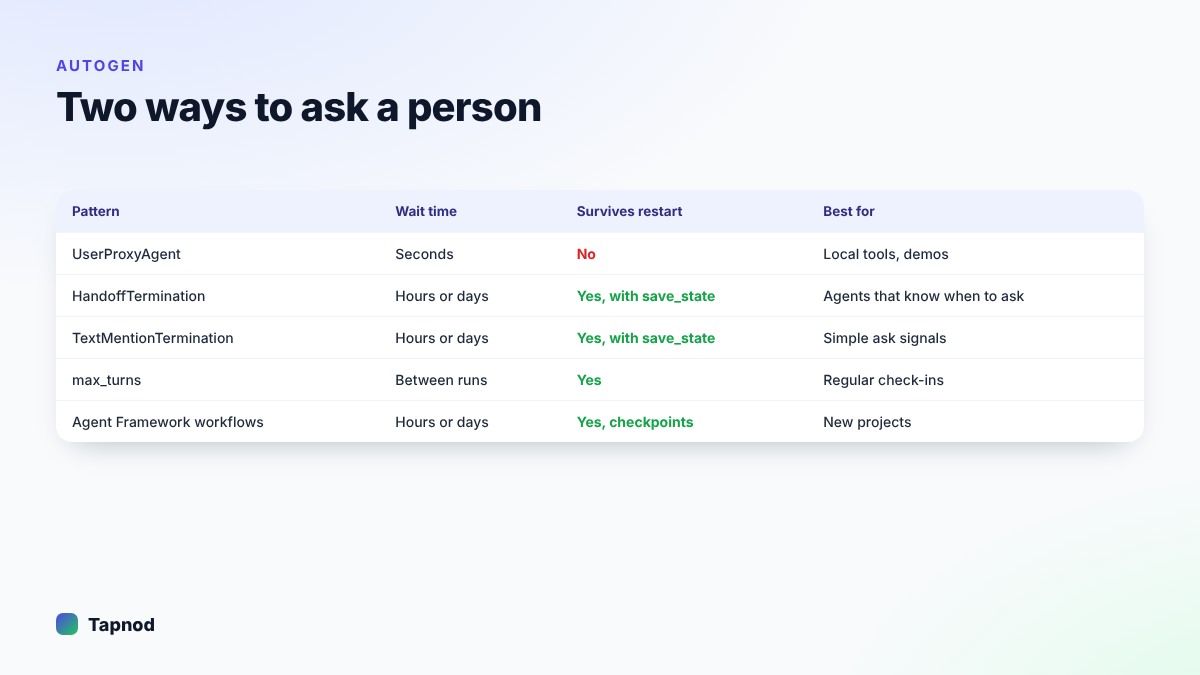
AutoGen AgentChat offers two ways to involve a person:
- During a run, with
UserProxyAgent: the team calls it, it asks a person for input through aninput_func, and the team waits. AutoGen's docs warn this blocks the team in a state that can't be saved or resumed, so use it only for short, quick answers. - Between runs, with termination: stop the team with a condition such as
HandoffTermination,TextMentionTerminationormax_turns, collect feedback whenever the person is ready, and pass it in on the nextrun().
For anything where a person may take minutes or hours to answer, the second pattern is the one that holds up. And for new projects, note that Microsoft now positions Microsoft Agent Framework as the successor to AutoGen and Semantic Kernel, with human in the loop built into its workflows.
"autogen human in the loop" gets about 20 US searches a month (Semrush, November 2026), small but steady, mostly from teams with existing AutoGen code.
Pattern 1: UserProxyAgent during a run
from autogen_agentchat.agents import AssistantAgent, UserProxyAgent
from autogen_agentchat.conditions import TextMentionTermination
from autogen_agentchat.teams import RoundRobinGroupChat

assistant = AssistantAgent("planner", model_client=client)
user = UserProxyAgent("user", input_func=input)  # replace input for web apps

team = RoundRobinGroupChat([assistant, user],
                           termination_condition=TextMentionTermination("APPROVE"))
await team.run(task="Plan the database migration for Saturday.")
Each time it's the user's turn, input_func is called and the team waits. In a web app you replace input with an async function that waits on your UI.
The catch: while waiting, the team is blocked, and that state can't be saved. If the person goes to lunch, your process holds the run open. If the server restarts, the run is gone.
Pattern 2: stop, then continue with feedback
The sturdier pattern is to let the team stop when it needs a person:
from autogen_agentchat.conditions import HandoffTermination
from autogen_agentchat.teams import Swarm

planner = AssistantAgent("planner", model_client=client, handoffs=["user"])
team = Swarm([planner], termination_condition=HandoffTermination(target="user"))

result = await team.run(task="Plan the database migration for Saturday.")
# the team stopped and handed off to the user; save team state
state = await team.save_state()

# hours later, with the person's answer:
await team.load_state(state)
await team.run(task=HandoffMessage(source="user", target="planner",
                                   content="Approved, but move it to Sunday 6am."))
Because the team has stopped, you can save its state, wait as long as needed, and resume in another process. This is what makes approvals from a phone or an inbox practical.
Which termination condition to use
| Condition | Stops when | Use it for |
|---|---|---|
HandoffTermination |
An agent hands off to a target such as "user" | Agents that know when they need a person |
TextMentionTermination |
A message contains a keyword | Simple "ask the human" signals |
max_turns |
A turn count is reached | Regular check-ins on long runs |
| Combined with ` | ` | Any of several conditions |
Microsoft Agent Framework
Microsoft describes Agent Framework as the direct successor to AutoGen and Semantic Kernel, built by the same teams. It reached 1.0 in 2026 and runs on Python and .NET. Its graph-based workflows support checkpointing and human-in-the-loop through request and response patterns, so a workflow can pause for an external answer and continue later. Its batteries-included agent type also includes tool approval with a "don't ask again" option.
If you're starting fresh, look at Agent Framework first; Microsoft publishes a migration guide from AutoGen. If you have AutoGen code in production, the termination pattern above keeps working while you plan the move.
Choosing between the two patterns
| Question | UserProxyAgent | Termination and resume |
|---|---|---|
| How long can the person take? | Seconds to a minute | Minutes to days |
| Survives a restart? | No | Yes, with saved state |
| Who decides when to ask? | The team's turn order | The agent, through a handoff, or a rule |
| Works with phone or inbox approvals? | Awkward | Yes |
| Best for | Demos, local tools, pair work | Deployed agents, approvals, overnight runs |
A practical rule: if the person might not be looking at the screen when the question comes up, use termination and resume.
Saving state safely
save_state() returns a dictionary you can store as JSON. Keep it in a database row with the team's purpose, the time it stopped, the question it asked and a version number for your agent code. When the answer arrives, load the matching row, check the version, and continue. If the code changed in a way that breaks old state, close the old run with a note and start a fresh one with the context the person provided.
Getting the question to a person
Whichever pattern you use, someone has to see the question. Options:
- Your own UI, wired to
input_funcor to the handoff message. - Chat, by posting the question to Slack or Teams and resuming when someone replies.
- An inbox, where the question appears as a card with the context, and the answer goes back by webhook or polling. See agent inbox.
The last two work with Pattern 2, since the team isn't holding a process open while it waits.
Writing questions agents can ask well
The agent decides what the person sees, so prompt it to ask well. In the system message, ask it to state the decision needed, the options, its recommendation and what happens next. "Should I proceed?" is a bad question. "Migration plan ready: 14 tables, est. 22 minutes downtime, Saturday 2am. Approve, or pick another window?" is a good one.
A worked example
Picture an AutoGen swarm planning infrastructure changes. A planner drafts the migration, a reviewer agent checks it against runbooks, and the planner hands off to "user" when the plan is ready. The team stops and its state is saved. The on-call engineer gets a card on her phone, replies "approved for Sunday 6am instead", and a worker loads the state and runs the team with her message. The planner updates the schedule and hands back a final summary.
Mistakes to avoid
- Blocking on input in a server. A
UserProxyAgentwaiting oninput()in a deployed service hangs forever. - Not saving state. Stopping without
save_state()means starting over. - Vague handoffs. If the agent doesn't explain what it needs, the person can't answer quickly.
- No limit on turns. Without a turn cap, a confused team can loop until your budget runs out.
Key takeaways
UserProxyAgentis for short, in-run questions; it blocks and can't be resumed.- For real approvals, stop the team with a termination condition, save state, and continue later.
HandoffTerminationlets agents decide when they need a person.- Microsoft Agent Framework is the successor, with workflow-level human in the loop and checkpointing.
FAQ
How do I add human input to AutoGen?
Use UserProxyAgent for quick in-run input, or stop the team with a termination condition like HandoffTermination, then run it again with the person's feedback.
Can AutoGen wait hours for a human answer?
Not with UserProxyAgent. Stop the team, save its state, and resume later with the answer.
Is AutoGen still maintained?
Microsoft positions Microsoft Agent Framework as the successor to AutoGen and Semantic Kernel, with migration guides for existing projects.
Does Microsoft Agent Framework support approvals?
Yes. Its workflows support human-in-the-loop with checkpointing, and its agents support tool approval.
Where Tapnod fits
When your AutoGen team hands off to a user, send the question to Tapnod; the answer comes back by webhook or polling, ready for the next run(). Start free.