 Tapnod
The short answer
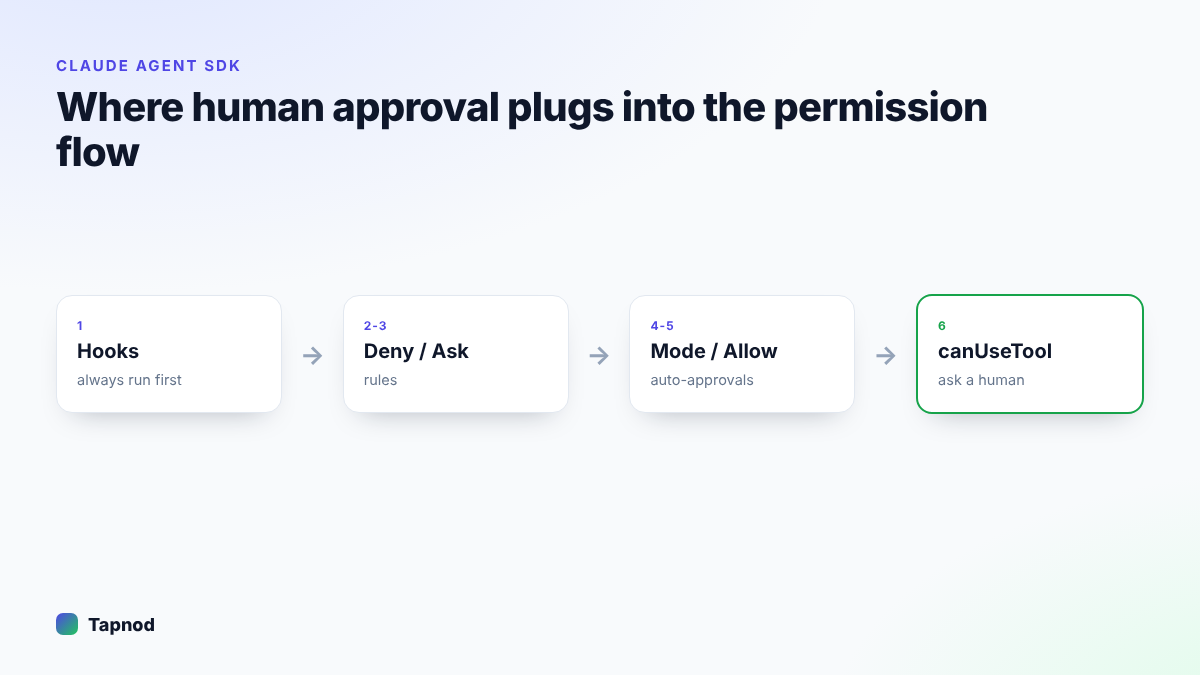
The Claude Agent SDK gives you the same agent loop that powers Claude Code, in Python and TypeScript. Human approval plugs into its permission system. When Claude requests a tool, the SDK checks, in order: hooks, deny rules, ask rules, the permission mode, allow rules, and finally your canUseTool callback. Anything not settled by the earlier steps reaches your callback, which is where you ask a human.
So the recipe is: allow the safe tools, deny the forbidden ones, and send everything else to a person through canUseTool.
"claude agent sdk" gets about 9,900 US searches a month at a keyword difficulty of 49 (Semrush, November 2026). The more specific "claude agent sdk human in the loop" is only about 30, which suggests many builders haven't yet found the approval side of the SDK. This guide is for them.
The permission order
| Step | What it does | Can it ask a human? |
|---|---|---|
| 1. Hooks | Run first; can deny or pass on | Can route elsewhere |
| 2. Deny rules | disallowed_tools and settings deny rules block the call |
No |
| 3. Ask rules | Matching ask rules send the call to your callback | Yes, via the callback |
| 4. Permission mode | bypassPermissions, acceptEdits and others approve some calls |
No |
| 5. Allow rules | allowed_tools and settings allow rules approve the call |
No |
6. canUseTool |
Your code decides | Yes |
Two consequences catch people out:
- Auto-approved calls never reach your callback. If a tool is in
allowed_toolsby bare name, or the mode approves it, your approval logic never runs for it. allowed_toolsdoesn't restrictbypassPermissions. In bypass mode, unlisted tools are approved too. Usedisallowed_toolsto block things in that mode.
A callback that asks a human
In TypeScript, canUseTool receives the tool name and input and returns a decision. This version auto-allows reads, and sends anything else to an approval service and waits for the answer:
import { query } from "@anthropic-ai/claude-agent-sdk";

const SAFE = new Set(["Read", "Glob", "Grep"]);

for await (const msg of query({
  prompt: "Clean up stale feature flags in src/flags and open a PR",
  options: {
    permissionMode: "default",
    disallowedTools: ["Bash(rm *)", "Bash(git push --force *)"],
    canUseTool: async (toolName, input) => {
      if (SAFE.has(toolName)) return { behavior: "allow", updatedInput: input };
      const answer = await requestApproval({ toolName, input }); // your function
      return answer.approved
        ? { behavior: "allow", updatedInput: answer.editedInput ?? input }
        : { behavior: "deny", message: answer.reason ?? "Rejected by reviewer" };
    },
  },
})) {
  if ("result" in msg) console.log(msg.result);
}
requestApproval is yours to write: show a prompt in your UI, post to Slack, or send a card to an inbox and poll for the reply. Return a clear message on deny so Claude can adjust instead of retrying the same call.
Hooks for checks that must always run
Because approved calls skip canUseTool, any check that must run on every call belongs in a PreToolUse hook. Hooks run first, and a hook's deny holds even in bypassPermissions mode. Use hooks for invariants like "never write outside this directory" and the callback for judgment calls like "should we send this email?".
Pick a mode on purpose
| Mode | Behavior | Good for |
|---|---|---|
default |
Calls needing approval go to your callback | Interactive apps with a human in the loop |
dontAsk |
Anything that would prompt is denied, callback skipped | Headless agents with a fixed tool surface |
acceptEdits |
File edits in scope auto-approve | Coding agents you review afterward |
plan |
Explore and plan without editing source files | Review before changes |
auto |
A classifier reviews actions | Long tasks with fewer interruptions |
bypassPermissions |
Nearly everything approves | Isolated sandboxes only |
Since Claude Code v2.1.302, SDK apps start in default mode unless you set one, which means calls needing approval are denied unless something approves them. If your agent "can't do anything", that's usually why.
You can also change modes mid-session with setPermissionMode() in TypeScript or set_permission_mode() in Python. A common pattern: start in plan, show the plan to a person, then switch to acceptEdits once they approve it.
Questions, not only approvals
Claude can ask clarifying questions through the AskUserQuestion tool, and those always reach your callback, even when an allow rule matches, because they need a person. In dontAsk mode they're denied, so a headless agent in that mode can't ask anything. If your agent should be able to ask while running unattended, keep default mode and route questions to wherever your humans are.
Editing, not only approving
The callback can return a modified input alongside an allow decision, which means a reviewer can fix a proposal instead of rejecting it. That's often the faster path: change the email's subject line, lower a refund amount, or narrow a file path, then let the tool run with the corrected values.
Two cautions. Validate edited input the same way you'd validate the original, since a person typing on a phone can make mistakes too. And tell Claude what changed, for example through the tool result or a follow-up message, so its next step reflects the edit instead of assuming its original proposal ran.
Designing the approval message
Whatever channel you use, the message decides whether the reviewer reads or rubber-stamps. Include the tool and the exact input, one sentence on why the agent wants it, whether it can be undone, and what happens if nobody answers. Keep it short enough to read on a lock screen.
Making approvals reachable
The SDK gives you the hook; you choose the channel. For agents that run while people are away, the channel matters more than the code:
- In-app prompts work when the user is in your product.
- Slack or email work for teams, but approvals get buried.
- An agent inbox collects approvals and questions from every agent in one queue, with answers sent back over MCP, webhooks or polling.
Whichever you choose, set a timeout and a default. A requestApproval that waits forever turns into a stuck agent. See human-in-the-loop AI agents for timeout patterns.
A worked example
Picture a support-ops agent built on the SDK. It reads tickets and order history freely, and drafts replies. Sending a reply or issuing a refund goes through canUseTool, which posts a card with the draft or the refund amount to the support lead's inbox. Approvals come back in seconds from a phone. A PreToolUse hook blocks any refund above a fixed limit outright, whatever the callback says. The agent handles the volume; a person signs off on anything a customer will see or that costs money.
Key takeaways
- Permissions run hooks, deny, ask, mode, allow, then
canUseTool. - Put human approval in
canUseTool, and invariants inPreToolUsehooks. - Auto-approved calls skip your callback, and
allowed_toolsdoesn't limit bypass mode. - Route approvals to a channel people actually watch, with timeouts.
FAQ
How do I add human approval to the Claude Agent SDK?
Implement a canUseTool callback that asks a person and returns allow or deny, and keep the tools you want reviewed out of allowed_tools so they reach it.
Why isn't my canUseTool callback being called?
The call was probably approved earlier: by an allow rule, by acceptEdits or bypassPermissions mode, or by a bare tool name in allowed_tools.
Can a hook override bypass mode?
Yes. Hooks run before the mode check, and a hook's deny applies even in bypassPermissions mode.
How do I let a headless SDK agent ask questions?
Keep default mode so AskUserQuestion reaches your callback, then forward the question to a person and return their answer. In dontAsk mode, questions are denied.
Where Tapnod fits
Tapnod can be the other end of your canUseTool callback: approvals and questions from your SDK agents land in one inbox on your phone. Connect an agent free.