 Tapnod
The short answer
CrewAI gives you a few ways to put a person in the loop, depending on where your crew runs:
@human_feedbackin Flows (CrewAI 1.8.0 and later): a decorator that pauses a Flow step for review and routes on the answer. Best for local development and console workflows.- Webhook-based HITL for deployed crews: you pass a
humanInputWebhookwhen you kick off a run, CrewAI calls it when a task needs review, and you resume the run through an endpoint with the reviewer's feedback. - Frontend approvals over AG-UI: a Flow binds tools your frontend registered, and the run pauses until the user responds in the UI.
All three share one idea: the crew stops, a person sees the output, and their answer decides what happens next.
"crewai human in the loop" gets about 20 US searches a month (Semrush, November 2026). It's a niche query, but the people searching are building multi-agent systems that publish, send or spend, where review matters most.
Option 1: @human_feedback in Flows
Flows are CrewAI's way of wiring crews and steps into an explicit sequence. The @human_feedback decorator marks a step whose output a person should review before the Flow continues. The reviewer's answer can be routed to different next steps, such as approved, needs changes or rejected.
from crewai.flow.flow import Flow, start, listen
from crewai.flow.human_feedback import human_feedback

class LaunchPostFlow(Flow):
    @start()
    def draft(self):
        return writer_crew.kickoff(inputs={"topic": self.state["topic"]}).raw

    @human_feedback(message="Review the draft. Approve, or describe changes.")
    @listen(draft)
    def review(self, draft_text):
        return draft_text

    @listen(review)
    def publish(self, result):
        if result.feedback_approved:
            cms.publish(result.output)
Exact attribute names vary by version, so check the decorator's docs for yours. The pattern is what matters: draft, pause for a person, then act on their decision.
This mode suits console and local runs, where someone is at the terminal. For crews deployed as services, use webhooks.
Option 2: webhook HITL for deployed crews
When a crew runs as a deployed service, nobody is at a terminal. CrewAI's webhook approach works like this:
- Kick off the run with a
humanInputWebhook(URL plus bearer or basic auth). - A task finishes that's marked for human input; CrewAI pauses and sends your webhook the execution ID, task ID and the task output.
- Your system shows it to a reviewer: an inbox, Slack, email or your own app.
- You resume by calling the resume endpoint with the execution ID, task ID, the feedback and whether it's approved.
- The crew continues, using the feedback if changes were requested.
One gotcha from CrewAI's docs: webhook URLs given at kickoff aren't carried over automatically, so pass them again when you call resume, or later notifications won't arrive.
| Step | Data you need |
|---|---|
| Kickoff | Inputs, webhook URL, auth |
| Webhook received | Execution ID, task ID, output |
| Resume | Execution ID, task ID, feedback, approval flag, webhook URLs again |
Option 3: approvals in your frontend
For apps where the end user is the reviewer, CrewAI Flows can be served over AG-UI with CopilotKit. The frontend registers approval tools; the Flow adds them to the model's tool list; when the model calls one, the run halts until the user responds in the UI, and their answer returns to the Flow as a tool result. More in AG-UI human in the loop.
Where to put review in a crew
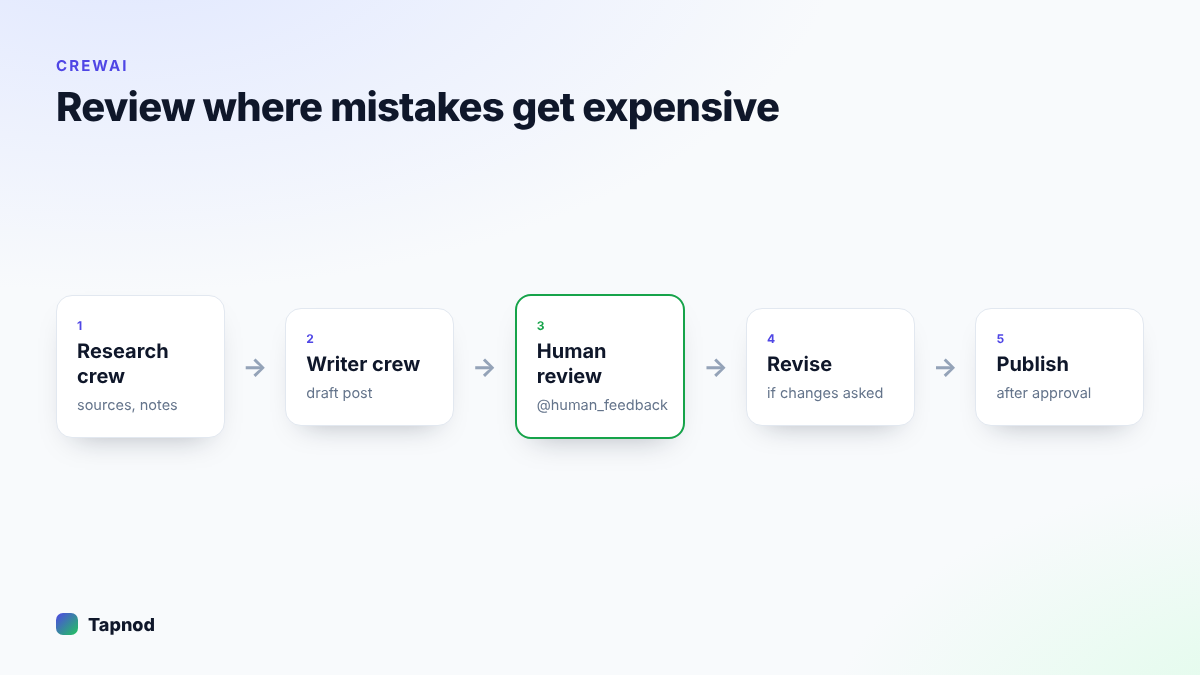
Multi-agent crews produce many intermediate outputs. Reviewing all of them defeats the point. Put people where mistakes become expensive:
| Point | Review? | Why |
|---|---|---|
| Research notes | No | Internal and cheap to redo |
| Plan or outline | Sometimes | Catching a wrong direction early saves a whole run |
| Final draft | Yes, if it's published | Public mistakes cost trust |
| Tool calls that send, spend or delete | Yes | Hard to undo |
| Errors and retries | Notify | A person decides whether to rerun |
Writing review requests people can answer
A webhook payload with raw task output isn't a review request. Before you show it to a person, add a one-line summary, the action that will follow approval, and what "changes requested" will do. Reviewers decide faster when they know the consequences.
A minimal webhook relay
The relay between CrewAI and your reviewers can be small. It receives the webhook, verifies the auth header, stores the execution ID and task ID, and posts a review request wherever reviewers are. When the reviewer answers, a second handler calls CrewAI's resume endpoint with the IDs, the feedback, the approval flag and the webhook URLs again. Keep the stored record until the run finishes, so a late answer or a retry doesn't resume the wrong task.
Handling feedback well
- Make changes concrete. "Shorter intro, remove the pricing claim" works better than "make it better".
- Limit loops. Cap revision rounds, then escalate to a person who can edit directly.
- Record decisions. Store who approved what and when, next to the execution ID. See AI agent audit trails.
- Time out sensibly. A draft nobody reviews in two days should expire or ping someone else.
A worked example
Picture a marketing crew: a researcher gathers sources, a writer drafts a launch post, an editor tightens it. The Flow pauses after the editor with @human_feedback. The head of marketing reads the draft on her phone, asks to drop a comparison claim she can't verify, and the writer revises. The second draft gets approved, and the publish step runs. Total human time: two minutes across two reviews, at the two points that mattered.
Mistakes to avoid
- Using console input in production. A blocked process waiting for stdin on a server is a stuck process.
- Forgetting webhook URLs on resume. Notifications stop silently.
- Reviewing every agent. Reviewers burn out, and approvals become rubber stamps.
- No context in the request. Reviewers need a summary, not a wall of task output.
Comparing CrewAI with other frameworks
LangGraph pauses anywhere with interrupt(); the OpenAI Agents SDK and Google ADK gate tools. CrewAI's model sits at the task and Flow-step level, which fits its idea of crews producing outputs in stages. For a framework-neutral view, see human in the loop architecture, or AutoGen human in the loop for Microsoft's approach.
Key takeaways
- Use
@human_feedbackin Flows for local and console review. - Use webhook HITL for deployed crews, and re-send webhook URLs on resume.
- Use AG-UI when the reviewer is your app's end user.
- Review where mistakes get expensive, not at every step.
FAQ
How do I add human input to CrewAI?
In Flows, use the @human_feedback decorator on a step. For deployed crews, pass a humanInputWebhook at kickoff and resume the run with feedback through the resume endpoint.
Does CrewAI support approvals on a phone?
Not directly. CrewAI calls your webhook; you decide where the request goes. Forward it to an inbox or chat app that works on mobile, then call resume with the answer.
Can a reviewer request changes instead of approving?
Yes. Both approaches carry feedback back into the run, so the crew can revise and ask again.
What's the difference between task-level and tool-level review?
Task-level review checks an output after a step finishes. Tool-level review checks an action before it runs. CrewAI focuses on task and Flow-step review.
Where Tapnod fits
Point your CrewAI webhook at a small relay, and each review request becomes a Tapnod card your team answers from their phones. Try it free.