 Tapnod
The short answer
The Claude Code Notification hook runs a command, HTTP call or other handler when Claude Code wants your attention: a permission prompt that's been waiting, an idle session, an MCP form, a background session that needs input. You register it under hooks.Notification in a settings file and use the matcher to pick which kinds of notification trigger it.
It receives JSON on stdin with the usual session fields plus a message, so your script can say what Claude wants. It can't block or change anything; it's purely for alerting.
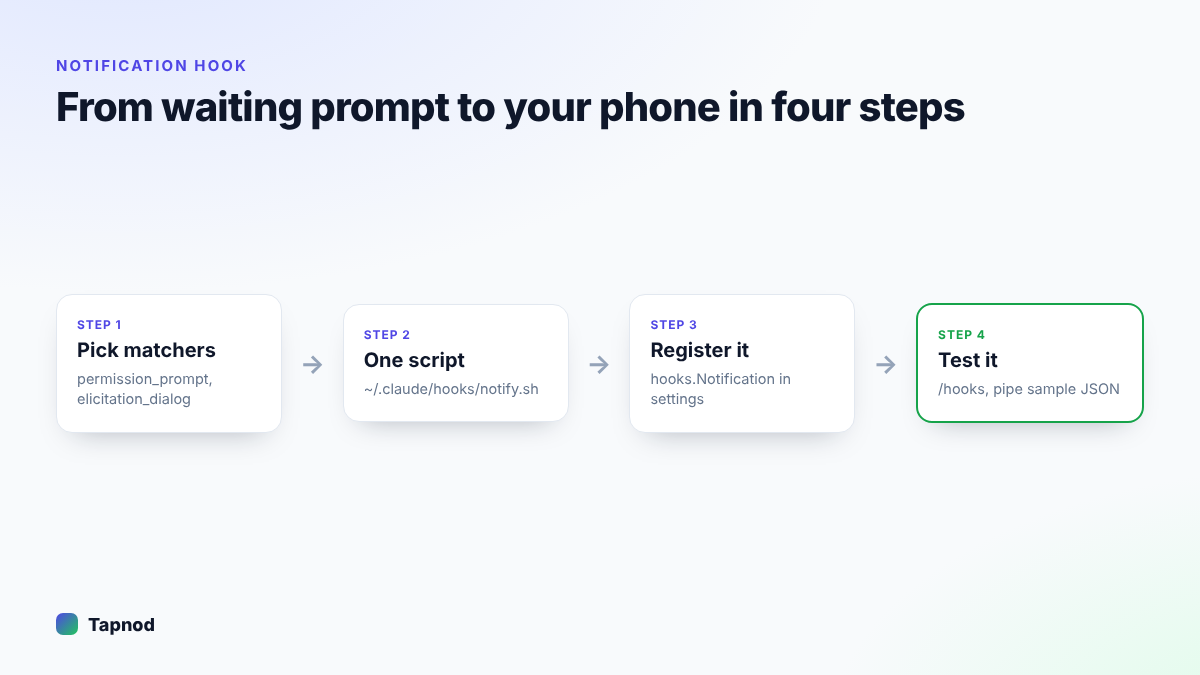
"claude code notification hook" gets about 40 US searches a month at a keyword difficulty of 35 (Semrush, November 2026). This guide is the step-by-step version; for a wider comparison of notification options, see Claude Code notifications.
Step 1: pick your matchers
| Matcher | Fires when |
|---|---|
permission_prompt |
A tool use needs your approval and the prompt has waited about six seconds |
idle_prompt |
Claude finished about 60 seconds ago and you haven't typed |
elicitation_dialog |
An MCP server opened a form and you haven't typed for about six seconds |
elicitation_url_dialog |
An MCP server asks you to open a URL |
agent_needs_input |
A background session starts waiting on you while agent view is open |
agent_completed |
A background session finishes or fails while agent view is open |
auth_success |
Authentication completes |
| empty string | All of the above and any other notification type |
Start with permission_prompt. It's the alert that saves the most time, because a waiting prompt means a stalled session.
Step 2: write one script for every alert
Rather than a different one-liner per matcher, write one script that reads the event and decides where to send it:
#!/usr/bin/env bash
# ~/.claude/hooks/notify.sh
set -euo pipefail
event=$(cat)
msg=$(jq -r '.message // "Claude Code needs your attention"' <<<"$event")
dir=$(basename "$(jq -r '.cwd' <<<"$event")")
title="Claude Code · $dir"

# 1. desktop, when available
if command -v osascript >/dev/null; then
  osascript -e "display notification \"${msg//\"/}\" with title \"$title\""
elif command -v notify-send >/dev/null && [ -n "${DISPLAY:-}" ]; then
  notify-send "$title" "$msg"
fi

# 2. phone or inbox, when configured
if [ -n "${CLAUDE_ALERT_WEBHOOK:-}" ]; then
  curl -s -m 5 -X POST "$CLAUDE_ALERT_WEBHOOK" \
    -H 'Content-Type: application/json' \
    -d "$(jq -c --arg t "$title" '{title:$t, message:.message, cwd:.cwd, session:.session_id}' <<<"$event")" >/dev/null || true
fi
exit 0
Make it executable with chmod +x ~/.claude/hooks/notify.sh. The || true on the webhook call means a network hiccup never shows up as a hook error. The script strips double quotes from the message before passing it to osascript, which avoids broken AppleScript.
Step 3: register it
In ~/.claude/settings.json:
{
  "hooks": {
    "Notification": [
      {
        "matcher": "permission_prompt|elicitation_dialog",
        "hooks": [ { "type": "command", "command": "~/.claude/hooks/notify.sh" } ]
      }
    ]
  }
}
If you'd rather skip the script for the webhook part, Claude Code also supports "type": "http" hooks that POST the event JSON straight to a URL, with headers that can use environment variables listed in allowedEnvVars.
Step 4: test it
- Type
/hooksin Claude Code and check the hook appears under Notification. - Pipe sample input into the script by hand:
echo '{"message":"Claude wants to run npm install zod","cwd":"/Users/me/acme-api","session_id":"test"}' | ~/.claude/hooks/notify.sh
- Trigger a real prompt: ask Claude to run a command you haven't allowed, then wait about six seconds without answering.
Write messages people act on
A notification is only useful if the person who gets it can decide something from it. The message field Claude Code passes is a good start, but you can make alerts sharper with a little context your script already has:
- Project first. Put the folder name in the title. "Claude Code · billing-service" tells you which window to open before you read anything else.
- Host when you have several machines. Add
$(hostname -s)so "needs approval" from the VPS doesn't look like the laptop. - What kind of wait. Prefix the text with the matcher type, such as "Approval" or "Idle", if you register one script for several matchers. You can tell them apart by registering separate entries that pass an argument, for example
notify.sh approvalandnotify.sh idle. - Group repeats. If the same session fires twice within a minute, skip the second alert. A small timestamp file per
session_idhandles it.
These small touches decide whether alerts get read or swiped away. Alerts that always say "Claude Code needs your attention" train people to ignore them within a week.
Quiet hours
Not every prompt deserves a 2 a.m. buzz. Add a time check to the script so phone alerts outside working hours only go out for a short list of folders, such as production services, while everything else waits for the morning. The desktop branch can keep running, since nobody is at the desk to see it anyway. Quiet hours are the difference between alerts you keep and alerts you mute.
What the hook can't do
The Notification hook is one-way. Its exit code and stderr are ignored, so it can't approve, deny or change anything. If you want to answer a prompt programmatically, that's a PermissionRequest hook, and it should be scoped tightly to the tools you trust. If you want to answer from your phone, use Remote Control, or send the alert to an inbox that can relay your decision.
Matcher strategy
| Goal | Matchers |
|---|---|
| Never miss a blocked session | permission_prompt, elicitation_dialog, elicitation_url_dialog |
| Know when work is done | idle_prompt, or a Stop hook |
| Manage background sessions | agent_needs_input, agent_completed |
| Everything, for logging | empty string |
You can register several entries under Notification, each with its own matcher and command. A common pattern is loud alerts for blocking events and quiet ones for done events.
A worked example
Picture a laptop and a cloud VM, both running Claude Code with the same notify.sh from a dotfiles repo. On the laptop, the script shows a macOS banner. On the VM there's no desktop, so only the webhook branch runs, posting to an inbox. When the VM session asks to restart a service, the card reaches the phone within seconds with the folder name and message. Same script, two environments, no special cases.
Key takeaways
- Register the hook under
hooks.Notificationand pick matchers, starting withpermission_prompt. - One script can handle desktop banners and webhooks, and it should always exit 0.
- Test by piping sample JSON into the script before relying on it.
- The hook only alerts. Use a
PermissionRequesthook, Remote Control or an inbox to answer.
FAQ
What does the Claude Code Notification hook receive?
JSON on stdin with common fields like session_id, transcript_path, cwd and hook_event_name, plus a message describing the notification.
Can a Notification hook approve a permission prompt?
No. Its output is ignored. Use a PermissionRequest hook, scoped narrowly, or answer through Remote Control or an inbox.
How do I get notified only for permission prompts?
Set the matcher to permission_prompt. Add elicitation_dialog if you use MCP servers that ask for input.
Why is there a delay before the notification?
permission_prompt waits about six seconds and idle_prompt about 60 seconds, so you aren't alerted about prompts you're already looking at.
Where Tapnod fits
Alerts tell you something is waiting. Tapnod lets Claude Code and your other agents send the actual question or approval as a card you can answer from your phone, connected over MCP, signed webhooks or polling. Start free.