 Tapnod
The short answer
Claude Code permissions are rules that decide whether a tool call runs, asks you first, or is blocked. You write them as allow, ask and deny lists in a settings file or manage them with /permissions. A rule names a tool and, optionally, a pattern: Bash(npm run test *), Read(./.env), WebFetch(domain:github.com).
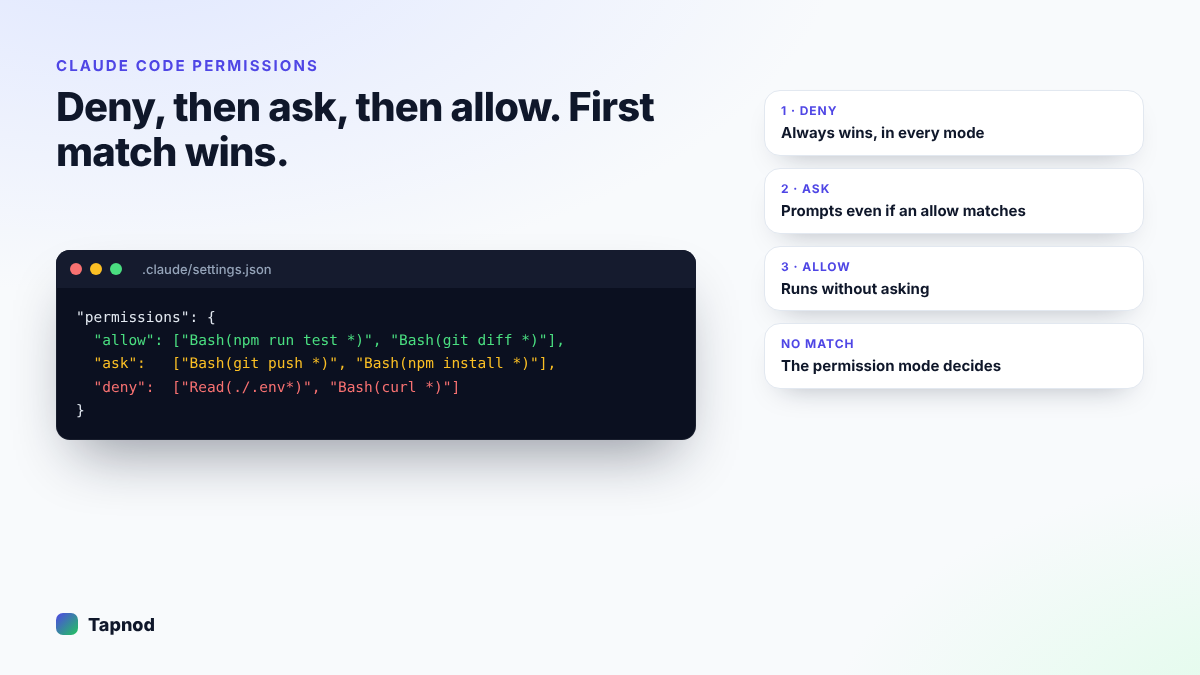
Rules are checked deny first, then ask, then allow, and the first match wins. Permission modes like acceptEdits and auto sit on top and change what happens when no rule matches.
"claude code permissions" gets around 590 US searches a month at a keyword difficulty of 43 (Semrush, November 2026). It's the reference page people come back to when a rule doesn't do what they expected.
What asks by default
| Tool type | Asks in the default mode? | "Don't ask again" lasts |
|---|---|---|
| File reads, Grep | No, inside your working directories | Not needed |
| Bash | Yes, except a built-in set of read-only commands | Permanently for that repo and command |
| File edits | Yes | Until the session ends |
| WebFetch | Yes, except some preapproved documentation domains | Permanently for that repo and domain |
| WebSearch | Yes | Permanently for that repo |
Permanent approvals are written to .claude/settings.local.json at the root of your git repository, so they apply to later sessions in that repo, including subdirectories and worktrees.
Rule syntax
A rule is a tool name, optionally followed by a pattern in parentheses.
| Rule | Matches |
|---|---|
Bash or Bash(*) |
Every Bash command |
Bash(npm run build) |
Exactly npm run build |
Bash(npm run *) |
npm run build, npm run test --watch, npm run |
Read(./.env) |
Reading .env in the current directory |
Edit |
Any file edit |
WebFetch(domain:example.com) |
Fetches to example.com |
mcp__github__get_* |
The get_ tools from your github MCP server |
Wildcards, carefully
The * stands in for whatever text sits in its place, and Claude Code matches everything before the first * as written. That makes placement matter:
Bash(git log *)allows onlygit logcommands.Bash(git *)allows every git command, includingpush.Bash(git * main)also matchesgit -c core.fsmonitor=<script> diff main, which can run a program. Claude Code warns at startup about a*before the subcommand.Bash(ls *)requires a space, so it doesn't matchlsof.Bash(ls*)does.
A trailing * also matches the bare command, so Bash(git log *) covers plain git log.
Order and precedence
Rules are evaluated deny, then ask, then allow. Specificity doesn't change that order. A broad deny like Bash(aws *) blocks aws s3 ls even if you also allow Bash(aws s3 ls). An allow can't carve an exception out of a deny.
Deny rules come in two strengths. A bare tool name, like Bash, removes the tool from Claude's context so it never sees it. A scoped rule, like Bash(rm *), leaves the tool available and blocks matching calls.
A team baseline
Here's a starting point for a project's checked-in .claude/settings.json:
{
  "permissions": {
    "allow": [
      "Bash(npm run test *)",
      "Bash(npm run lint *)",
      "Bash(git status)",
      "Bash(git diff *)",
      "Bash(git log *)"
    ],
    "ask": [
      "Bash(git push *)",
      "Bash(npm install *)"
    ],
    "deny": [
      "Read(./.env*)",
      "Read(./secrets/**)",
      "Bash(curl *)",
      "Bash(wget *)"
    ]
  }
}
Each developer can add personal rules in ~/.claude/settings.json or the untracked .claude/settings.local.json. Organizations can enforce rules through managed settings that users can't override.
Shell commands are parsed, not string-matched
Claude Code understands shell operators. Bash(npm test *) won't approve npm test && rm -rf build, because each subcommand separated by &&, ||, ;, | and similar must match on its own. Deny and ask rules apply if any subcommand matches, even inside a subshell or a for loop.
Some wrappers are stripped before matching, so Bash(npm test *) also matches timeout 30 npm test. The stripped list includes timeout, time, nice, nohup, stdbuf and bare xargs. Tools like npx, docker exec and devbox run are not stripped, so a rule such as Bash(devbox run *) approves whatever comes after it. Write one rule per inner command instead.
The gaps to know about
Permission rules are a strong layer, not a complete one. The docs call out several limits:
- A Bash rule matches the command as written.
Bash(curl *)doesn't match/usr/bin/curlorsh -c 'curl ...'. Pair network deny rules with the sandbox's network allowlist when the restriction has to hold. - Argument patterns are fragile. Trying to restrict
curlto one domain with a Bash pattern misses variations. Denycurland allowWebFetch(domain:...)instead. - Your prompt isn't a rule. Instructions in
CLAUDE.mdshape what Claude tries, but they don't change what Claude Code allows. Only rules, modes and hooks do.
Modes on top of rules
Rules decide specific calls. Modes decide the default for everything else.
| Mode | Effect |
|---|---|
default |
Ask for anything not allowed |
acceptEdits |
File edits and common filesystem commands run without asking |
plan |
Explore without making changes |
auto |
A classifier reviews actions instead of you |
dontAsk |
Anything that would prompt is denied |
bypassPermissions |
Everything runs, except deny rules |
Deny rules apply in every mode, bypass included. For the tradeoffs of each mode, see how to make Claude Code stop asking for permission.
Going further with hooks
When a rule can't express what you need, a PreToolUse hook can inspect the full tool input and allow, ask or deny with a reason. A PermissionRequest hook can answer prompts for you or forward them somewhere else, like your phone. Our Claude Code hooks examples include both.
A worked example: rules for a monorepo
Picture a monorepo with a web app, an API and infrastructure code. The team wants Claude to move fast in the app and API, and to be careful near infrastructure.
The checked-in settings allow test, lint and type-check commands for each package, plus read-only git. An ask rule covers Bash(terraform *) and Bash(kubectl *), so infrastructure commands always reach a person. A deny rule blocks reads of infra/secrets/**. Developers who want fewer prompts add personal allow rules locally without touching the shared file. Infrastructure prompts go to the on-call person's phone through a notification hook, so nobody has to sit and watch.
Key takeaways
- Rules are evaluated deny, then ask, then allow, and the first match wins.
- Put the
*after the subcommand, as inBash(git log *). - Shell operators are parsed, so each subcommand must match on its own.
- Bash rules match commands as written, so pair network deny rules with sandbox limits.
FAQ
Where do Claude Code permission rules go?
In permissions.allow, permissions.ask and permissions.deny inside a settings file: ~/.claude/settings.json for you, .claude/settings.json for the project, .claude/settings.local.json for untracked local rules, or managed settings for an organization.
Which wins, allow or deny?
Deny. Rules are evaluated deny, then ask, then allow, and the first match decides. A specific allow can't override a broad deny.
How do I allow an MCP tool?
Use the mcp__<server>__<tool> name, such as mcp__github__create_issue, or a glob after the server prefix, such as mcp__github__get_*.
Why does my allow rule not match?
Usually the * is in the wrong place, the command uses a wrapper that isn't stripped, or a deny or ask rule matches first. Check /permissions to see every active rule and its source file.
Where Tapnod fits
Keep ask rules for the commands that matter and answer them from your phone: Tapnod turns Claude Code's prompts into one-tap cards. Try it free.