 Tapnod
The short answer
Claude Code plays sounds and shows desktop notifications through hooks. Add a Notification hook to ~/.claude/settings.json that runs your operating system's sound or notification command, and choose which moments trigger it with a matcher: permission_prompt when Claude needs approval, idle_prompt when it's done and waiting. Use a Stop hook if you want a sound after every turn.
Different sounds for "needs you" and "done" make the alerts far more useful, because you know whether to get up before you look.
"claude code sound notification" gets about 40 US searches a month at a keyword difficulty of 12, with "claude code audio notification" and "claude code macos notification" around 30 each (Semrush, November 2026). Small numbers, but these readers want a working command, and that's what this page gives.
macOS
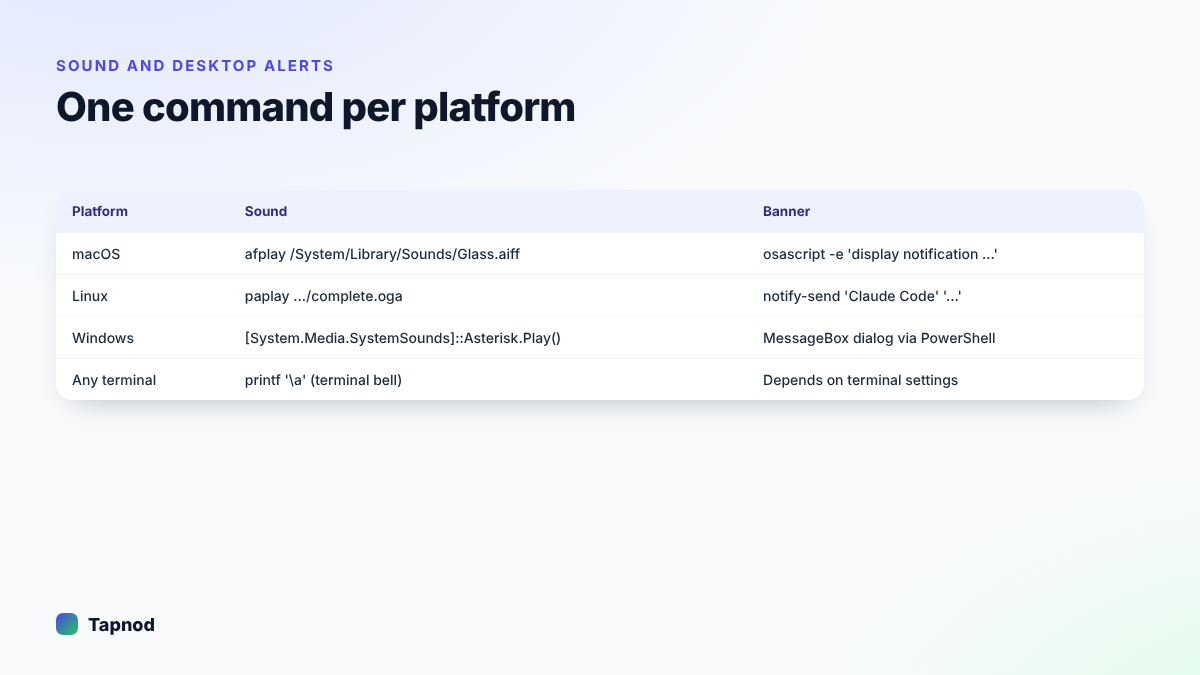
Sound only. afplay plays any audio file, and macOS ships system sounds in /System/Library/Sounds:
{
  "hooks": {
    "Notification": [
      {
        "matcher": "permission_prompt",
        "hooks": [ { "type": "command", "command": "afplay /System/Library/Sounds/Glass.aiff" } ]
      },
      {
        "matcher": "idle_prompt",
        "hooks": [ { "type": "command", "command": "afplay /System/Library/Sounds/Hero.aiff" } ]
      }
    ]
  }
}
Banner with sound. osascript -e 'display notification "Needs your approval" with title "Claude Code" sound name "Glass"' shows a notification in the corner and plays the sound.
Gotcha: osascript sends notifications through Script Editor. If Script Editor doesn't have notification permission, the command fails silently and macOS won't ask. Run osascript -e 'display notification "test"' once in a terminal and check System Settings, Notifications.
Linux
Sound only. On most desktops with PulseAudio or PipeWire, paplay plays freedesktop sounds:
paplay /usr/share/sounds/freedesktop/stereo/complete.oga
Banner. notify-send 'Claude Code' 'Needs your approval' shows a desktop notification. It needs a notification daemon, which SSH sessions, headless servers and most containers don't have. If Claude Code runs on a remote box, play the sound or show the banner on your local machine instead, which usually means sending the event over the network.
Windows
Sound only. From PowerShell, [System.Media.SystemSounds]::Asterisk.Play() plays a system sound. In a hook:
powershell.exe -NoProfile -Command "[System.Media.SystemSounds]::Asterisk.Play()"
Dialog. The example in Anthropic's hooks guide uses System.Windows.Forms.MessageBox, which opens a dialog box rather than a toast. It can open behind your terminal, so test it first.
WSL. If Claude Code runs inside WSL, powershell.exe must be on your PATH through Windows interop for these commands to work.
The terminal bell
The lowest-effort option is the terminal bell: a hook that runs printf '\a'. Whether you hear anything depends on your terminal's settings. iTerm2, Windows Terminal, GNOME Terminal and VS Code's integrated terminal each let you turn the bell into a sound, a visual flash, a badge, or nothing. It's handy when you work in one terminal and want a tap on the shoulder.
Which events deserve a sound
| Event | Hook and matcher | Suggested sound |
|---|---|---|
| Needs approval | Notification / permission_prompt |
Distinct, slightly urgent |
| Done and idle | Notification / idle_prompt |
Soft, pleasant |
| MCP form waiting | Notification / elicitation_dialog |
Same as approval |
| Every turn ends | Stop |
Very short, or none |
| Turn failed on an API error | StopFailure |
Low, unpleasant |
Two sounds cover most people: one for "come back now" and one for "finished whenever you're ready".
One script, every platform
If you use the same dotfiles on several machines, put the platform check in one script instead of maintaining three settings files:
#!/usr/bin/env bash
# ~/.claude/hooks/chime.sh  usage: chime.sh urgent|soft
kind=${1:-soft}
case "$(uname -s)" in
  Darwin)
    [ "$kind" = urgent ] && afplay /System/Library/Sounds/Glass.aiff || afplay /System/Library/Sounds/Hero.aiff ;;
  Linux)
    if grep -qi microsoft /proc/version 2>/dev/null; then
      powershell.exe -NoProfile -Command "[System.Media.SystemSounds]::Asterisk.Play()"
    else
      paplay /usr/share/sounds/freedesktop/stereo/complete.oga 2>/dev/null || printf '\a'
    fi ;;
  *) printf '\a' ;;
esac
exit 0
Register it twice: chime.sh urgent under the permission_prompt matcher and chime.sh soft under idle_prompt. The WSL branch uses Windows interop, and anything unknown falls back to the terminal bell. Always exiting 0 means a missing sound file never shows up as a hook error.
Pick sounds you won't tune out
Sound design matters more than it seems. If the "needs you" sound is the same one your chat app uses, you'll ignore it within a day. Pick something you don't hear elsewhere, keep it short, and make the urgent one clearly different from the soft one. Volume matters too: a chime you can hear from the next room is the point, but one that makes you jump every ten minutes will get turned off. If your sessions trigger many prompts, fix that first with allow rules rather than making the sound quieter.
Troubleshooting
- Nothing happens. Type
/hooksand confirm the hook is listed under the right event. Check the matcher spelling exactly. - The command works in your terminal but not in the hook. Hooks may run with a different
PATH. Use absolute paths like/usr/bin/afplay. - Sound plays but late.
permission_promptwaits about six seconds andidle_promptabout 60 seconds by design, so you don't get pinged for prompts you're already looking at. - Silent on macOS. Give Script Editor notification permission, and check Focus mode.
- Silent over SSH. The sound plays on the remote machine, not yours. Forward the event to your laptop or phone instead.
When sound isn't enough
Sounds work when you're within earshot of the computer. When you're in another room or out, you need the alert on your phone, and ideally a way to answer it. Remote Control push in the Claude app covers that for one Claude Code session; a hook that posts to a push service or webhook covers servers and API-key setups. Both are walked through in Claude Code notifications.
A worked example
Picture a developer who pairs two sounds with two matchers. permission_prompt plays a sharp "Glass" chime and also posts the prompt to their phone. idle_prompt plays a soft "Hero" sound only. At the desk, the chime means turn around and approve. In the kitchen, the phone shows the prompt with an approve button. The soft sound means a task finished, which can wait until the coffee is done.
Key takeaways
- Use
afplayon macOS,paplayon Linux and PowerShell on Windows. - Pair
permission_promptwith an urgent sound andidle_promptwith a soft one. - Hooks run where Claude runs, so remote sessions need a webhook, not a local sound.
- Fewer prompts make the remaining alerts worth hearing.
FAQ
How do I make Claude Code play a sound?
Add a Notification hook that runs a sound command, such as afplay /System/Library/Sounds/Glass.aiff on macOS or paplay on Linux, with a matcher like permission_prompt or idle_prompt.
How do I get a desktop notification on macOS?
Use osascript -e 'display notification "..." with title "Claude Code"' in a Notification hook, and make sure Script Editor has notification permission.
Why doesn't notify-send work?
It needs a desktop notification daemon. SSH sessions, servers and most containers don't have one.
Can I use different sounds for different events?
Yes. Add separate entries under Notification with different matchers, each running a different sound command.
Where Tapnod fits
When a chime isn't enough, Tapnod sends Claude Code's approvals and results to your phone as cards you can act on. Start free.