 Tapnod
The short answer
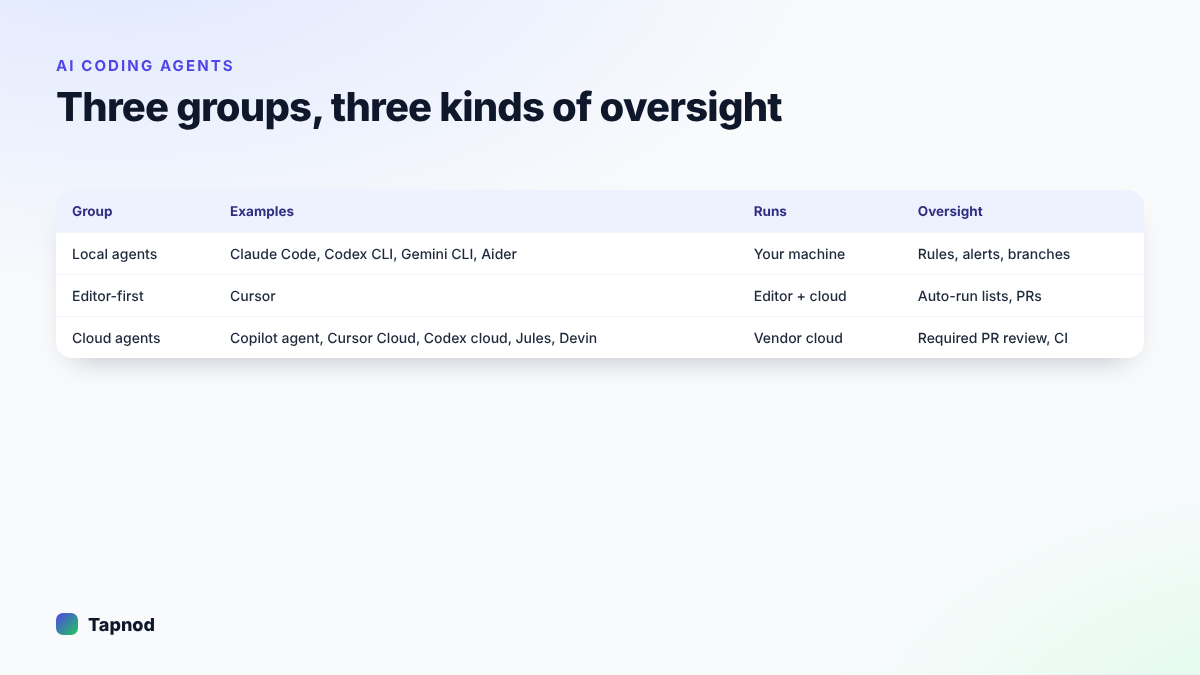
The leading AI coding agents fall into three groups. Terminal and IDE agents you steer locally, such as Claude Code, the Codex CLI, Gemini CLI and Aider. Editor-first tools with agents built in, such as Cursor. Cloud agents you assign tasks to and review as pull requests, such as GitHub Copilot's coding agent, Cursor Cloud Agents, Codex cloud tasks, Google's Jules and Devin.
There's no single best one. The right choice depends on where your code runs and how much you want to hand off, and every one of them needs some oversight setup to be safe on real projects.
"best ai coding agents" gets about 320 US searches a month at a keyword difficulty of 43, while "ai coding agent" gets 2,400 (Semrush, November 2026). Most lists rank by benchmark scores. This one ranks nothing; it maps each type of agent to the oversight it needs, because that's what decides whether it works on your codebase.
The three groups
| Group | Examples | Where work runs | You review |
|---|---|---|---|
| Local agents | Claude Code, Codex CLI, Gemini CLI, Aider | Your machine or server | Diffs on a branch, as you go |
| Editor-first | Cursor, and agent modes in other editors | Your editor, plus cloud options | Edits inline, PRs for cloud runs |
| Cloud agents | Copilot coding agent, Cursor Cloud Agents, Codex cloud, Jules, Devin | Vendor's environment | Pull requests |
Local agents
Claude Code runs in the terminal, IDE extensions, a desktop app and the web. It has the deepest permission controls in this list: allow, ask and deny rules, six permission modes including a classifier-checked auto mode, and lifecycle hooks. Remote Control and Channels let you reach a local session from your phone.
Codex CLI is OpenAI's terminal agent, with approval policies and sandbox modes, a notify setting and hooks. Since May 2026 you can steer local Codex sessions from the ChatGPT mobile app.
Gemini CLI is Google's open-source terminal agent. Aider is a long-running open-source favorite that works git-first, committing changes as it goes.
Oversight they need: permission rules that allow routine commands and gate risky ones, a way to hear about waiting prompts, and branch-based work so review is a normal diff.
Editor-first
Cursor puts the agent inside a fast AI-first editor, so you shape edits as they happen. Its Cloud Agents, formerly Background Agents, take longer tasks to the cloud and return pull requests, startable from web, iOS, Slack, GitHub and Linear.
Oversight it needs: settings for which terminal commands the agent may run automatically, and the same PR review as any contributor for cloud runs. See Claude Code vs Cursor for a direct comparison.
Cloud agents
GitHub Copilot's coding agent takes an issue and opens a pull request, keeping the checkpoint inside GitHub's existing review flow. Codex cloud tasks and Cursor Cloud Agents work similarly from their own products. Jules is Google's asynchronous coding agent. Devin from Cognition pitches itself as an autonomous software engineer and works across longer tasks.
Oversight they need: branch protection, required reviews, CI that must pass, and scoped tokens. The PR is the gate, so the gate must be real.
Oversight matrix
| Need | Local agents | Editor-first | Cloud agents |
|---|---|---|---|
| Control which commands run | Permission rules and modes | Auto-run settings | Environment setup |
| Hear when it needs you | Hooks, app pushes | In-editor, Slack | PR notifications, Slack |
| Stop risky actions | Ask and deny rules, hooks | Command allow and deny lists | No prod credentials in the environment |
| Final review | Diff on a branch | Inline, or PR | PR with CI |
| Works with laptop closed | Only on a server | Cloud agents only | Yes |
Questions to ask in a trial
A week-long trial on your real codebase tells you more than any benchmark. Give each candidate the same three tasks: a small bug fix, a test backfill and a mechanical refactor. Then compare:
| Question | Why it matters |
|---|---|
| How many interventions did each task need? | Measures real autonomy on your code |
| How large and focused were the diffs? | Big diffs cost review time |
| Did it ask good questions when unsure? | Guessing is the expensive failure |
| Could you control which commands it ran? | Decides whether you can trust it unattended |
| How did you hear when it needed you? | Decides whether it stalls when you step away |
Score each tool on those five points, and the decision usually becomes obvious. Benchmarks tell you how capable a model is in general; a trial tells you how the agent behaves in your repository, with your tests and your conventions.
How to choose
- Where does your code need to run? If it needs local services or a VPN, start with a local agent.
- How much do you want to hand off? Small edits favor editor-first; whole tasks favor local or cloud agents.
- How does your team review? If everything already goes through PRs, cloud agents fit naturally.
- What controls do you need to show? Regulated or security-conscious teams may need fine-grained rules and audit logs.
- What do you already pay for? Several of these come bundled with subscriptions you may have.
Many teams settle on two: an editor-first tool for interactive work and a local or cloud agent for handed-off tasks.
A baseline setup for any agent
1. One branch or worktree per agent task.
2. Routine commands allowed: tests, lint, type check, read-only git.
3. Risky commands ask: push, install, migrate, deploy.
4. Secrets out of reach: deny .env reads, scoped tokens only.
5. Alerts for "needs you", digests for "finished".
6. Human review before merge, same bar as human code.
This works whether the agent is in a terminal, an editor or the cloud, and it's the part that decides whether an agent saves time or creates cleanup work. For the reasoning behind each line, see supervising AI coding agents.
A worked example
Picture a five-person product team choosing tools. They already review everything through GitHub PRs with required checks. They pick Copilot's coding agent for well-defined issues, Cursor for day-to-day editing, and Claude Code for backend tasks that need the local Docker stack. Each tool reports differently, so they route every "needs a decision" moment to one shared inbox and keep PR review as the final gate for all three.
Key takeaways
- Coding agents split into local, editor-first and cloud groups.
- Pick by where your code must run and how much you hand off.
- Every agent needs oversight: command controls, alerts and real review.
- Many teams run two tools and route decisions to one place.
FAQ
What is the best AI coding agent?
It depends on your setup. Local agents like Claude Code suit work tied to your environment, editor-first tools like Cursor suit hands-on editing, and cloud agents like Copilot's coding agent suit PR-based teams.
Which AI coding agent is safest?
The one you configure well. Fine-grained permission rules, alerts for risky actions and required review matter more than the choice of tool. Claude Code currently offers the most granular built-in controls.
Can AI coding agents work while my laptop is off?
Cloud agents can. Local agents need the machine, or a server, to stay on.
Should a team use more than one coding agent?
Many do. Give each a clear lane and send all approvals and questions to one place.
Where Tapnod fits
Whichever agents you pick, Tapnod gives them one inbox for questions, approvals and results, on the web and on your phone. Start free.