 Tapnod
The short answer
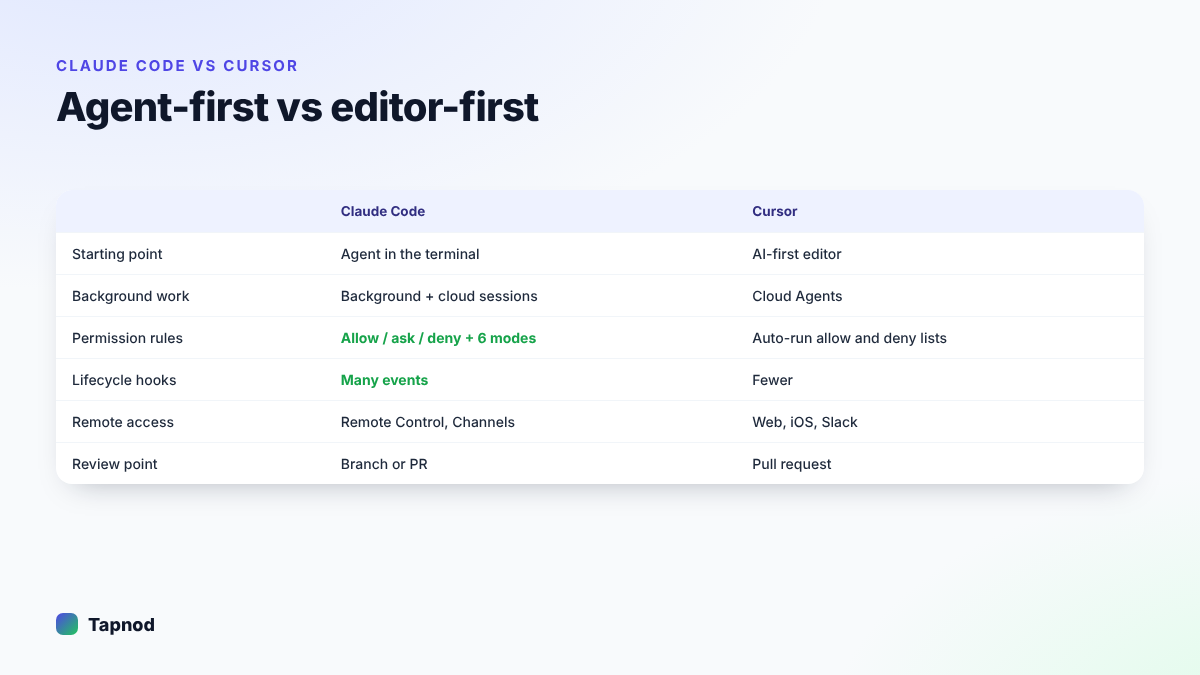
Claude Code and Cursor overlap more every year, but they start from different places. Cursor is an AI-first code editor: you work inside the IDE, and its agent edits alongside you, with Cloud Agents for longer work in the background. Claude Code is an agent first: it started in the terminal, now also runs in IDE extensions, a desktop app and the web, and is built around giving one agent a task and letting it work through it, with permission rules and hooks controlling what it may do.
If you want to stay hands-on in an editor, Cursor tends to feel natural. If you want to hand off whole tasks and supervise, Claude Code's controls are deeper. Many developers use both.
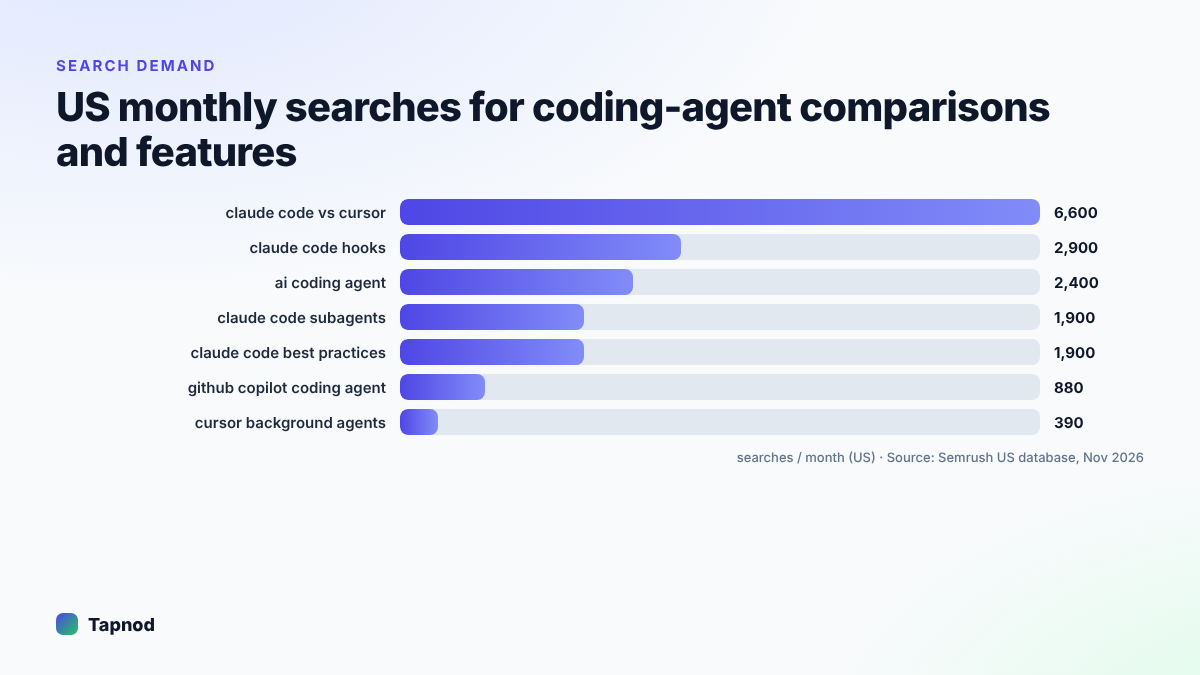
"claude code vs cursor" gets about 6,600 US searches a month at a keyword difficulty of 32 (Semrush, November 2026), the biggest comparison query in this space. Most comparisons focus on model quality and price. This one focuses on what changes your day: how much each tool does on its own, and how you stay in control.
How each one works
| Claude Code | Cursor | |
|---|---|---|
| Starting point | An agent in the terminal | An AI-first editor |
| Where you use it | Terminal, VS Code and JetBrains extensions, desktop app, web, mobile | The Cursor editor, web, iOS app, Slack |
| Main unit of work | A task given to an agent | Editing with an agent beside you |
| Background work | Background sessions, agent view, cloud sessions | Cloud Agents (formerly Background Agents) |
| Remote access | Remote Control, Channels, cloud sessions | cursor.com/agents, iOS app, Slack |
| Extensibility | Hooks, skills, subagents, plugins, MCP | Rules, MCP, integrations |
Autonomy: who drives
In Cursor, you're usually in the editor, reading diffs as they appear and accepting or adjusting them. The agent is fast and close to your cursor, which makes it great for work where you're thinking through the design as you go.
Claude Code leans the other way. You describe a task, it plans, reads the codebase, runs commands and edits files, checking in when it needs permission or a decision. You can still steer step by step, but the design favors longer runs with fewer interruptions. Features like agent view, background sessions and subagents all point at the same idea: several agents working while you supervise.
Permissions and oversight
This is where the tools differ most for anyone running agents unattended.
| Control | Claude Code | Cursor |
|---|---|---|
| Command approval | Allow, ask and deny rules with pattern matching | Settings for whether agent terminal commands run automatically, with allow and deny lists |
| Modes | default, acceptEdits, plan, auto, dontAsk, bypassPermissions | Agent and ask-style modes in the editor |
| Classifier-checked autonomy | Auto mode blocks risky actions like force pushes | Not a direct equivalent |
| Lifecycle hooks | PreToolUse, PermissionRequest, Notification, Stop and more | Fewer extension points |
| Review point for background work | Your branch, or a PR from cloud sessions | Pull requests from Cloud Agents |
Claude Code's permission system is unusually detailed: rules like Bash(npm run test *), deny rules that apply in every mode, and hooks that can block, log or route any tool call. If you need to prove what an agent was allowed to do, that depth matters. Our guide to Claude Code permissions covers it.
Cursor's oversight centers on the editor and on pull requests. For Cloud Agents, the PR is the checkpoint, which fits teams that already review everything through PRs.
Working away from the desk
| Claude Code | Cursor | |
|---|---|---|
| Continue a local session from phone | Remote Control in the Claude app | Not the main model; cloud agents instead |
| Start cloud work from phone | Cloud sessions | Cloud Agents from web, iOS or Slack |
| Chat-app control | Channels for Telegram, Discord, iMessage | Slack with @cursor |
| Completion alerts | Push toggles, hooks | Slack notifications, apps |
Claude Code can reach a session on your own machine with its local tools. Cursor sends long work to its cloud, so it keeps running with your laptop closed. Both are reasonable; they suit different setups.
Which one should you pick
| If you | Lean toward |
|---|---|
| Like to see and shape every edit in an editor | Cursor |
| Want to hand off whole tasks and review results | Claude Code |
| Need fine-grained rules for what an agent may run | Claude Code |
| Want background work without your laptop | Either: Cursor Cloud Agents or Claude Code cloud sessions |
| Trigger work from Slack threads | Cursor's @cursor or Claude in Slack |
| Run agents on servers and CI | Claude Code headless mode |
There's no wrong answer, and using both is common: Cursor for interactive work in the editor, Claude Code for longer tasks in the terminal or background.
Cost and team fit
Both tools sell individual and team plans, and both consume model usage that grows with how much autonomous work you hand them. Rather than comparing list prices, which change often, compare how each fits the way your team already works: an editor everyone opens daily, or agents that run alongside existing terminals, CI and review flows.
Using both without losing track
The catch with two tools is two streams of questions and results. Cursor reports through Slack, PRs and its apps; Claude Code through the terminal, its mobile app and hooks. A few rules help:
- Give each tool a lane, such as Cursor for UI work and Claude Code for backend tasks.
- Name work consistently, using ticket numbers in prompts and branch names.
- Keep one review routine for PRs from both.
- Send "needs you" moments to one place. Claude Code hooks can forward permission prompts and questions; Cursor's Slack notices can sit alongside them, or both can feed an agent inbox.
A worked example
Picture a solo founder building a SaaS app. Mornings, they work in Cursor on the front end, accepting edits as they go. Before lunch, they give Claude Code a backend task in the terminal: add rate limiting to the public API, with tests. It runs in acceptEdits mode with test commands allowed, and a Notification hook sends permission prompts to their phone. During lunch they approve one dependency install. Late afternoon, they start a Cursor Cloud Agent from Slack to fix a styling bug a user reported. By evening they have two PRs and one finished branch, all reviewed in one sitting.
Key takeaways
- Cursor is an editor with agents; Claude Code is an agent with many front ends.
- Claude Code has deeper permission rules, modes and hooks for unattended work.
- Cursor's Cloud Agents run without your laptop and deliver pull requests.
- Using both works well if each has a lane and questions land in one place.
FAQ
Is Claude Code better than Cursor?
Neither is better for everyone. Cursor suits hands-on editing in an IDE. Claude Code suits handing off tasks and supervising, with stronger permission and hook controls.
Can I use Claude Code inside Cursor?
Cursor is built on VS Code, and Claude Code offers a VS Code extension and also runs in any integrated terminal, so many developers run Claude Code from within their editor.
Which is safer for autonomous work?
Claude Code offers more granular controls, including deny rules that apply in every mode, auto mode's classifier and lifecycle hooks. Cursor's Cloud Agents rely on pull request review as the checkpoint.
Can both run while my laptop is closed?
Yes, through cloud options: Cursor Cloud Agents and Claude Code cloud sessions. Local Claude Code sessions need the machine on.
Where Tapnod fits
Using Claude Code and Cursor together? Tapnod gives both, and your other agents, one inbox for questions, approvals and results on your phone. Try it free.