 Tapnod
The short answer
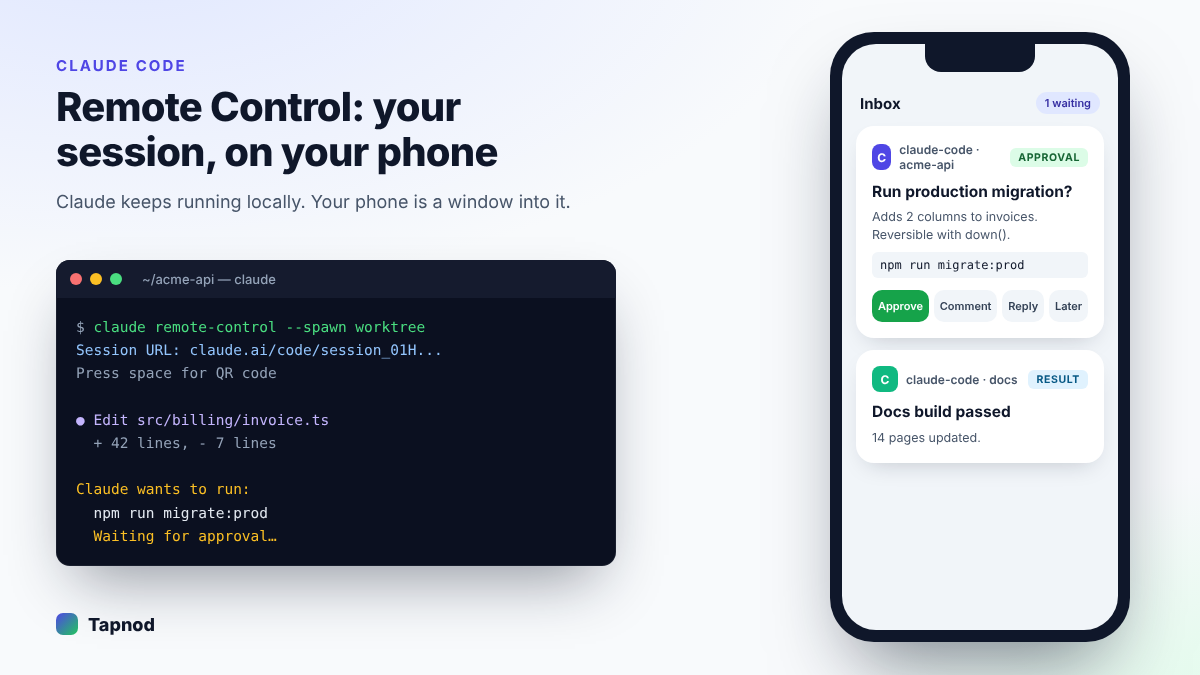
Claude Code Remote Control lets you keep driving a Claude Code session that runs on your own computer from claude.ai/code or the Claude app on iOS and Android. The session never moves to the cloud. Your laptop keeps running Claude, your files and MCP servers stay local, and the phone or browser is a window into that session.
You start it with claude remote-control, claude --remote-control (short form --rc), or /remote-control inside a running session. It is in research preview, it works on Pro, Max, Team and Enterprise plans, and it does not work with an API key.
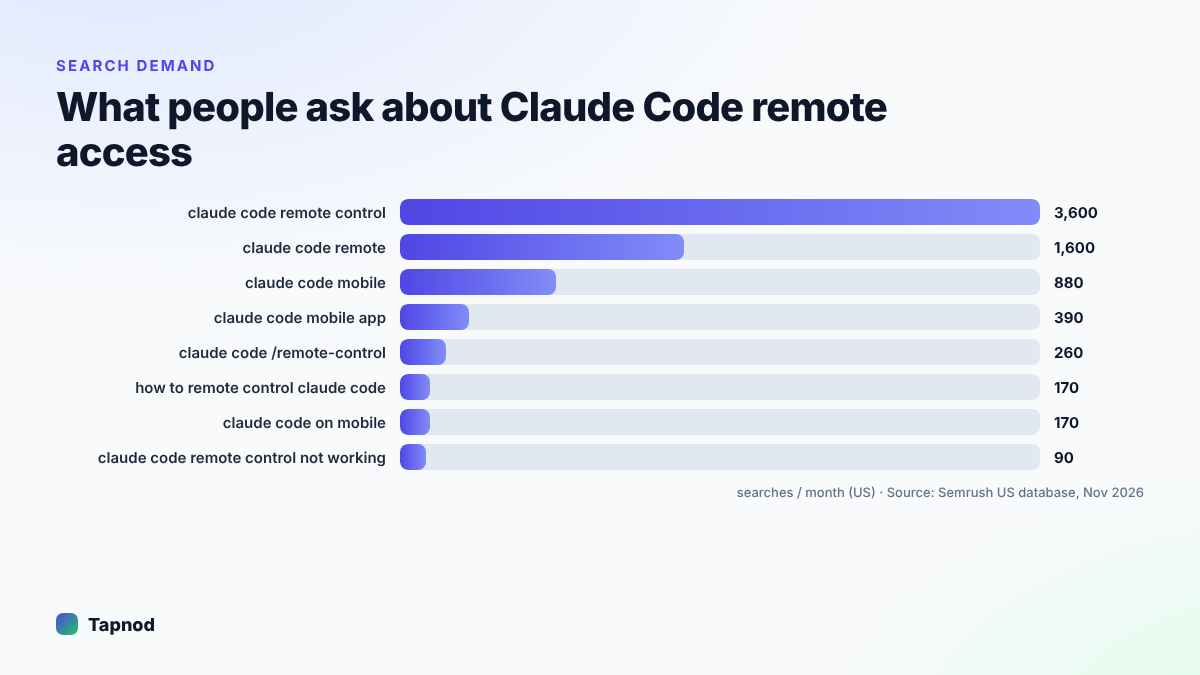
People look for this a lot. In the US, "claude code remote control" gets about 3,600 searches a month, and "how to remote control claude code" adds another 170 (Semrush, November 2026). Most of those searches come from the same situation: a long task is running, you need to step away, and you don't want it to stall on a permission prompt while you're gone.
The three ways to start a session
Remote Control has three entry points. Pick based on whether you want to keep typing in the terminal too.
| Command | What it does | Best for |
|---|---|---|
claude remote-control |
Server mode. Waits for connections and can serve several sessions from one process | Starting work from your phone, many parallel sessions |
claude --remote-control or claude --rc |
A normal interactive session that is also reachable remotely | Working at the desk, then leaving |
/remote-control or /rc |
Turns on Remote Control inside a session that is already running | You started a task and only now decided to leave |
Server mode prints a session URL, and pressing the spacebar shows a QR code you can scan with your phone. It accepts a few useful flags:
# one server, each new session in its own git worktree, at most 4 at a time
claude remote-control --spawn worktree --capacity 4

# start every served session in acceptEdits mode
claude remote-control --permission-mode acceptEdits

# bring back the last session this directory's server started (v2.1.200+)
claude remote-control --continue
The --spawn worktree option matters if you plan to run more than one session against the same repository. The default, same-dir, puts every session in the same working directory, so two sessions editing the same file can step on each other.
Setup in five steps
- Check your version. Run
claude --version. Remote Control needs v2.1.51 or later, and several newer flags need later builds. - Sign in with a claude.ai account. Run
claudeand use/login. IfANTHROPIC_API_KEYis set, Claude Code uses API-key auth and Remote Control refuses to start. - Trust the workspace. Run
claudein the project directory at least once and accept the trust dialog. - Team or Enterprise only: an Owner has to switch on the Remote Control toggle in the Claude Code admin settings first.
- Start a session with one of the three commands above, then open the URL, scan the QR code, or find the session in the Claude app.
If you don't have the app yet, run /mobile inside Claude Code. It shows a QR code that opens the right app store for your phone.
What works from your phone
Once you're connected, the conversation stays in sync across the terminal, the browser and the phone. You can send messages from any of them. Typing @ on the phone still autocompletes file paths from your local project, and you can attach a photo or a file. Claude Code downloads the file to your machine and hands it to Claude as an @ reference.
Permission prompts and AskUserQuestion questions are forwarded to your device and stay open until you answer. That is the part most people care about: a long refactor can ask "may I run the migration?" and you can answer from wherever you are.
Several slash commands work remotely if you pass the value as an argument, such as /model sonnet or /effort high. From the mobile app, /mcp returns a text summary of your servers instead of opening the picker.
Push notifications
Remote Control can push to your phone. Claude decides when to send one, usually when a long task finishes or when it needs a decision from you. You can also ask for one in your prompt, for example "notify me when the tests finish".
To turn it on, install the Claude app, sign in with the same account, allow notifications, then run /config and enable Push when Claude decides, Push when actions required, or both. Beyond those two toggles there is no per-event configuration. Pushes are skipped while you are typing in the connected terminal.
If you want pushes from events you define yourself, such as "only ping me for permission prompts in the payments repo", that's the job of Claude Code hooks, not Remote Control.
Limits you will run into
Remote Control is a window into one machine, and most of its limits follow from that.
| Limit | What happens | Workaround |
|---|---|---|
| Computer sleeps or goes offline | The session pauses with it | Keep the machine awake, or use a cloud session |
| Network outage of roughly 10 minutes in server mode | The claude remote-control process exits |
Run it again, or use --continue to resume |
| One remote session per interactive process | A second remote session needs another process | Use server mode for parallel sessions |
Local-only commands such as /plugin and /resume |
They don't run from the phone or the web | Run them at the terminal |
| Other forwarded dialogs | They expire after five minutes by default and take the no-action default | Adjust dialogExpiry in settings |
Amazon Bedrock, Google Cloud, Microsoft Foundry, or a custom ANTHROPIC_BASE_URL |
Remote Control is unavailable | Use direct Anthropic auth |
On security, the local process only makes outbound HTTPS requests and never opens inbound ports. Messages are routed through the Anthropic API. If you want an extra check, Pro and Max users can turn on Require trusted devices so only verified devices can steer sessions.
Remote Control vs Claude Code on the web
Both use the claude.ai/code interface, which confuses people. The difference is where the work runs.
| Remote Control | Cloud session on the web | |
|---|---|---|
| Runs on | Your machine | Anthropic-managed cloud by default |
| Local files, tools and MCP servers | Available | Not available |
| Needs your computer on | Yes | No |
| Good for | Continuing local work while away | Starting fresh work with no laptop |
If your task depends on a local database, a VPN, or MCP servers that only exist on your laptop, Remote Control is the right pick. If you're starting from zero on a public repo, a cloud session avoids keeping your laptop awake.
For a wider tour of the options, including SSH and tmux, see every way to work with Claude Code away from your desk.
Turn it on for every session
You can make Remote Control connect automatically. Run /config and set Enable Remote Control for all sessions, or put this in your user settings file:
{
  "remoteControlAtStartup": true
}
A true in a project's .claude/settings.json is ignored on purpose, so a checked-in file can't switch Remote Control on for everyone who opens the repository. A false there does turn it off for that repository.
Where Remote Control stops being enough
Remote Control solves the one-person, one-machine case well. It gets harder when you run Claude Code on two laptops and a VPS, add a Cursor background agent and a research bot, and want one place that shows what's waiting on you. Each tool has its own app, its own notification rules and its own idea of "done".
That's the gap an agent inbox fills. Every agent sends its questions, approvals, results and errors to one queue, and you answer them in one place. Remote Control and an inbox work fine together: Remote Control for deep back-and-forth with one session, the inbox for the twenty small decisions spread across everything else. We cover the pattern in the agent inbox.
FAQ
Does Claude Code Remote Control work with an API key?
No. It needs a claude.ai login on a Pro, Max, Team or Enterprise plan. If ANTHROPIC_API_KEY, ANTHROPIC_AUTH_TOKEN or an apiKeyHelper is active, Claude Code reports that Remote Control requires claude.ai subscription auth.
Can I approve permission prompts from my phone?
Yes. Permission prompts and Claude's questions are forwarded to the connected device and stay open until you answer them. Turn on Push when actions required in /config so your phone tells you when one is waiting.
Does my code leave my computer?
The session keeps running on your machine, so code execution and filesystem access stay local. The conversation itself is relayed through the Anthropic API so your phone can see it.
Why did my Remote Control session stop?
The usual causes are a sleeping laptop, a long network outage in server mode, or an auth change such as an API key being set. See Claude Code Remote Control not working for the full checklist.
Where Tapnod fits
Tapnod gives every agent you run, including Claude Code, one inbox on the web and on Android, with approve, reply, comment and later on each card. See how it works or grab a founder lifetime deal.