 Tapnod
The short answer
There are two separate things people mean by "Claude Code and Slack":
- Claude Code in Slack: mention
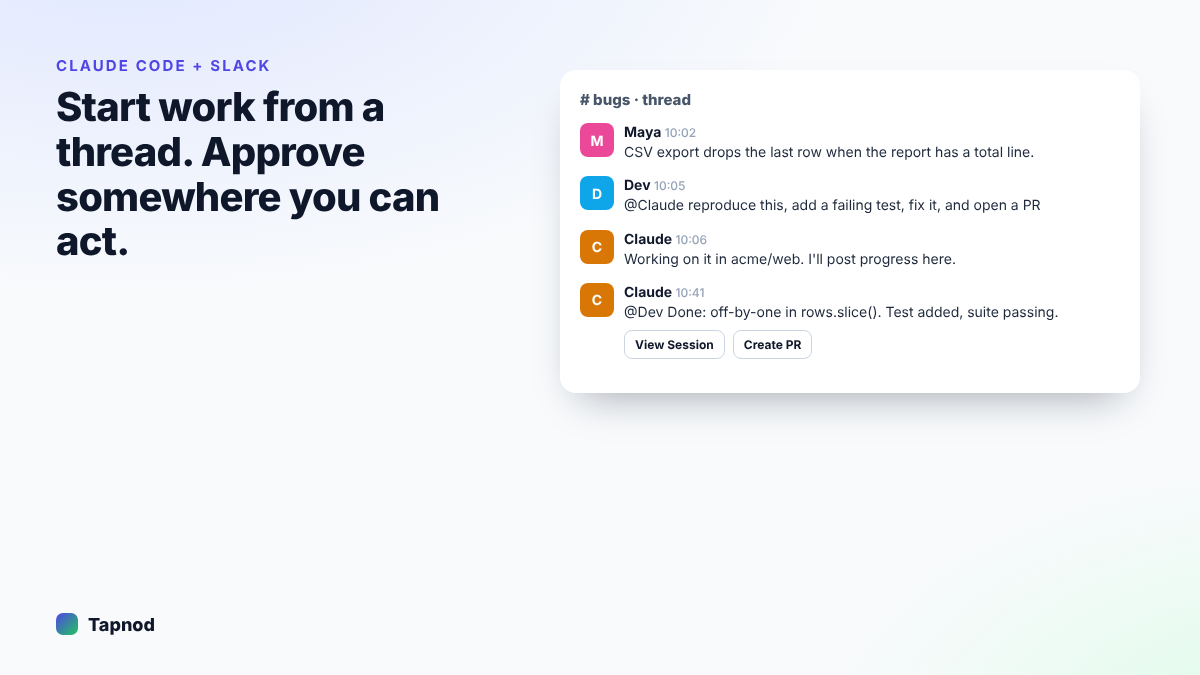
@Claudewith a coding task in a channel, and Claude starts a Claude Code session on the web using the thread as context, posts progress to the thread, and gives you buttons to view the session or create a pull request. Anthropic is retiring this version for Team and Enterprise workspaces in favor of Claude Tag; on Pro and Max it remains the way to set it up. - Slack as an alert channel for your own sessions: hooks that post "needs approval", "done" or "failed" from a local Claude Code session into a Slack channel or DM.
The first starts new cloud work from conversations. The second keeps you informed about work already running. Neither is a great place to approve risky actions at scale, which is the part people discover last.
"claude code slack" gets about 390 US searches a month at a keyword difficulty of 50 (Semrush, November 2026). Slack is where many teams already discuss bugs, so wiring the agent into it feels natural.
Part 1: @Claude in Slack
When you mention @Claude in a channel, Claude decides whether the message is a coding task. Coding tasks become a Claude Code session on claude.ai/code; other messages get a normal chat reply, depending on your routing mode.
What you need:
| Requirement | Detail |
|---|---|
| Plan | Pro, Max, Team or Enterprise with Claude Code access |
| Claude Code on the web | Enabled for your account |
| GitHub | Connected, with at least one repository authenticated |
| Slack | Claude app installed by an admin, your account linked in App Home |
How a session flows:
- You mention
@Claudewith a request, ideally in a thread with the bug report. - Claude reads the thread, or recent channel messages, for context and picks a repository.
- A Claude Code session is created on the web.
- Progress updates appear in the thread.
- When finished, Claude mentions you with a summary and buttons: View Session and Create PR.
Each session runs under your own account and plan limits. It works only in channels, not DMs, and Claude must be invited with /invite @Claude. Current limits include GitHub-only repositories and one pull request per session.
One warning from the docs deserves repeating: Claude reads the conversation for context and may follow directions from other messages in it, so use it only in trusted channels.
Part 2: Slack alerts from local sessions
Local Claude Code sessions don't post to Slack by themselves. Hooks fix that. A Notification hook with the permission_prompt matcher can post to a Slack incoming webhook whenever a session waits for approval:
#!/usr/bin/env bash
# ~/.claude/hooks/slack-notify.sh
event=$(cat)
msg=$(jq -r '.message // "Claude Code needs attention"' <<<"$event")
dir=$(basename "$(jq -r '.cwd' <<<"$event")")
payload=$(jq -n --arg t ":hourglass: *$dir*: $msg" '{text: $t}')
curl -s -m 5 -X POST -H 'Content-Type: application/json' -d "$payload" "$SLACK_WEBHOOK_URL" >/dev/null || true
exit 0
Register it under Notification with the permission_prompt matcher, and add a Stop hook for "done" messages if you want them. Keep the webhook URL in an environment variable, not in a committed settings file.
Where Slack falls short
Slack is good at conversation. Approvals are a different job, and three problems show up as volume grows:
| Problem | Why it happens |
|---|---|
| Approvals get buried | Agent alerts mix with human chat and scroll away |
| No clear "open" state | It's hard to tell which requests are still waiting |
| One-way alerts | A webhook message can't approve the prompt; you still go to the terminal |
For a handful of alerts a day, Slack is fine. Once several agents post there, people start muting the channel, and a muted approval channel is the same as no approval at all. We compare options in Slack approval workflows for AI agents.
Making Slack alerts actually useful
- Use a dedicated channel for agent alerts, separate from discussion.
- Different emoji or prefixes per kind: waiting, done, failed.
- Include the project and the exact ask, so people can decide from the message.
- Thread follow-ups under the original alert instead of posting new messages.
- Route urgent ones elsewhere. Approvals that block work might go to the session owner's phone, not a shared channel.
Claude Tag for organizations
For Team and Enterprise workspaces, Anthropic is moving to Claude Tag, where @Claude runs as your organization's shared identity with admin-configured access, rather than under each person's own account. Existing Slack apps and the @Claude handle stay, and your Anthropic account team can share the cutover date. If you're setting up a new workspace on those plans, start with Claude Tag; on Pro and Max, the earlier integration described above is still the path.
When to use which
| You want to | Use |
|---|---|
| Turn a bug thread into a fix and PR | @Claude in Slack |
| Know when your local session is waiting | Notification hook to Slack or your phone |
| Approve a prompt from anywhere | Remote Control, or an inbox with approve buttons |
| Track many agents' requests across tools | One inbox, with Slack for discussion |
A worked example
Picture a team whose #bugs channel gets a report about broken CSV exports. A developer replies in the thread: @Claude reproduce this, add a failing test, fix it, and open a PR. Claude reads the thread, picks the web app repository, and posts progress. Forty minutes later it mentions the developer with a summary; they click Create PR and review it like any other. Meanwhile, the same developer's local Claude Code session on a backend task posts a waiting approval to #agent-alerts through a hook. That one they answer through Remote Control on their phone, because the Slack message can't approve anything itself.
Key takeaways
@Claudein Slack starts cloud Claude Code sessions from channel context; Team and Enterprise are moving to Claude Tag.- Local sessions can post alerts to Slack through hooks and incoming webhooks.
- Slack works for a few alerts but buries approvals as volume grows.
- Keep discussion in Slack and route urgent approvals somewhere you can act on them.
Related guides
- Slack approval workflows for AI agents: when Slack works for approvals and when it doesn't.
- The Notification hook, step by step: the script behind Slack and phone alerts.
FAQ
Can Claude Code work in Slack?
Yes. Mention @Claude with a coding task in a channel where the app is installed, and it starts a Claude Code session on the web, posts updates to the thread, and offers to create a pull request.
Does Claude Code in Slack work in DMs?
No. It works only in public or private channels where Claude has been invited.
Can I get Claude Code permission prompts in Slack?
Yes, with a Notification hook that posts to a Slack webhook. The message is one-way; you approve through the terminal, Remote Control or another tool.
Is Slack a good place for agent approvals?
For a few a day, yes. At higher volume approvals get buried among human messages, and it's hard to see which are still open.
Where Tapnod fits
Keep Slack for conversation and give approvals their own home: Tapnod collects them from Claude Code and your other agents as cards you can act on from your phone. See how it works.