 Tapnod
The short answer
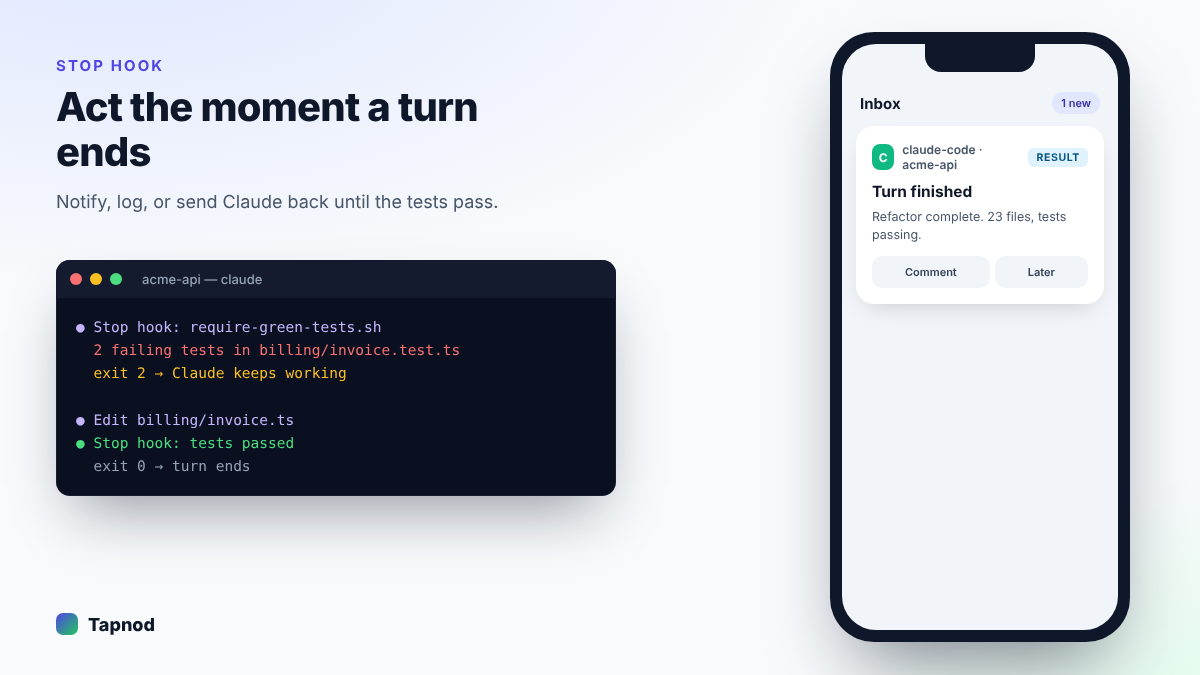
The Stop hook runs when Claude finishes responding at the end of a turn. You can use it to send a "done" notification, log what happened, or check the result and send Claude back to work if something isn't finished. To keep Claude going, return {"decision": "block", "reason": "..."} or exit with code 2 and a reason on stderr; Claude reads the reason and continues.
Its sibling SubagentStop does the same when a subagent finishes, and StopFailure fires when a turn ends because of an API error.
"claude code stop hook" gets about 70 US searches a month (Semrush, November 2026). It's a small query, but the people searching it are building real automation, usually either "tell me when it's done" or "don't let it stop until the tests pass".
What the hook receives
Like every hook, Stop gets JSON on stdin with common fields: session_id, transcript_path, cwd and hook_event_name. It also gets last_assistant_message, the final text of the turn.
Use last_assistant_message rather than reading the transcript file. The transcript is written asynchronously and can lag the current turn, so a script that reads it may see the previous message instead.
Use 1: notify when the turn ends
The simplest Stop hook sends a notification with the project name and the start of Claude's last message:
#!/usr/bin/env bash
# ~/.claude/hooks/stop-notify.sh
input=$(cat)
project=$(basename "$(echo "$input" | jq -r '.cwd')")
summary=$(echo "$input" | jq -r '.last_assistant_message // "Done"' | head -c 180)
curl -s -H "Title: Claude Code finished ($project)" -d "$summary" "https://ntfy.sh/$NTFY_TOPIC" > /dev/null
exit 0
Register it in ~/.claude/settings.json:
{
  "hooks": {
    "Stop": [
      { "hooks": [ { "type": "command", "command": "~/.claude/hooks/stop-notify.sh" } ] }
    ]
  }
}
Stop doesn't use matchers, so you can leave the matcher out. Remember it fires at the end of every turn, including short answers to quick questions. If that's too chatty, filter in the script, for example only notifying when the turn took longer than a few minutes or when the message mentions tests.
Use 2: keep working until a condition holds
The more powerful use is a quality gate. Your hook checks something, and if it fails, it blocks the stop and tells Claude why:
#!/usr/bin/env bash
# .claude/hooks/require-green-tests.sh
if ! npm test --silent > /tmp/test-out.txt 2>&1; then
  echo "Tests are failing. Fix them before finishing. Last output:" >&2
  tail -n 20 /tmp/test-out.txt >&2
  exit 2
fi
exit 0
Exit code 2 prevents Claude from stopping and continues the conversation, with stderr as the reason. The JSON form does the same: {"decision": "block", "reason": "Test suite must pass before proceeding"}. For softer feedback that keeps the conversation going without being an error, Stop also accepts hookSpecificOutput.additionalContext.
Don't build an infinite loop
A gate that can never pass will send Claude back forever. Put limits in the script:
- Cap retries. Count blocks in a temp file keyed by
session_idand give up after three. - Gate only real work. Skip the check if no files changed in this turn, for example by comparing
git statusoutput. - Make the reason specific. "Tests failing in
billing/invoice.test.ts" gets fixed; "something is wrong" doesn't. - Keep it fast. A gate that takes ten minutes runs at the end of every turn.
onFailure: "block" has no effect on Stop, because a broken hook can't be fixed by Claude continuing. If your script errors, the turn ends normally.
Use 3: log every turn
A Stop hook that appends a line per turn gives you a lightweight session history: time, folder, and the first sentence of Claude's message. It pairs well with a PreToolUse command log. Together they answer "what did it do while I was away" in two files.
A retry cap you can copy
Here's the counting logic from the loop-prevention advice, as a wrapper around any gate command:
#!/usr/bin/env bash
# .claude/hooks/gate-with-cap.sh  usage: gate-with-cap.sh "npm test --silent"
input=$(cat)
sid=$(jq -r '.session_id' <<<"$input")
counter="/tmp/claude-gate-$sid"
tries=$(cat "$counter" 2>/dev/null || echo 0)

if eval "$1" > /tmp/gate-out-$sid.txt 2>&1; then
  rm -f "$counter"; exit 0
fi
if [ "$tries" -ge 3 ]; then
  rm -f "$counter"
  echo "Gate still failing after 3 attempts. Stopping so a human can look." >&2
  exit 0
fi
echo $((tries + 1)) > "$counter"
echo "Check failed (attempt $((tries + 1)) of 3):" >&2
tail -n 25 /tmp/gate-out-$sid.txt >&2
exit 2
On the fourth failure it lets the turn end, which is when your "done" alert should say the gate gave up. That message is far more useful to a human than a session that loops quietly for an hour.
Stop vs Notification for "done" alerts
Stop hook |
Notification with idle_prompt |
|
|---|---|---|
| Fires | Every time Claude finishes responding | About 60 seconds after Claude stops and you haven't typed |
| Noise | High for quick back-and-forth | Low, since active chats don't trigger it |
| Has the final message | Yes, last_assistant_message |
The notification message |
| Can keep Claude working | Yes | No |
For "ping me when a long task ends", idle_prompt is often quieter. For "check the result before finishing", only Stop can do it. Compare all the done-alert options in get pinged when Claude Code is done.
SubagentStop and StopFailure
SubagentStop fires when a subagent finishes, with the same decision control. Use it to validate a subagent's output before the main agent uses it, for example rejecting a research summary with no sources.
StopFailure fires when the turn ends because of an API error. Send it somewhere loud, because a failed turn often means the session is waiting on you for nothing. See Claude Code subagents for how this fits into delegation.
A worked example
Picture a team that wants every Claude Code session to end with a green build and a short report. Their project settings register two Stop hooks. The first runs the type checker and unit tests, blocking with the failing output, and gives up after three tries with a note to the human. The second posts a "turn finished" card to the team's agent inbox with the folder name and the first 200 characters of last_assistant_message.
Developers stopped finding sessions that claimed to be done with red tests, and the inbox shows at a glance which sessions finished, which gave up, and which are waiting.
FAQ
When does the Claude Code Stop hook run?
When Claude finishes responding at the end of a turn. SubagentStop runs when a subagent finishes, and StopFailure runs when a turn ends due to an API error.
How do I make Claude keep working from a Stop hook?
Exit with code 2 and write the reason to stderr, or print {"decision": "block", "reason": "..."}. Claude reads the reason and continues.
How do I get the final message in a Stop hook?
Read last_assistant_message from the JSON on stdin. It's more reliable than reading the transcript, which may lag.
Does the Stop hook need a matcher?
No. Stop doesn't use matchers, so you can omit the field.
Where Tapnod fits
Connect Claude Code to Tapnod and its results, errors and questions show up as cards you can read and answer from your phone, next to your other agents. Connect an agent free.