 Tapnod
The short answer
Claude Code can talk to you over Telegram through Channels, a research-preview feature. You create a Telegram bot, install the official Telegram plugin, start Claude Code with --channels, and pair your account. Messages you send the bot arrive in your running local session, and Claude replies in the same chat while the work runs on your machine.
It's a chat bridge, not a full remote terminal. For that, Remote Control and the Claude app are the closer fit. Many people end up using both.
"claude code telegram" gets about 260 US searches a month at a keyword difficulty of 24 (Semrush, November 2026). For context, Channels shipped as a research preview in March 2026, so this is a young feature with a lot of curiosity around it.
How Channels work
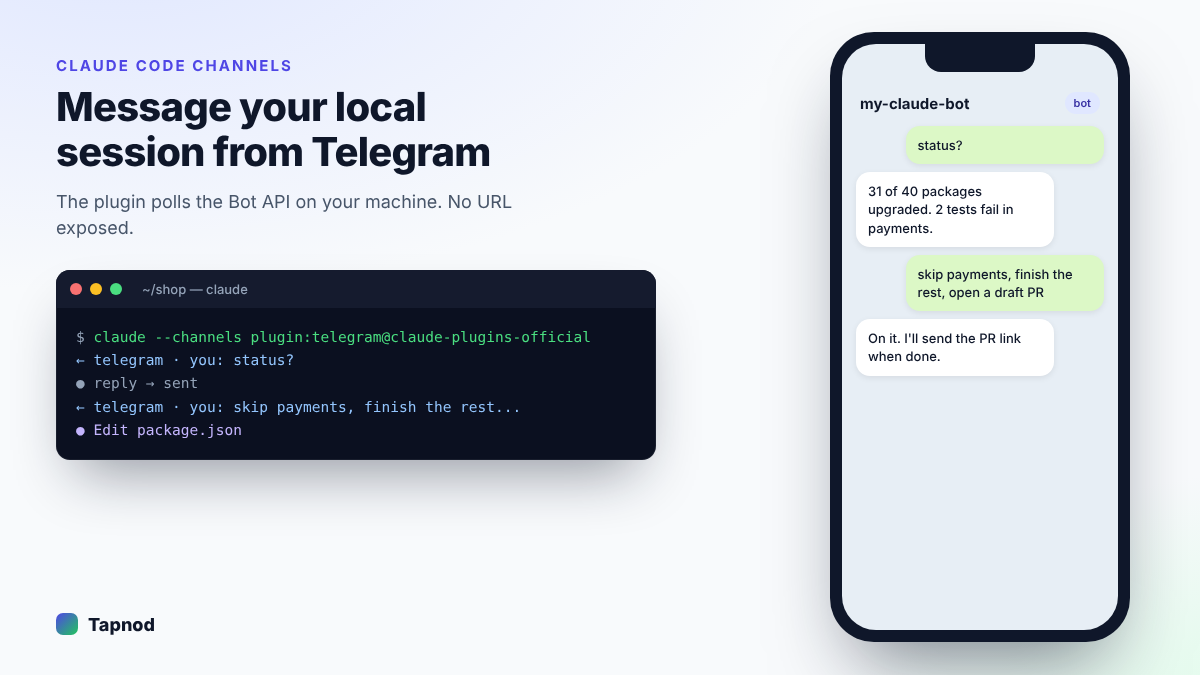
A channel is an MCP server that pushes events into a Claude Code session that's already open. For Telegram, the plugin runs on your machine and polls the Telegram Bot API for new messages, so you don't expose any URL. When a message from an allowed sender arrives, Claude sees it as an event, does the work, and replies through the plugin's reply tool.
Two details surprise people:
- Events only arrive while the session is open. For an always-on setup, run Claude in a persistent terminal or background process.
- The terminal doesn't show Claude's reply text. You see the inbound message and a tool call confirming the reply was sent; the reply itself appears in Telegram.
Set it up
You need Claude Code signed in with a claude.ai account or a Console API key, and Bun installed, because the official channel plugins are Bun scripts. On Team and Enterprise plans, an Owner must enable channels first.
- Create a bot. In Telegram, open BotFather, send
/newbot, pick a name and a username ending inbot, and copy the token. - Install the plugin inside Claude Code:
/plugin install telegram@claude-plugins-official. Choose user scope so it works in every project. - Save the token:
/telegram:configure <token>. It's stored in~/.claude/channels/telegram/.env, or you can setTELEGRAM_BOT_TOKENin your environment. - Restart with the channel enabled:
claude --channels plugin:telegram@claude-plugins-official
- Pair your account. Message your bot; it replies with a pairing code. Back in Claude Code, run
/telegram:access pair <code>, then lock it down with/telegram:access policy allowlist.
The --channels flag doesn't appear in claude --help during the preview, but it works.
Security: the allowlist is the whole game
Every approved channel plugin keeps a sender allowlist. Only IDs you've paired can push messages; everyone else is dropped silently. That matters more than it sounds, because anyone who can message your session can ask Claude to run commands on your machine.
If a channel supports permission relay, the same allowlist decides who can approve or deny tool use in your session from the chat. Only pair accounts you'd trust with that.
Organizations get two managed settings: channelsEnabled as a master switch, and allowedChannelPlugins to restrict which plugins can register.
What happens with permission prompts
If Claude hits a permission prompt while you're away, the session pauses until someone answers. Channels that declare the permission relay capability can forward those prompts to you in the chat so you can approve or deny remotely. Check whether the plugin you use supports it before you rely on it for long tasks.
In non-interactive mode with -p, tools that need terminal input, such as multiple-choice questions and plan approval, are turned off so the session never waits forever.
Telegram vs the other ways to reach Claude Code
| Channels (Telegram) | Remote Control | Notification hook | |
|---|---|---|---|
| Direction | Two-way chat | Full session view | One-way alert |
| Where Claude runs | Your machine | Your machine | Your machine |
| Login types | claude.ai or Console API key | claude.ai subscription only | Any |
| Good for | Quick tasks and questions from chat | Steering a session in detail | Knowing it needs you |
| Setup | Bot, plugin, pairing | One command | A few lines of JSON |
Remote Control is better when you want to see the conversation, files and tool calls as they happen. Channels win when you want to fire off "run the tests on main and tell me what broke" from the same app you already use all day. See Claude Code Remote Control for that side.
Discord and iMessage
The same research preview includes Discord and iMessage plugins. Discord follows almost the same steps: create a bot in the Developer Portal, enable Message Content Intent, invite it to your server, install discord@claude-plugins-official, configure the token, and pair. iMessage needs macOS and Full Disk Access for your terminal, and texting yourself works with no pairing.
Limits worth knowing
- Research preview. The flag syntax and protocol may change, and only plugins on an approved allowlist register.
- Your machine must be on with the session running.
- Not on Bedrock, Google Cloud's Agent Platform or Microsoft Foundry.
- One session's view. A Telegram bot talks to the Claude Code session it's attached to. If you run several sessions and other agents, you get several chats.
A worked example
Picture a developer running a long dependency upgrade on a home workstation. Before heading out, they start Claude Code with the Telegram channel in a tmux session. From the train, they message the bot: "status?" Claude replies that 31 of 40 packages are upgraded and two tests fail in the payments module. They reply: "skip payments for now, finish the rest, and open a draft PR". An hour later the bot sends the PR link.
What the chat can't easily show is a 400-line diff. That review waits for a laptop, which is the right place for it.
When a chat bot isn't enough
Telegram works well for one person and one session. It gets crowded when you run Claude Code on two machines, a LangGraph agent, an n8n workflow and a research bot, each wanting a different chat. At that point a single inbox with typed cards, such as approvals, questions and errors, is easier to scan than five chat threads. We explain the idea in the agent inbox.
Key takeaways
- Channels connect Telegram, Discord and iMessage to a running local session.
- The allowlist decides who can command your machine, so pair only yourself.
- Prompts pause the session unless the channel supports permission relay.
- Use Remote Control when you need the full session view.
FAQ
Can I control Claude Code from Telegram?
Yes, with Channels. Install the Telegram plugin, start Claude Code with --channels plugin:telegram@claude-plugins-official, and pair your Telegram account with your bot.
Does Claude Code Channels work with an API key?
Yes. Channels need Anthropic authentication through claude.ai or a Console API key. They aren't available on Bedrock, Google Cloud's Agent Platform or Microsoft Foundry.
Is it safe to control Claude Code from Telegram?
It's as safe as your allowlist. Pair only your own account, set the policy to allowlist, and remember that anyone allowed can ask Claude to act on your machine.
Can I approve permission prompts from Telegram?
Only if the channel declares permission relay. Otherwise the session pauses at the prompt until you answer at the terminal or through Remote Control.
Where Tapnod fits
When one chat per agent gets too busy, Tapnod gives Claude Code and your other agents a single inbox for approvals, questions and errors on your phone. Start free.