 Tapnod
The short answer
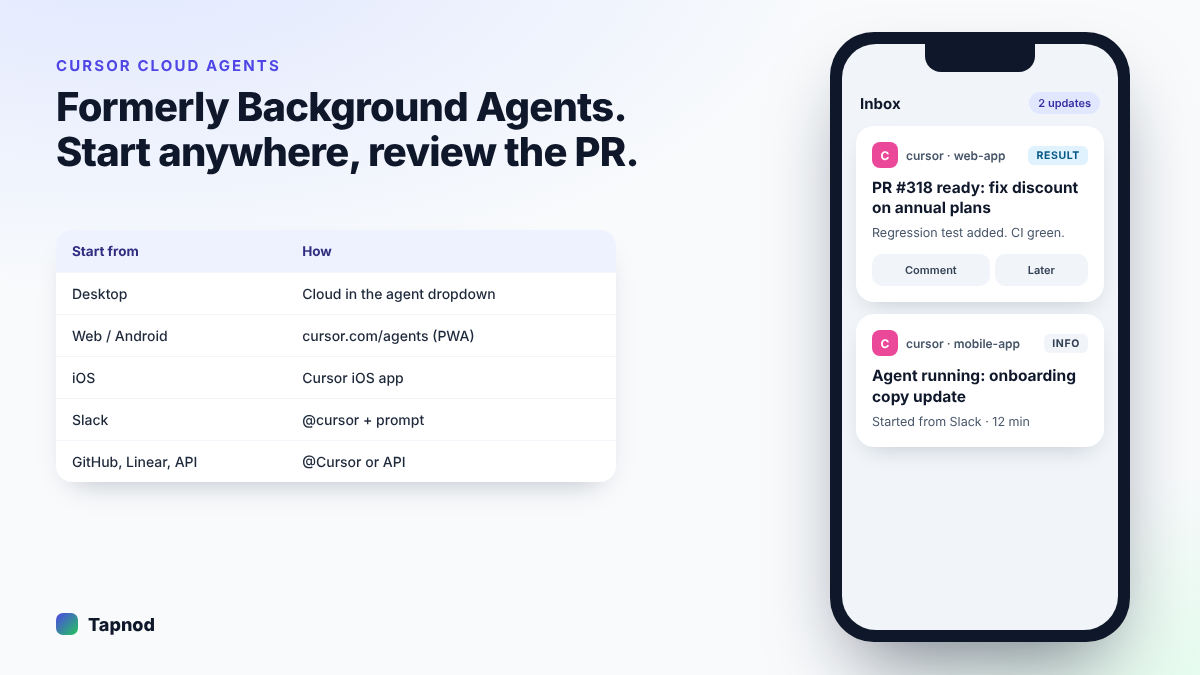
Cursor's background agents are now called Cloud Agents. They're long-running coding agents that work in a cloud environment on their own branch, then open a pull request when they finish. You can start and follow them from the Cursor desktop app, from cursor.com/agents on any browser, from the Cursor iOS app, from Slack with @cursor, and from GitHub, Linear or the API.
To keep track while you're away, use Slack notifications for completed tasks, the web or mobile view to check progress, and pull requests as the final review step.
"cursor background agents" gets about 390 US searches a month, and "cursor background agent" another 260 (Semrush, November 2026). The old name still dominates search, even though Cursor's docs now say Cloud Agents were formerly called Background Agents.
What Cloud Agents do
A Cloud Agent gets a task, a repository and a branch, and works in a remote environment that Cursor prepares with your repository and dependencies. It can build features, fix bugs and write tests, and it typically opens a pull request when it's done. Cursor describes them as agents that run for a long time and produce artifacts to show their changes.
Because they run in the cloud, they keep going when your laptop is closed. That's the main difference from an agent running in your local editor.
Ways to start one
| From | How |
|---|---|
| Cursor desktop | Select Cloud in the dropdown under the agent input |
| Web | cursor.com/agents on any device |
| iOS | The Cursor iOS app |
| Android | cursor.com/agents in Chrome, then Install App for a PWA |
| Slack | Mention @cursor with a prompt |
| GitHub, Linear | Mention @Cursor |
| API and Automations | Kick off agents programmatically or on schedules and events |
Starting from where the request already lives, such as a Slack thread about a bug or a Linear issue, saves rewriting context. Cursor reads the Slack thread before starting.
Tracking them while you're away
Slack. When a Cloud Agent started from Slack completes, Cursor posts a notification with an option to view the pull request. @Cursor list my agents shows everything running. You can also opt into Slack notifications when starting agents from web or mobile.
Web and mobile. cursor.com/agents shows your agents and lets you follow progress, review diffs and manage pull requests. On iPhone, the native Cursor iOS app does the same; on Android, the PWA install gives you an app icon.
Pull requests. The PR is the real checkpoint. Treat it like any contributor's PR: CI runs, a human reviews, and only then does it merge.
A review checklist for agent PRs
Agent PRs tend to be large and confident. A short checklist keeps reviews honest:
- Read the description first. Check it matches the task you asked for and that scope didn't grow.
- Check the files list. Changes outside the expected area deserve a question.
- Run it, don't only read it. Pull the branch or use a preview deploy.
- Look at the tests the agent added. Check that they test behavior, not only that the new code runs.
- Search for leftovers: debug logs, commented-out code, TODOs.
- Ask for changes in the PR rather than fixing by hand, so the agent learns the pattern for the next run.
Automations: agents on a schedule
Cursor also offers Automations, which run Cloud Agents in the background from schedules or events, such as GitHub, GitLab, Slack, webhooks and Linear. That turns a one-off agent into a recurring worker: a nightly dependency check, an agent that picks up every issue with a certain label, or one that reacts to a failing build.
Automations raise the oversight stakes, because nobody started the run by hand. Three rules help:
- Scope each automation to one kind of task, with a prompt that says what it must not touch.
- Require PR review for everything it produces, with branch protection on main.
- Send failures somewhere visible. A scheduled agent that fails quietly every night is worse than no automation.
When to use Cloud Agents
| Good fit | Better done locally |
|---|---|
| Well-scoped bugs with a clear repro | Work that needs local services or VPN |
| Writing tests for existing code | Exploratory design work |
| Small features behind a flag | Changes you want to steer step by step |
| Dependency bumps with CI to check them | Anything touching secrets you can't give the cloud |
Writing prompts for unattended runs
An agent you can't watch needs the instructions you'd normally give along the way. Include the goal, the boundary and the finish line:
Fix the bug where the checkout total ignores discount codes on annual plans.
Only change files under apps/web/checkout and their tests.
Add a regression test that fails before the fix.
Stop and open a draft PR when tests pass. Do not touch pricing config.
"Do not touch" lines matter more for cloud agents than local ones, because nobody is there to notice a wrong turn early.
Cloud Agents in a multi-agent setup
Cloud Agents are one stream of work among several for many teams: maybe Claude Code on laptops, Codex on a Mac mini, an n8n workflow for ops. Each reports completion its own way, Cursor through Slack, PRs and its apps. That works, but it splits your attention. If you want one place that shows every agent's finished work and waiting questions, look at the agent inbox pattern, and for how the tools compare, background agents explained.
A worked example
Picture a small team that runs a Slack channel called #bugs. When someone posts a clear bug report, a developer replies in the thread with @cursor fix this, add a regression test, open a draft PR. Cursor reads the thread and starts a Cloud Agent. Forty minutes later the channel shows a completion notice with a PR link. The developer reviews on their phone, sees the test, pulls the branch at their desk to confirm, and merges. Bugs with unclear repro steps stay with humans; clear ones go to the agent.
Key takeaways
- Background Agents are now Cloud Agents in Cursor's docs and product.
- Start them from the desktop app, web, iOS, Slack, GitHub, Linear or the API.
- Slack completion notices and the web or mobile view are how you track them.
- The pull request is the review checkpoint; treat it like any contributor's.
FAQ
What are Cursor background agents?
They're Cursor's long-running cloud coding agents, now called Cloud Agents. They work on a branch in a remote environment and usually open a pull request when finished.
How do I get notified when a Cursor agent finishes?
Agents started from Slack post a completion notification with a link to the PR, and you can opt into Slack notifications when starting agents from web or mobile.
Can I use Cursor agents on my phone?
Yes. Use the Cursor iOS app, or open cursor.com/agents in a mobile browser and install it as a progressive web app on Android.
Do Cursor Cloud Agents need my laptop on?
No. They run in Cursor's cloud environment, so they keep working when your computer is off.
Where Tapnod fits
If Cursor is one of several agents you run, Tapnod gives all of them one inbox for results, questions and approvals on your phone. See how it works.