 Tapnod
The short answer
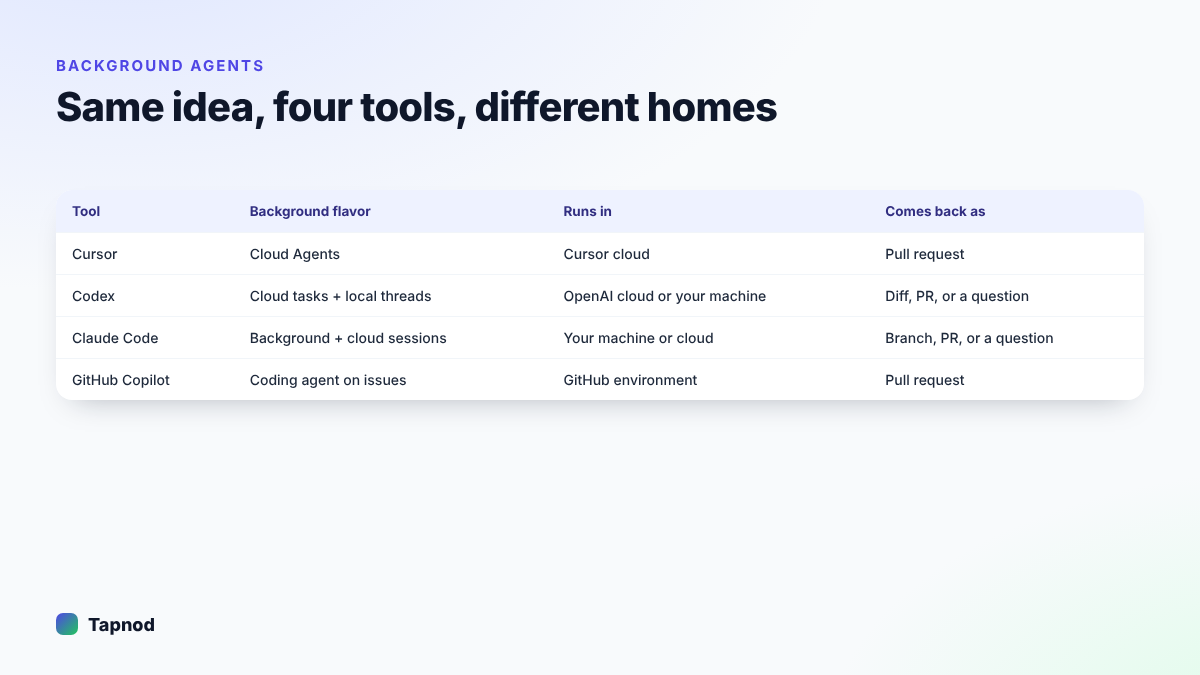
A background agent is a coding agent that works without you watching each step. You give it a task, it runs on its own for minutes or hours, and it comes back with a result, usually a branch or pull request, or with a question when it needs one. Every major coding tool has a version now:
| Tool | Background flavor | Where it runs |
|---|---|---|
| Cursor | Cloud Agents, formerly Background Agents | Cursor's cloud |
| OpenAI Codex | Cloud tasks, plus local threads you steer from the ChatGPT app | OpenAI's cloud or your machine |
| Claude Code | Background sessions in agent view, cloud sessions | Your machine or the cloud |
| GitHub Copilot | Coding agent assigned to issues | GitHub's environment |
The hard part isn't starting them. It's knowing which ones finished, which ones need you, and which ones quietly went wrong.
"background agents" gets about 140 US searches a month at a keyword difficulty of 31, while tool-specific terms like "cursor background agents" (390) and "ai coding agent" (2,400) are bigger (Semrush, November 2026). People search by tool name first and discover the general idea later.
Local vs cloud background agents
The most useful distinction is where the agent runs, because it decides what the agent can reach and whether your laptop must stay on.
| Local background agent | Cloud background agent | |
|---|---|---|
| Examples | Claude Code background sessions, Codex local threads | Cursor Cloud Agents, Codex cloud tasks, Claude Code cloud sessions, Copilot coding agent |
| Your machine must stay on | Yes | No |
| Local services, VPN, local MCP servers | Available | Not available |
| Setup cost | Low | Environment setup for dependencies |
| Typical output | Local branch, files, sometimes a PR | A pull request |
| Best for | Work tied to your environment | Self-contained tasks from anywhere |
How each tool handles it
Cursor Cloud Agents start from the desktop app, cursor.com/agents, the iOS app, Slack, GitHub or Linear, and they open a PR when done. Slack can notify you on completion. See Cursor background agents.
Codex offers cloud tasks against a connected repository, plus local threads on your machine that you can steer from the ChatGPT mobile app, including approvals. See Codex remote.
Claude Code has background sessions you manage in agent view (claude agents), background commands within a session (Ctrl+B), and cloud sessions at claude.ai/code. See Claude Code background tasks.
GitHub Copilot's coding agent is assigned to an issue and works in GitHub's environment, then opens a pull request for review, which keeps the human checkpoint inside the PR workflow your team already uses.
What goes wrong with background agents
Running agents unattended removes the moment where you'd notice a wrong turn. The failure modes are predictable:
- Silent stalls. A local agent waits on a permission prompt or a question no one sees.
- Scope creep. "Fix the login bug" becomes a refactor of the auth module.
- Confident wrong answers. Tests pass because the agent changed the tests.
- Collisions. Two agents edit the same files on the same branch.
- Forgotten work. A finished PR sits unreviewed for a week because nobody saw the notification.
Guardrails that work
| Problem | Guardrail |
|---|---|
| Silent stalls | Alerts for "needs input", or answers from your phone |
| Scope creep | Explicit boundaries in the prompt: which folders, what not to touch |
| Wrong answers | Ask for a regression test that fails before the fix |
| Collisions | One branch or worktree per agent |
| Forgotten work | One place that lists finished work and waiting questions |
A prompt template that covers the first three:
Goal: <one sentence>.
Scope: only change files under <path> and their tests.
Proof: add a test that fails before your change and passes after.
Stop when: tests pass. Then open a draft PR and summarize what you changed.
If unsure about behavior changes, ask instead of guessing.
Picking the right task for a background agent
Not every task suits unattended work. The best candidates share three traits: a clear finish line, a mechanical way to check success, and low cost if the agent goes the wrong way.
| Good background task | Keep it interactive |
|---|---|
| Fix a bug with a known reproduction | Investigate an unclear production issue |
| Add tests to a module | Design a new API |
| Upgrade a dependency with CI to verify it | Refactor core architecture |
| Apply a mechanical change across many files | Anything touching billing or auth logic for the first time |
| Draft docs from existing code | Decide product behavior |
When in doubt, start interactive and hand off the second half. Once the plan is agreed and the first piece works, the rest is often mechanical enough to run in the background.
Tracking several at once
One background agent is easy to follow. Five across three tools is where people lose track. Each tool reports differently: Slack messages, app notifications, PRs, terminal bells. A few habits keep it manageable:
- Name tasks the same way across tools, such as the ticket number, so a PR, a Slack message and a terminal session are obviously the same work.
- Route "needs you" events to one place, separate from "finished" events.
- Review PRs in a fixed slot, such as twice a day, instead of whenever a notification arrives.
- Cap concurrency. Three agents you can supervise beat ten you can't.
The pattern behind the second habit is an agent inbox: every agent sends questions, approvals, results and errors to one queue you check from your phone.
A worked example
Picture a two-person team on a Monday. They assign a Copilot coding agent to a documentation issue, start a Cursor Cloud Agent on a flaky checkout test, and run a Claude Code background session locally to upgrade a logging library, which needs their local Docker setup. By lunch, the Copilot PR is ready, the Cursor agent asks in Slack whether it may skip one end-to-end test, and the Claude Code session asks for permission to change a config file. Two questions in two places, one PR waiting. They answer both questions, review the PR, and decide to route future questions from all three tools into one inbox.
Key takeaways
- Background agents work unattended and return a result or a question.
- Local agents reach your environment; cloud agents run with your laptop closed.
- Stalls, scope creep, edited tests and forgotten PRs are the usual failures.
- Clear prompts, separate branches and one place for questions keep several agents manageable.
Before you start your first one
Pick one task you'd happily hand to a new colleague on their first day: clear, testable and low risk. Write the prompt with a goal, a scope, a proof and a finish line. Decide where its questions will reach you, and block an hour to review the result. Starting small builds the habits that make five parallel agents manageable later.
FAQ
What is a background agent?
A coding agent that works on a task without step-by-step supervision, then returns a result such as a pull request, or asks a question when it needs input.
Which tools have background agents?
Cursor (Cloud Agents), OpenAI Codex (cloud tasks and local threads), Claude Code (background and cloud sessions) and GitHub Copilot's coding agent all offer versions of it.
Do background agents need my computer on?
Cloud ones don't. Local ones, like Claude Code background sessions or Codex local threads, need the machine running.
How do I keep track of many background agents?
Use one branch per agent, consistent task names, and a single place for questions and finished work, such as an agent inbox.
Where Tapnod fits
Tapnod is that single place: background agents from any tool send their questions, results and errors to one inbox you can work through on your phone. Start free.