 Tapnod
The short answer
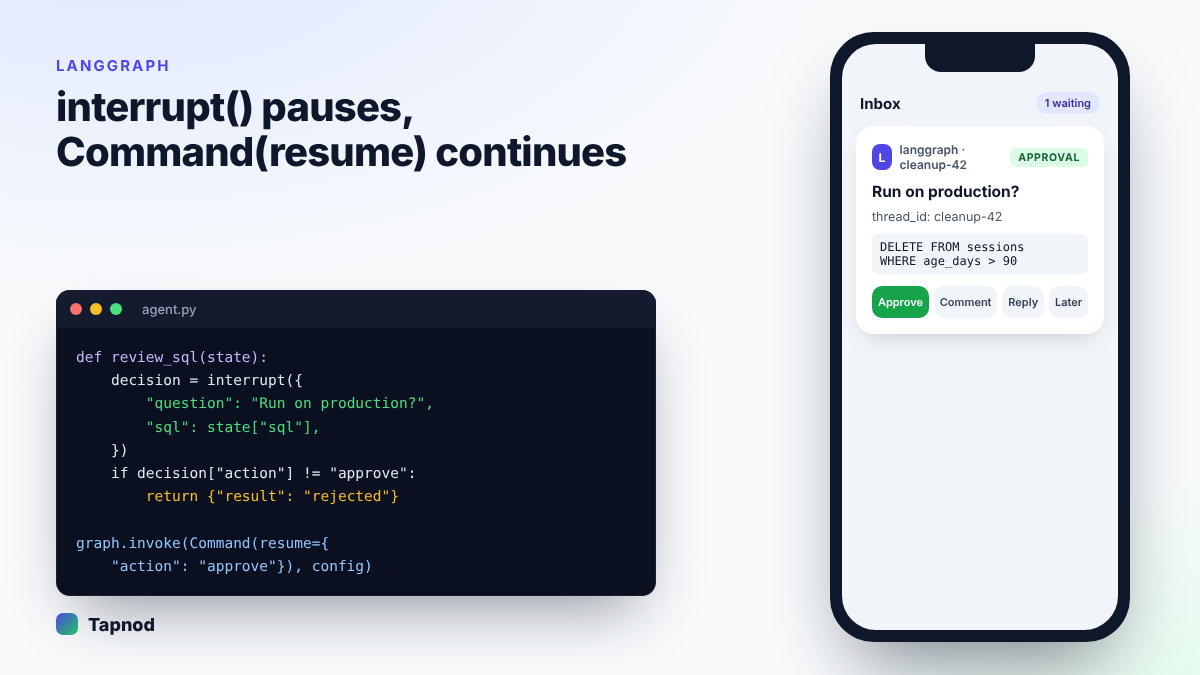
LangGraph does human in the loop with one function, interrupt(). Call it inside a node and the graph pauses, saves its state through a checkpointer, and hands your payload to the caller. When a person decides, you invoke the graph again with Command(resume=value) on the same thread_id, and interrupt() returns that value as if nothing had happened.
That's the whole mechanism. The hard parts are around it: where to put the interrupt, how to keep side effects safe when the node reruns, and how to get the question in front of a human who isn't watching your terminal.
LangGraph is where a lot of developers meet the idea. "langgraph human in the loop" gets about 320 US searches a month, plus 170 for "human in the loop langgraph" and 110 for "langgraph human in the loop interrupt" (Semrush, November 2026).
The minimum working example
from typing import TypedDict
from langgraph.graph import StateGraph, START, END
from langgraph.checkpoint.memory import InMemorySaver
from langgraph.types import interrupt, Command

class State(TypedDict):
    sql: str
    result: str

def review_sql(state: State):
    decision = interrupt({
        "kind": "approval",
        "question": "Run this statement on production?",
        "sql": state["sql"],
    })
    if decision.get("action") == "edit":
        return {"sql": decision["sql"]}
    if decision.get("action") != "approve":
        return {"result": "rejected by reviewer"}
    return {}

def run_sql(state: State):
    if state.get("result"):
        return {}
    return {"result": execute(state["sql"])}

builder = StateGraph(State)
builder.add_node("review_sql", review_sql)
builder.add_node("run_sql", run_sql)
builder.add_edge(START, "review_sql")
builder.add_edge("review_sql", "run_sql")
builder.add_edge("run_sql", END)
graph = builder.compile(checkpointer=InMemorySaver())

config = {"configurable": {"thread_id": "cleanup-42"}}
first = graph.invoke({"sql": "DELETE FROM sessions WHERE age_days > 90"}, config)
print(first["__interrupt__"])          # the payload your reviewer needs

graph.invoke(Command(resume={"action": "approve"}), config)
Three things make this work: a checkpointer when you compile, a thread_id in the config, and the same thread_id when you resume. A new thread ID starts an empty thread, which is the most common reason a resume "does nothing".
Use InMemorySaver for local testing only. In production, use a durable checkpointer so a restart doesn't lose every paused run.
The rules that trip people up
LangGraph's interrupt docs list a handful of rules. In practice, these four cause most of the bugs:
| Rule | Why it matters | What to do |
|---|---|---|
Don't wrap interrupt() in a broad try/except |
Interrupts work by raising an exception, so a bare except swallows the pause |
Catch specific exceptions and keep interrupt() outside them |
| The node restarts from the top on resume | Code before the interrupt runs twice | Keep side effects after the interrupt or in a later node |
| Resume values match interrupts by position | Reordering or skipping interrupts between runs mixes answers up | Keep the order stable and data-independent |
| Payloads must be JSON-serializable | Functions and class instances can't be stored | Pass dicts, strings and numbers |
The second rule is the dangerous one. If your node sends an email and then calls interrupt() for approval, the email goes out again on resume. Put the approval first, or split the side effect into its own node like run_sql above.
Three patterns you'll use
Approve or reject. Interrupt with the action and context, then branch on the answer. Resume with Command(resume=True) or Command(resume=False), or a richer dict like the example above.
Review and edit. Interrupt with a draft, let the person change it, and write the edited value back to state. This suits emails, release notes and SQL, where a small fix beats a full reject.
Interrupts inside tools. Call interrupt() inside a tool function to gate only that tool, for example a send_payment tool, while the rest of the agent runs freely. The LangGraph interrupt guide covers tool-level gating and parallel interrupts in more detail.
When several branches interrupt at once, each interrupt gets an ID, and you resume them together by passing a mapping of interrupt IDs to values.
If you use create_agent
If you build agents with LangChain's create_agent rather than a hand-written graph, LangChain ships human-in-the-loop middleware that interrupts before chosen tool calls and accepts approve, edit or reject decisions. Under the hood it still uses LangGraph interrupts and a checkpointer, so everything above about threads and resuming applies. See LangChain human in the loop middleware.
Getting the question to a human
interrupt() hands you a payload. It doesn't decide where that payload goes. You have three common options.
| Option | How it works | Good for |
|---|---|---|
| Your own app | Read __interrupt__, render a UI, call resume from your backend |
Products where end users approve |
| LangChain's Agent Inbox | Open-source UI that lists interrupts from a LangGraph deployment | Teams already on LangGraph deployments |
| An external agent inbox | Your node posts the payload to an inbox and resumes when an answer arrives | Mixed stacks, mobile approvals, many agents |
The third option looks like this in practice: when the graph returns an interrupt, a small worker sends the payload to your inbox as a decision card, stores the thread_id, and calls graph.invoke(Command(resume=answer), config) when the reply comes back by webhook or polling. The graph itself stays unchanged.
This matters once you have more than LangGraph in your life. If you also run Claude Code, an n8n workflow and a cron-based research bot, having each one bring its own approval UI gets old fast. Compare the options in LangGraph Agent Inbox: setup and alternatives.
Testing interrupts locally
Interrupt bugs are much easier to catch in a test than in production. A short test plan covers the common failures:
- Run to the interrupt and assert the payload has everything a reviewer needs, such as the SQL and the environment.
- Resume with approve and assert the side effect happened exactly once.
- Resume with reject and assert it didn't happen at all.
- Resume with an edit and assert the edited value was used.
- Resume on a different thread ID and confirm you get a fresh run, so you know what a lost ID looks like.
Count side effects with a fake executor rather than hitting a real database. If step 2 shows two executions, something before your interrupt() call isn't idempotent.
Production checklist
- Durable checkpointer so paused runs survive restarts.
- Stable thread IDs that you can find again, such as
ticket-1234, not random UUIDs you forget to store. - Idempotent code before every interrupt.
- A timeout policy: what happens to a thread nobody answers for a week.
- Re-check external state after resume. A run paused for two days may be acting on stale data.
- Log the decision with who answered and when.
- Validate resume values. Newer LangGraph versions let you pass a
response_schematointerrupt()so bad answers are rejected early.
FAQ
How do I add human in the loop to a LangGraph agent?
Compile the graph with a checkpointer, call interrupt(payload) in the node where you need a decision, read the payload from __interrupt__, then resume with Command(resume=answer) using the same thread_id.
Why does my LangGraph node run twice?
On resume, the interrupted node restarts from its first line. Anything before interrupt() runs again, so move side effects after it or into a separate node.
Should I use interrupt_before instead of interrupt()?
Static breakpoints like interrupt_before and interrupt_after are useful for debugging. For human-in-the-loop workflows, LangGraph recommends interrupt() inside the node.
Can a LangGraph run wait for days?
Yes. With a durable checkpointer, the thread stays paused until you resume it. Re-check anything time-sensitive before acting on the answer.
Where Tapnod fits
Connect your LangGraph agent to Tapnod over MCP, signed webhooks or polling, and pending decisions show up as cards you can approve, reply to or snooze from your phone, next to your other agents. See how it works.