 Tapnod
The short answer
The OpenAI Agents SDK supports human in the loop through tool approvals. Mark a tool with needs_approval (Python) or needsApproval (TypeScript), set to true or to a function that decides per call. When the agent tries to use it, the run pauses and returns interruptions. You convert the result to a RunState, call approve() or reject() for each interruption, and resume with the same agent and that state. The state can be serialized, so the approval can happen minutes or days later.
"openai agents sdk human in the loop" gets about 50 US searches a month at a keyword difficulty of 37 (Semrush, November 2026). Small, but specific: developers who've hit their first sensitive tool and need to gate it.
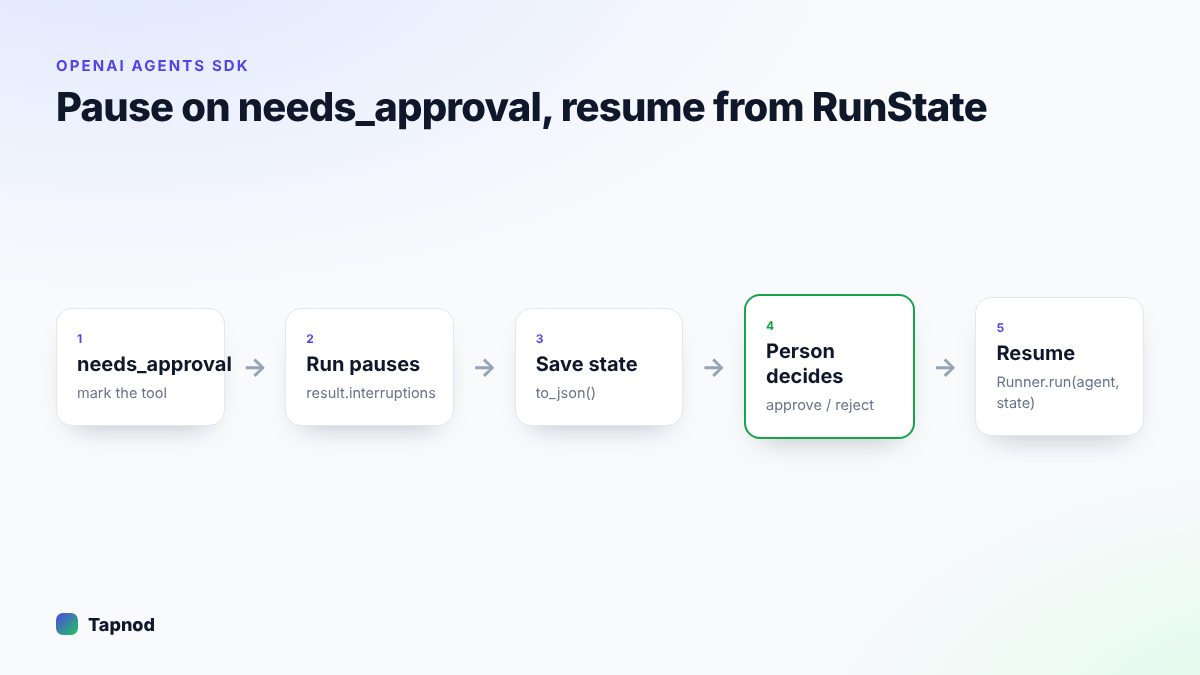
The flow in five steps
- Declare which tools need approval.
- Run the agent; when a gated tool is called, the run stops with interruptions.
- Convert the result to state with
result.to_state(). - Decide:
state.approve(interruption)orstate.reject(interruption)for each one. - Resume with
Runner.run(agent, state); the run continues and may pause again if another approval is needed.
Python example
from agents import Agent, Runner, function_tool, RunState

@function_tool(needs_approval=True)
def cancel_order(order_id: int) -> str:
    """Cancel a customer's order."""
    return orders.cancel(order_id)

agent = Agent(name="Support", instructions="Help customers with orders.", tools=[cancel_order])

result = await Runner.run(agent, "Please cancel order 4411, it was a mistake.")

if result.interruptions:
    state = result.to_state()
    saved = state.to_json()          # store it; a person may answer later
    # ... later, after a human decides:
    state = await RunState.from_json(agent, saved)
    for item in result.interruptions:
        if human_said_yes(item.name, item.arguments):
            state.approve(item)
        else:
            state.reject(item)
    result = await Runner.run(agent, state)

print(result.final_output)
TypeScript follows the same shape with needsApproval, result.interruptions, state.approve() and state.reject().
Conditional approval
needs_approval can be a function instead of True, so you only interrupt when it matters: refunds over a threshold, emails to external domains, deletions in production. Conditional approval keeps reviewers focused on the calls that deserve a look.
Sticky decisions
Approving the same safe call ten times in one run is tedious. state.approve(item, always_approve=True) or state.reject(item, always_reject=True) caches the decision for future calls to that tool in the run. These sticky decisions are stored in the run state, so they survive serializing with to_json() or to_string() and restoring later.
Use them sparingly. "Always approve" for a read-only lookup is fine; for anything that writes, ask each time.
Rejection messages
When you reject, give the model something useful. The SDK supports a custom rejection message, falling back to a formatter or default text if you don't provide one. "Cancellation rejected: order already shipped, offer a return label instead" leads to a better next step than a generic denial.
Beyond function tools
The same interruption flow applies across the run, not only to the top-level agent:
| Case | How approval works |
|---|---|
| Tools on agents reached by handoff | Same interruptions on the run |
Agent.as_tool(..., needs_approval=...) |
Interruptions surface on the outer run; approve there and resume the root run |
| Shell and apply-patch tools | needs_approval, plus on_approval callbacks for decisions in code |
| Hosted MCP tools | require_approval: "always", optionally with an approval callback |
| Streaming runs | Drain the stream, approve, then resume with a streamed run |
Long waits and versioning
Because state can be stored, approvals can take hours. That raises a practical issue: if you deploy a new version of your agent or upgrade the SDK while runs are paused, the saved state may not match. OpenAI's guidance for long-lived approvals is to version your agent code and store the version with the serialized state, so you resume with the matching code.
Guardrails and approvals work together
OpenAI's docs separate two controls: guardrails for automatic checks, and human review for decisions that need a person. Use guardrails to block clearly bad inputs and outputs automatically, and approvals for actions where context and judgment matter. Applications built on the Responses API or Agents SDK don't automatically inherit Codex's auto-review; you add review and enforcement to your own application.
Mistakes to avoid
A few patterns show up again and again in teams adopting tool approvals:
- Gating every tool. If lookups need approval, reviewers stop reading after the first dozen. Gate writes, sends, payments and deletions.
- Losing the state. Keeping
RunStateonly in memory means a restart drops every pending approval. Store the serialized state in a database row keyed by something you can look up later, such as a ticket ID. - Approving blind. The interruption tells you the tool name and arguments. Show both to the reviewer in plain language, not as a JSON blob.
- No timeout. Decide what happens when nobody answers in a day: reject with a message, escalate to someone else, or expire the run.
- Mixing versions. Resuming state with different agent code can fail or behave oddly. Store a version number next to the saved state.
How it compares to other frameworks
| Framework | Gate | Resume |
|---|---|---|
| OpenAI Agents SDK | needs_approval on tools |
Approve or reject on RunState, run again |
| LangGraph | interrupt() in nodes or tools |
Command(resume=...) on the thread |
| Google ADK | require_confirmation on FunctionTool |
Confirmation response event |
| CrewAI | @human_feedback in Flows, or webhooks |
Feedback or the resume endpoint |
The shape is the same everywhere: pause, show a person, resume with the answer. See LangGraph interrupt() and Google ADK human in the loop for the others.
Getting interruptions to reviewers
The SDK gives you interruptions and a resumable state. Where reviewers see them is up to you: your app's UI, a chat message, or an inbox. For agents that run unattended, the pattern is simple: store the state, post the pending action to wherever reviewers are, and resume when their answer comes back by webhook or polling. More patterns in how to add a human in the loop to any AI agent.
A worked example
Picture a support agent with three tools: look up orders, cancel orders, and issue refunds. Lookups run freely. Cancellations need approval only if the order has shipped, via a conditional needs_approval. Refunds over $100 always need approval. When a customer asks to cancel a shipped order and refund it, the run pauses with two interruptions. The state is saved, and a card goes to the support lead. They reject the cancellation with "already shipped, offer a return" and approve the refund. The agent resumes, offers a return label and confirms the refund.
Key takeaways
- Mark tools with
needs_approval, as a boolean or a per-call function. - Paused runs return interruptions; approve or reject them on
RunState, then resume. - Serialize state for approvals that take time, and version your agent code.
- Use sticky decisions only for safe, repetitive calls.
FAQ
How do I add human approval in the OpenAI Agents SDK?
Set needs_approval=True on a tool. When the agent calls it, handle result.interruptions, approve or reject on result.to_state(), and resume with Runner.run(agent, state).
Can approval happen later, not in the same process?
Yes. Serialize the state with to_json() or to_string(), store it, and restore it with RunState.from_json() when the person answers.
Can I approve automatically in some cases?
Yes. Make needs_approval a function that only requires approval for risky calls, or use on_approval callbacks for supported tool types.
What happens to sticky approvals across resumes?
Decisions made with always_approve or always_reject are stored in the run state and survive serialization.
Where Tapnod fits
Store the run state, send the pending approval to Tapnod, and resume when a reviewer taps approve on their phone. Connect an agent free.