 Tapnod
The short answer
Codex on mobile lives inside the ChatGPT app on iOS and Android. OpenAI launched it in preview on May 14, 2026, across all plans including Free and Go. From your phone you can follow Codex threads running on your machines, answer its questions, approve commands, review diffs and test output, switch models and start new tasks.
The work itself stays on the machine where Codex runs. Your phone is a remote for it, connected through a relay OpenAI built so your computer isn't exposed directly to the internet.
"codex mobile" gets about 880 US searches a month at a keyword difficulty of 50, and advertisers pay over $23 a click (Semrush, November 2026). That price tells you how much the agent-on-your-phone space is worth to tool makers right now.
What you can do from the app
OpenAI's launch post lists the main actions. In practice they fall into four groups:
| Job | From your phone |
|---|---|
| Unblock | Answer clarifying questions, approve commands |
| Review | Read terminal output, test results, screenshots and diffs |
| Steer | Change direction, switch models |
| Start | Kick off a new task on a connected machine |
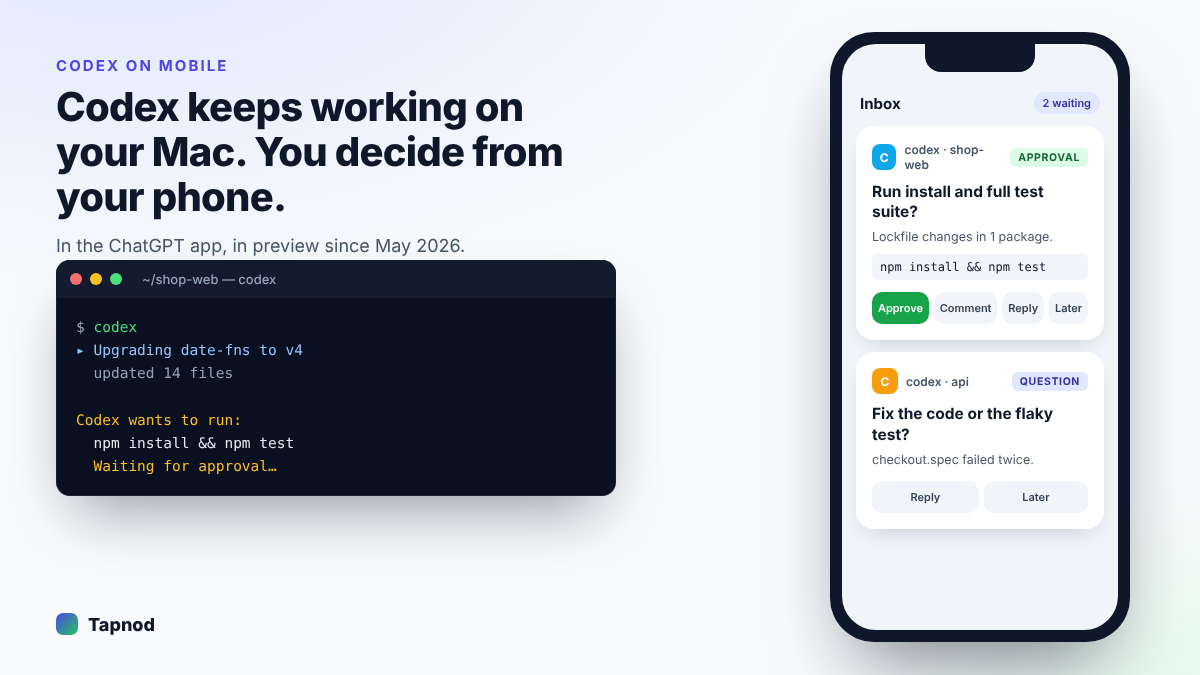
The approval piece is the one that changes your day. Codex often stops at decision points: two ways to fix a bug, a command that needs permission, a test that won't pass. Before mobile, those stops meant waiting until you were back at the desk.
How it connects
Codex runs where it always does: the CLI, the desktop app, or an IDE on your Mac, a dedicated machine, or a managed remote environment. You link your phone from Codex's settings, which shows a QR code to scan with the ChatGPT app.
Files, credentials, permissions and local setup stay on that machine. Updates flow to your phone in real time through OpenAI's relay layer, which keeps trusted machines reachable across devices without exposing them publicly.
At launch, coverage pointed out that mobile control worked with macOS-based Codex sessions, with Windows support on the roadmap. If you run Codex on Linux or Windows, check the current support status before planning around it.
Setup in five steps
- Update both apps: the ChatGPT app on your phone and the Codex app on your Mac.
- Sign in with the same ChatGPT account on both.
- Open Codex settings on your machine and find the mobile linking option.
- Scan the QR code with the ChatGPT app.
- Start or open a thread and check it appears on your phone with live updates.
Allow notifications for the ChatGPT app, or you'll only see Codex's questions when you happen to open it.
Where Codex mobile shines
Long refactors. You start a refactor before leaving, and halfway through Codex finds two reasonable approaches. You read the tradeoffs on your commute, pick one, and the work keeps moving.
Flaky test triage. Codex reports a failing test and asks whether to fix the code or the test. A one-line reply from your phone saves a stalled hour.
Quick fixes. An idea while you're out becomes a task on your machine before you forget it.
Where it's thinner
Phones are poor at reviewing large diffs, and that's true for every mobile coding tool. Use the phone to decide direction and approve small, clear actions, and leave the 600-line review for a real screen. It's also only Codex. If your setup includes Claude Code, Cursor agents, n8n workflows or your own scripts, each of those has its own app or none at all.
Codex mobile vs other mobile agent options
| Codex in ChatGPT app | Claude Code Remote Control | Cursor on web and iOS | Agent inbox | |
|---|---|---|---|---|
| Agent | Codex | Claude Code | Cursor cloud agents | Any agent that connects |
| Where work runs | Your machine or managed env | Your machine | Cursor's cloud | Wherever the agent runs |
| Approvals from phone | Yes | Yes | Review and PRs | Yes |
| Covers several tools | No | No | No | Yes |
Each first-party app is excellent for its own agent. The gap appears when you run several. Our guide to managing AI agents from a mobile app covers that case, and Does Codex have remote control like Claude Code? compares the two closest options directly.
Pair it with notifications
Mobile control is most useful when your phone tells you something is waiting. Beyond the ChatGPT app's own notifications, the Codex CLI can run a program on every finished turn through its notify setting in ~/.codex/config.toml, and Codex hooks, now generally available, can run commands at points like the end of a turn:
# ~/.codex/config.toml
notify = ["bash", "-lc", "~/.codex/notify.sh"]
The script receives a JSON payload describing the event, which you can forward anywhere. Setup details are in Codex CLI notifications.
Teams and managed environments
OpenAI's announcement also mentions connecting to managed remote environments, not only personal machines. For teams that already develop inside cloud devboxes, that means the phone can reach the same environment where builds, credentials and services already live, with workspace-level controls on top. If your company uses ChatGPT Enterprise, check with your admin which Codex features are enabled before relying on mobile access for production work.
The same announcement listed programmatic access tokens for CI and automation, and hooks for scanning prompts for secrets, running validators or logging conversations. Together with mobile approvals, that gives a team the pieces for a supervised setup: automation that runs on its own, hooks that enforce rules, and people who approve the exceptions from wherever they are.
Safe habits for approving from a phone
- Ask for a summary before approving anything big: files changed, commands planned, and what could go wrong.
- Approve commands you recognize; defer ones you don't. "Later" is a fine answer.
- Keep sandboxing on. Approving from a phone is quick, which is exactly why the sandbox and approval policy should still do their job.
- Review the final diff at a desk before merging.
A worked example
Picture a developer who starts a dependency upgrade in the Codex app on a Mac mini at home, then heads to the office. Forty minutes in, Codex asks to update a lockfile and run the full test suite. The approval arrives in the ChatGPT app with the exact command; they approve. Later Codex reports two failing tests and proposes skipping one marked flaky. They reply "fix the other one, leave the flaky test alone and note it". By lunch the branch is ready for a proper review at a desk.
Key takeaways
- Codex on mobile runs in the ChatGPT app on iOS and Android, in preview since May 2026.
- Your phone is a remote; the work stays on your machine or managed environment.
- It handles approvals, questions, diffs, test output and new tasks.
- Launch coverage noted macOS-based sessions first, with Windows planned.
FAQ
Is there a Codex mobile app?
Codex is available inside the ChatGPT app on iOS and Android, in preview on all plans, rather than as a separate app.
Can I approve Codex commands from my phone?
Yes. When Codex needs permission or clarification, you can approve or answer from the ChatGPT app.
Does my code leave my computer with Codex mobile?
The work runs on the machine where Codex operates. Updates such as diffs and terminal output are sent to your phone through OpenAI's relay.
Does Codex mobile work with Windows?
At launch, coverage noted support for macOS-based Codex sessions, with Windows on the roadmap. Check OpenAI's current docs for updates.
Where Tapnod fits
If Codex is one of several agents you run, Tapnod gives all of them one inbox on your phone for questions, approvals, results and errors. Try it free.