 Tapnod
The short answer
Yes, in practice. Since May 2026, Codex has been available in the ChatGPT mobile app in preview, and it works much like Claude Code's Remote Control: the agent keeps running on your own machine, and your phone becomes a window where you can answer questions, approve commands, review diffs and start tasks.
The differences are in the details: which plans and logins work, which operating systems host the session, how you link devices, and how notifications behave.
"does codex have remote control like claude code" gets about 260 US searches a month at a keyword difficulty of 40 (Semrush, November 2026). A question that specific, searched that often, usually means people are choosing between the two tools based on this feature.
What each one is
Claude Code Remote Control connects claude.ai/code or the Claude app on iOS and Android to a Claude Code session on your machine. You start it with claude remote-control, claude --remote-control, or /remote-control. It's a research preview on Pro, Max, Team and Enterprise plans.
Codex in the ChatGPT app connects your phone to Codex running in the CLI, desktop app or IDE on your machine, or in a managed remote environment. You link it from Codex settings with a QR code. OpenAI launched it in preview on iOS and Android across all plans, including Free and Go.
Side by side
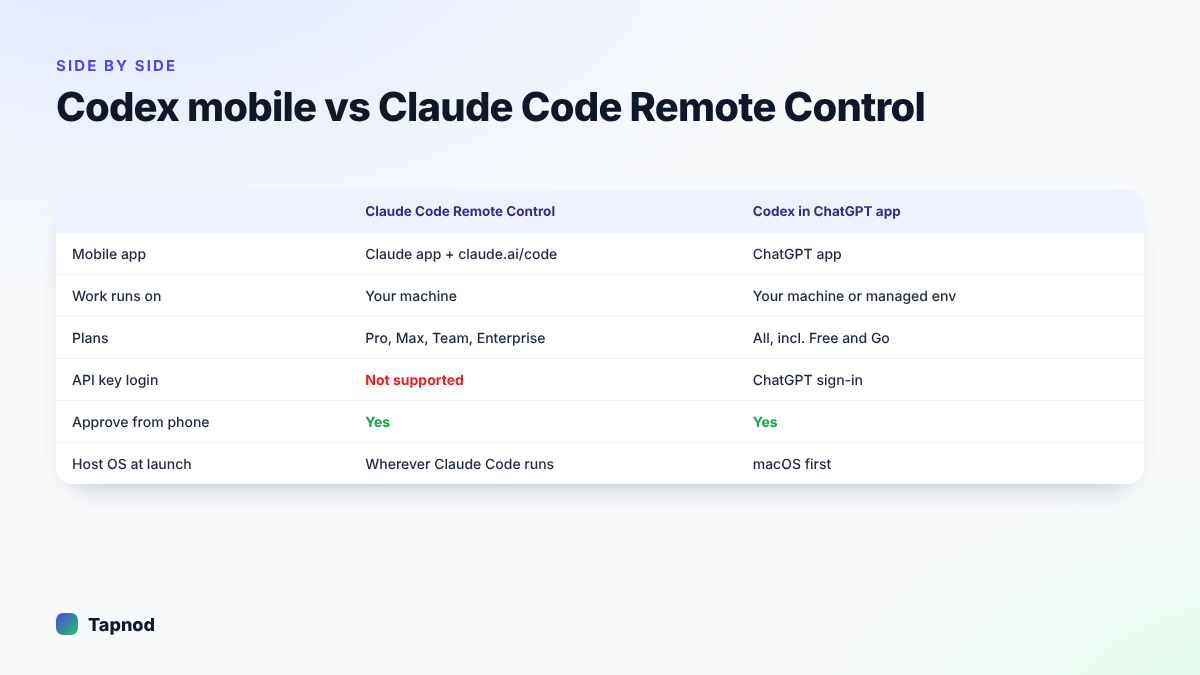
| Claude Code Remote Control | Codex in ChatGPT app | |
|---|---|---|
| Launched | Research preview, early 2026 | Preview, May 14, 2026 |
| Mobile app | Claude app, plus claude.ai/code | ChatGPT app |
| Where work runs | Your machine | Your machine or a managed remote environment |
| Plans | Pro, Max, Team, Enterprise | All plans, including Free and Go |
| API key login | Not supported | Uses your ChatGPT sign-in |
| Host OS at launch | Wherever Claude Code runs | macOS sessions first, Windows planned |
| Approve commands from phone | Yes | Yes |
| Review diffs and output | Yes | Yes, including screenshots and test results |
| Start new work | Yes, server mode can spawn sessions | Yes |
| Push notifications | "Push when actions required" and "Push when Claude decides" | Through the ChatGPT app |
| Team and Enterprise | Owner must enable | Follows workspace settings |
Setup compared
Claude Code:
cd ~/projects/acme-api
claude remote-control --spawn worktree
# press space for a QR code, scan it with the Claude app
Codex: open Codex settings on your Mac, choose the mobile linking option, and scan the QR code with the ChatGPT app. Both take about a minute once the apps are installed.
Where they differ in practice
Multiple sessions. Claude Code's server mode can serve many sessions from one process, each in its own git worktree with --spawn worktree, up to a capacity you set. Codex's mobile view works across your threads and connected machines. Both handle parallel work; Claude Code exposes more of the knobs on the command line.
Notifications. Claude Code gives you two push toggles in /config plus hooks for custom events, including a Notification hook that fires on permission prompts. Codex has app notifications plus a notify setting and hooks in the CLI. If you like scripting your alerts, both give you room.
Network and auth edge cases. Claude Code Remote Control doesn't work through Bedrock, Google Cloud, Microsoft Foundry or a custom gateway, and needs subscription auth rather than an API key. Codex mobile uses your ChatGPT sign-in. If your company routes models through a gateway, check each tool's rules before you plan around remote access.
Host operating system. At launch, Codex's mobile control worked with macOS-based sessions, with Windows planned. Claude Code's Remote Control works wherever Claude Code runs. That alone can decide it for Linux and Windows users.
Security and privacy compared
Both designs keep code execution on your machine and route the conversation through the vendor's service so your phone can see it. Neither asks you to open inbound ports.
| Claude Code Remote Control | Codex in ChatGPT app | |
|---|---|---|
| Connection | Your machine makes outbound HTTPS calls and polls the Anthropic API | OpenAI's relay keeps trusted machines reachable without public exposure |
| Device trust | Optional "require trusted devices" on Pro and Max, org-level on Team and Enterprise | Follows your ChatGPT account and workspace controls |
| Admin control | Owner toggle on Team and Enterprise, managed setting to disable per device | Workspace settings |
| What reaches the phone | Conversation, prompts, tool activity | Threads, screenshots, terminal output, diffs, test results |
For most individuals, the practical security question is the same for both: whoever has your phone and account can approve actions on your machine. Use a device passcode, keep sessions scoped to the project at hand, and keep deny rules or sandboxing in place so a mistaken tap can't do much damage.
Which should you use
You probably won't pick a coding agent on remote control alone, but it's a fair tiebreaker:
| If you | Lean toward |
|---|---|
| Already pay for Claude Pro or Max | Claude Code Remote Control |
| Use ChatGPT on a Free or Go plan | Codex in the ChatGPT app |
| Run sessions on Linux servers | Claude Code, or SSH for either |
| Want scripted, per-event alerts | Either, with hooks |
| Use both agents | Both apps, or one inbox for both |
The two-agent problem
Plenty of developers now use both: Claude Code for some work, Codex for other work, maybe Cursor's cloud agents too. Each has its own excellent mobile surface, and that's the catch. Three apps, three notification streams, three places to remember to check.
The fix is to choose where decisions land. Some people pick the app of the agent they use most and accept the rest. Others route questions and approvals from every agent into one inbox. We explain the second approach in the agent inbox.
A worked example
Picture a developer using Claude Code for backend work and Codex for front-end tasks, both on a home desktop. Claude Code runs with Remote Control and Codex is linked to the ChatGPT app. In practice, their phone shows two kinds of prompts in two apps. They decide to keep both apps for deep steering, but they add a small hook to each agent that also sends approval requests to a single inbox. When they're busy, they check one place; when a task needs real back-and-forth, they open that agent's own app.
Key takeaways
- Codex gained a Remote Control-style experience in the ChatGPT app in May 2026.
- Both keep the work on your machine and put approvals on your phone.
- Plans, auth rules and host OS support are the real differences.
- Running both agents means choosing where decisions land.
FAQ
Does Codex have remote control like Claude Code?
Yes. Codex in the ChatGPT mobile app lets you approve commands, answer questions, review diffs and start tasks on Codex running on your machine, similar to Claude Code's Remote Control.
Which is free?
Codex in the ChatGPT app rolled out across all ChatGPT plans, including Free and Go. Claude Code Remote Control needs a Pro, Max, Team or Enterprise plan.
Can I use Claude Code Remote Control with an API key?
No. It needs claude.ai subscription auth. Codex mobile uses your ChatGPT sign-in.
Can I manage both from one place?
Each tool has its own app. To see both agents' requests together, route their approvals to a shared inbox. See Claude Code Remote Control and Codex remote for each side's setup.
Where Tapnod fits
Running Codex and Claude Code side by side? Tapnod puts both agents' questions and approvals in one inbox on your phone. Start free with two agents.