 Tapnod
The short answer
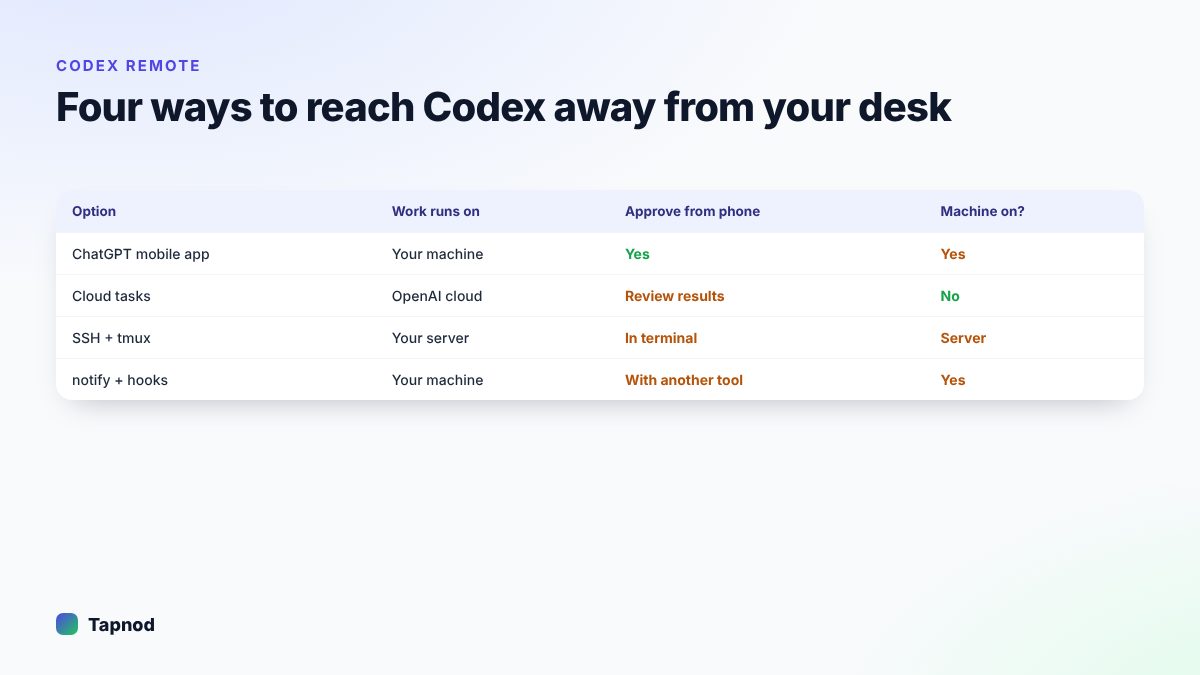
You can work with OpenAI Codex remotely in four ways:
- The ChatGPT mobile app, which connects to Codex running on your machines and lets you answer questions, approve commands and review diffs.
- Codex cloud tasks, which run in OpenAI's environment from a repository, with no machine of yours involved.
- SSH and tmux, attaching to a Codex CLI session on a server from any terminal.
- Notifications through
notifyand hooks, so Codex tells you when a turn ends and you decide whether to step in.
The first option is the newest, launched in preview in May 2026, and it's the closest match to what most people mean by "Codex remote".
"codex remote" gets about 390 US searches a month at a keyword difficulty of 42, and "does codex have remote control like claude code" adds 260 (Semrush, November 2026). The second query shows where the interest comes from: people who've used Claude Code's Remote Control want the same thing for Codex.
Option 1: the ChatGPT mobile app
OpenAI brought Codex to the ChatGPT app on iOS and Android with an announcement called "Work with Codex from anywhere". You link your phone to Codex on your machine with a QR code, and from then on you can work across your threads, review outputs, approve commands, switch models and start new tasks.
The important design choice: your files, credentials, permissions and local setup stay on the machine where Codex runs. Updates reach your phone through a relay OpenAI built to keep trusted machines reachable without exposing them directly to the internet. Coverage at launch noted that mobile control worked with macOS-based Codex sessions first.
Full walkthrough in Codex on mobile.
Option 2: cloud tasks
Codex can also run tasks in OpenAI's cloud environment against a connected repository. Nothing depends on your laptop being on, which is why this suits "fix this bug while I'm out" work that doesn't need local services. The trade-off is the usual one for cloud agents: no access to your local databases, VPN or machine-specific tools, and you review the result as a diff or pull request.
Option 3: SSH and tmux
The low-tech route works for any CLI agent. Run Codex inside tmux on a server or always-on desktop, then attach from a terminal app:
# on the server
tmux new -s codex
codex

# later, from your phone or another computer
ssh dev@build-box -t tmux attach -t codex
You see the real terminal and can answer approval prompts directly. It's tiring for anything beyond short replies on a phone keyboard, but it works with every setup and gives you full control.
Option 4: notifications
If you mostly trust a task, you don't need to watch it. You need to know when it ends or stalls. The Codex CLI's notify setting runs an external program when Codex emits a supported event, and the docs list agent-turn-complete:
# ~/.codex/config.toml (user-level, not project)
notify = ["python3", "/Users/me/.codex/notify.py"]
Your program receives a JSON payload as an argument, so it can send a desktop alert, a phone push or a message to an inbox. Codex also has a [tui] section with built-in desktop notifications in recent versions, and Codex hooks, now generally available, can run commands at points like the end of a turn. Put notification settings in your user config: Codex ignores some notification and telemetry keys in project-level config files. Details in Codex CLI notifications.
Compare the options
| ChatGPT app | Cloud tasks | SSH + tmux | Notifications | |
|---|---|---|---|---|
| Work runs on | Your machine | OpenAI cloud | Your server | Your machine |
| Machine must stay on | Yes | No | Server must | Yes |
| Approve from phone | Yes | Review results | Yes, in terminal | Only with another tool |
| Local tools and files | Yes | No | Yes | Yes |
| Effort to set up | QR code | Connect repo | Server and SSH | A few config lines |
Approval policy matters more when you're away
Remote work tempts people to loosen approvals so tasks don't stall. Codex's approval_policy and sandbox_mode settings control that. Values like on-request and a workspace-write sandbox keep Codex productive while still pausing for risky actions; danger-full-access turns the sandbox off, and the docs advise using it only where your environment already isolates processes.
The better fix for stalls is making approvals reachable, not removing them. With the mobile app or a notification setup, an approval costs you seconds wherever you are.
What to keep on the machine, what to send to the phone
Remote access works best when you're deliberate about what you do where. The phone is great for small, clear decisions and poor for deep review.
| On the phone | At the machine |
|---|---|
| Approving a command you recognize | Reviewing a large diff line by line |
| Choosing between two approaches Codex proposes | Debugging a failure that needs local tools |
| Answering "which branch?" or "skip this test?" | Changing config, sandbox or approval settings |
| Starting a small, well-scoped task | Merging to main |
A useful habit is asking Codex for a short summary before you approve anything big from the phone: files changed, commands it plans to run next, and what could go wrong. Three lines of context turn a blind approval into an informed one.
A setup that works
- Run Codex on a machine that stays on, such as a Mac mini or a desktop.
- Link the ChatGPT app for approvals and quick steering.
- Add a
notifyscript that sends "turn complete" with the project name to your phone. - Keep the sandbox on with an approval policy that asks for risky actions.
- Use cloud tasks for self-contained fixes when the machine is busy.
A worked example
Picture a developer with a Mac mini at home running two Codex threads: one migrating API routes, one writing tests. At the office, the ChatGPT app shows the migration thread asking which of two error-handling patterns to follow. They pick one. The test thread finishes and the notify script posts "turn complete: tests added for billing" to their phone. On the train home, they spot a typo in the marketing site and start a cloud task to fix it, since it doesn't need the Mac mini at all.
Key takeaways
- The ChatGPT app is the main way to steer Codex remotely, with approvals and diffs on your phone.
- Cloud tasks run without your machine; local sessions keep your tools and files.
notifyand hooks tell you when turns end, from user-level config.- Keep approvals on and make them reachable instead of turning them off.
FAQ
Can I control Codex remotely?
Yes. The ChatGPT mobile app connects to Codex running on your machine, and you can approve commands, answer questions, review diffs and start tasks from your phone.
Does Codex have remote control like Claude Code?
Codex in the ChatGPT app offers a similar experience to Claude Code's Remote Control, with work staying on your machine. See our side-by-side comparison.
How do I get notified when Codex finishes?
Set notify in ~/.codex/config.toml to a program that handles the agent-turn-complete event, or use Codex hooks or the built-in TUI notifications.
Can Codex run without my computer?
Yes, with cloud tasks that run in OpenAI's environment against your repository.
Where Tapnod fits
Codex has its own app; your other agents don't. Tapnod collects questions and approvals from all of them in one inbox on your phone. See how it works.