 Tapnod
The short answer
Human in the loop automation is an automated workflow that pauses at specific steps for a person to approve, edit or add information, then continues on its own. It lets you automate the 90% of a process that's routine while keeping judgment on the 10% that isn't.
The three rules that make it work: pause only where a mistake is costly, send the request where people will see it quickly, and decide what happens if nobody answers.
"human in the loop automation" gets about 140 US searches a month at a keyword difficulty of 42 (Semrush, November 2026). Most searchers already automate something and want AI in the flow without losing control.
Why AI changed automation
Classic automation moved data between systems with fixed rules. If the rule was right once, it was right every time. AI steps are different: they draft, classify, summarize and decide, and they're usually right but not always. That "usually" is why people come back into the loop. A human step turns an AI output from a guess into a decision someone owns.
Where to pause
| Step | Pause? | Why |
|---|---|---|
| Moving data between systems | No | Deterministic |
| AI classification for internal routing | Rarely | A wrong route is cheap to fix |
| AI-drafted messages to customers | Yes, at first | Tone and facts reach real people |
| Financial actions above a threshold | Yes | Money is hard to recover |
| Changes to records others rely on | Often | Errors spread downstream |
| Publishing content | Yes | Public and permanent |
| Exceptions the automation can't handle | Always | A person decides what to do |
Three kinds of human step
- Approve or reject: the person checks a proposed action and says yes or no.
- Review and edit: the person can change the content before approving, such as fixing a sentence in a draft.
- Provide input: the automation asks for information it doesn't have, such as a missing code or a choice between options.
Most tools support all three under different names.
Tools that support human steps
| Tool | Human step feature | Notes |
|---|---|---|
| Zapier | Human in the Loop app: Request Approval, Collect Data | Premium; review by email, Slack or another Zap |
| n8n | Human review for AI tool calls, wait nodes, forms | Self-hostable; approvals through chat apps |
| Microsoft Power Automate | Approvals connector | Strong in Microsoft 365 shops |
| UiPath | Action Center tasks | Built for RPA exceptions |
| Agent frameworks | Interrupts and tool approvals | LangGraph, OpenAI Agents SDK, Google ADK |
| Agent inboxes | Cards for questions and approvals | Collect requests from many agents |
Details in Zapier human in the loop and n8n human in the loop.
Anatomy of a good approval request
A request someone can answer in ten seconds has:
- A title with the decision: "Send this reply to Acme about the late shipment?"
- The content to review, laid out as fields rather than a blob.
- Why it was flagged, if a rule triggered it: "Mentions a refund over $50."
- The consequence: "Approving sends immediately."
- Clear buttons: "Send reply" and "Discard", rather than "Yes" and "No".
A workflow in pseudo-config
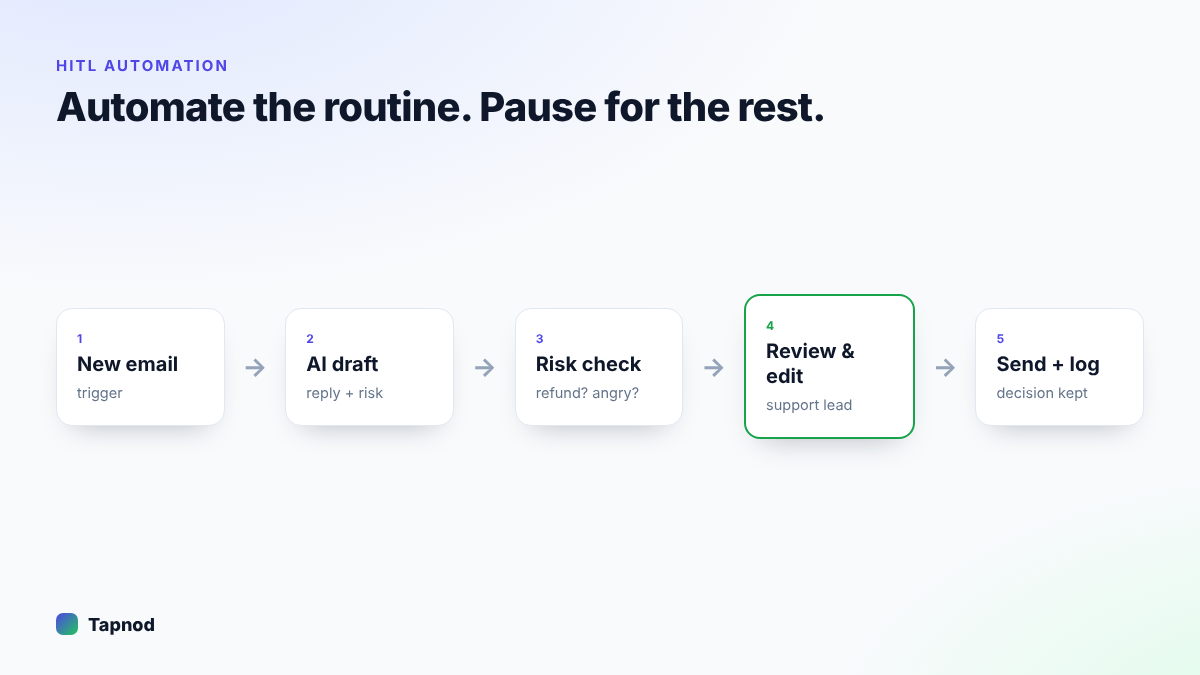
trigger: new_support_email
steps:
  - ai_draft_reply
  - classify_risk:
      high_if: mentions_refund or sentiment == "angry" or customer_tier == "enterprise"
  - if risk == "high":
      human_step:
        type: review_and_edit
        assignee: support-lead
        notify: [mobile_push, slack]
        timeout: 2h
        on_timeout: escalate_to: support-manager
  - send_reply
  - log_decision
Low-risk replies send automatically; high-risk ones wait for a person, with a fallback if the first reviewer is busy.
Avoiding bottlenecks
Human steps fail in predictable ways. Watch for these:
| Problem | Fix |
|---|---|
| Requests pile up unanswered | Mobile notifications, named owners, escalation timers |
| Reviewers approve without reading | Fewer, better-targeted requests |
| One person is the only approver | Add a backup or a shared queue |
| Approvals happen, then nobody knows | Log decisions and link them to the run |
| Edits are lost | Map the reviewer's edited fields into later steps |
Who should review
The reviewer should be the person who owns the outcome, not whoever happens to be online. A refund goes to someone accountable for refunds; a public post goes to someone accountable for the brand. If ownership is unclear, the human step becomes a formality. Name a primary reviewer and a backup for each step, and write down the authority each one has: approve up to an amount, edit but not approve, or approve anything.
Measuring the loop
- Time to decision: median and worst case per step.
- Approval rate unchanged: if it's near 100%, the step may not be needed.
- Edit rate: high edit rates suggest the AI step needs better prompts or data.
- Escalation rate: how often the first reviewer doesn't answer in time.
Review these monthly and retire steps that no longer earn their cost.
Automation and AI agents together
Many teams now run both: workflow automation for structured processes, and AI agents for open-ended work like coding, research or operations. Each has its own approval mechanism, which means approvals scatter across Zapier, Slack, terminals and dashboards. A shared inbox that collects human steps from both is often the simplest fix, since reviewers check one place. See AI approval workflows.
A worked example
Picture an e-commerce team automating returns. An AI step reads the customer's message and photos and proposes approve, deny or ask for more information. Returns under $40 with a clear photo are approved automatically. Everything else goes to a reviewer with the AI's reasoning, the order history and the photos. Denials always need a person. After two months, the team raises the automatic threshold to $60, because reviewers approved nearly every case between $40 and $60 unchanged.
Rolling out human steps
Introduce human steps gradually. Start a new AI step in shadow mode, where the AI proposes and a person does the real work, then compare. Move to review and edit once proposals are mostly right. Move to approval only, then to automatic with sampling, as the error rate falls. Each move should be a decision someone makes with numbers, not a default that happens because nobody looked.
When to remove a human step
Human steps aren't permanent. Remove or relax one when:
- It's approved unchanged nearly every time for several weeks.
- Mistakes it would catch are cheap and easy to reverse.
- A rule or a better model can cover the cases it was catching.
Keep it when the action is irreversible, public or regulated, even if approvals are routine.
Key takeaways
- Human in the loop automation pauses workflows where mistakes are costly.
- Use approve, review-and-edit or provide-input steps as needed.
- Write requests people can answer in seconds, and set timeouts.
- Measure time to decision and unchanged approvals, and retire steps that don't earn their cost.
FAQ
What is human in the loop automation?
An automated workflow that pauses at chosen steps for a person to approve, edit or supply information, then continues automatically.
Which automation tools support human approval steps?
Zapier, n8n, Microsoft Power Automate and UiPath all have approval or human task features, and agent frameworks support interrupts and tool approvals.
How do I stop human steps from slowing everything down?
Gate only costly actions, notify reviewers on their phones, set escalation timers and remove steps that are always approved unchanged.
Can AI agents and automations share one approval inbox?
Yes, if both send their human steps to the same place, usually by webhook or API.
Where Tapnod fits
Tapnod gives your automations and agents one inbox for approvals, questions and errors, with answers from your phone. Start free.