 Tapnod
The short answer
On Android you can use Claude Code in four ways: the Claude app to steer sessions on your computer through Remote Control or to run cloud sessions; claude.ai/code in Chrome; an SSH terminal app attached to Claude Code on a server; and push alerts from hooks to any notification app or installed web app. The main Android-specific work is making sure notifications arrive on time, since battery optimization can delay them.
"claude code android" gets about 140 US searches a month and "claude code mobile android" about 40 (Semrush, November 2026). Android users also tend to search more about installable web apps and terminal apps, because both work particularly well on the platform.
Option 1: the Claude app
Install the Claude app from Google Play and sign in with the account you use for Claude Code. Then:
- To steer a local session, start it with
claude --remote-controlon your computer and open it in the app. Permission prompts and questions are forwarded and stay open until you answer. - To start fresh work without your computer, use a cloud session in the claude.ai/code interface.
If you don't have the app yet, /mobile inside Claude Code shows a QR code that opens the right store. Remote Control needs a Pro, Max, Team or Enterprise plan and claude.ai login. Full details in Claude Code Remote Control.
Option 2: claude.ai/code in Chrome
Everything Remote Control and cloud sessions offer in the app also works at claude.ai/code in a mobile browser. Some people prefer it for longer reading, since you can zoom and switch tabs more freely. Push notifications come through the app, though, so keep it installed even if you work in the browser.
Option 3: SSH terminal apps
Android has strong terminal apps with good keyboard support, which makes the classic setup comfortable:
# on your server or always-on desktop
tmux new -s claude
claude

# from the Android terminal app
ssh you@home-server -t tmux attach -t claude
This works with any login type, including API keys and gateways that Remote Control doesn't support. Pair it with a Bluetooth keyboard if you do more than short replies.
Option 4: push alerts from hooks
For setups where Remote Control isn't available, a Notification hook can post permission prompts to any push service your Android phone subscribes to, or to an agent inbox that installs as a progressive web app. Android handles installed web apps well: Chrome's "Install app" adds them to your home screen with their own icon and notifications.
Make notifications arrive on time
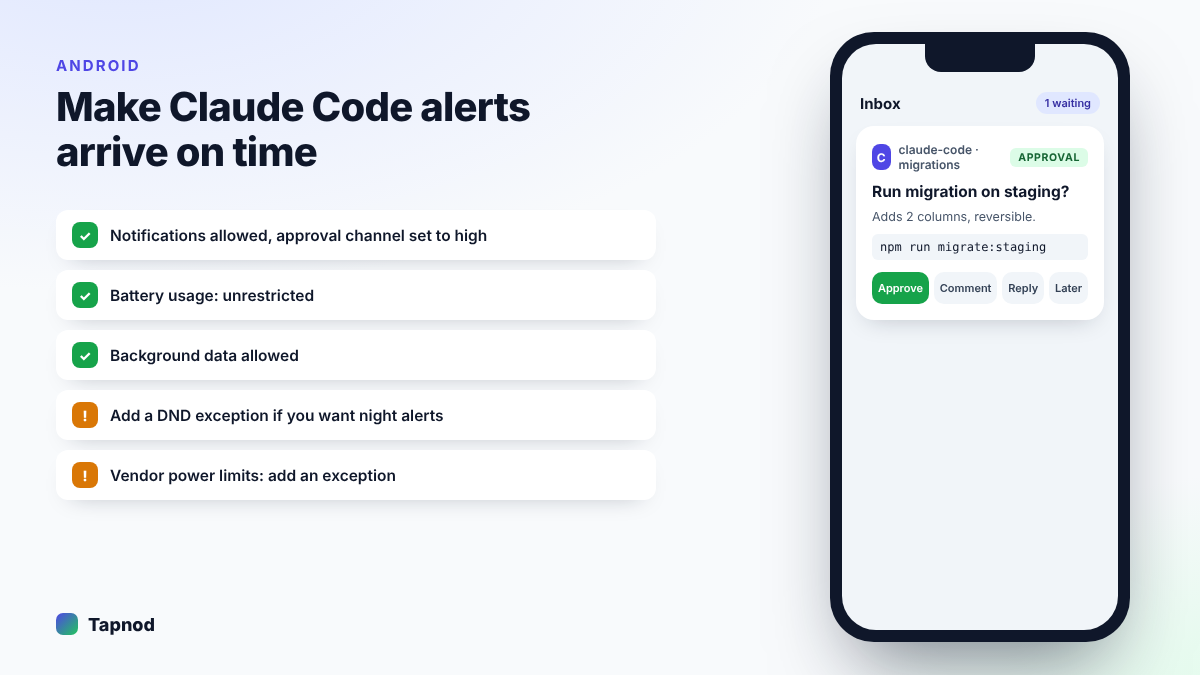
Android's battery management is the most common reason Claude alerts arrive late or not at all. Check these settings for the Claude app and any notification app you use:
| Setting | What to set |
|---|---|
| App notifications | Allowed, with the relevant categories on |
| Battery usage | Unrestricted, or excluded from battery optimization |
| Background data | Allowed |
| Do Not Disturb exceptions | Add the app if you want alerts at night |
| Notification channel importance | High or urgent for approval alerts |
Some phone makers add their own aggressive power management on top of Android's. If alerts still lag, search for your phone model plus "background app limits" and apply the vendor's exception steps.
Android vs iPhone for Claude Code
| Android | iPhone | |
|---|---|---|
| Claude app with Remote Control | Yes | Yes |
| Installable web apps | Excellent, via Chrome install | Supported via Add to Home Screen |
| Terminal apps for SSH | Many strong options | Good options |
| Common notification issue | Battery optimization | Focus modes and summaries |
Neither platform is better for Claude Code; the setup steps differ slightly.
A tablet changes the picture
Android tablets with a keyboard case make agent supervision far more comfortable than a phone. The larger screen means you can actually read a diff, and split-screen lets you keep the Claude app open beside a terminal app or a browser with your pull request. If you supervise agents often while traveling, a tablet is a better investment than squinting at a phone.
A practical tablet setup:
- Claude app on one side for Remote Control sessions and prompts.
- A terminal app on the other for SSH into servers, with a hardware keyboard.
- Your Git host in Chrome for reviewing pull requests on a proper screen.
- Notification settings the same as on your phone, so alerts reach whichever device you're holding.
Hook alerts to Android in practice
If you rely on hooks rather than Remote Control, the simplest Android setup uses a push service with an Android app that subscribes to a topic. Your Notification hook posts the prompt text and project name to that topic; your phone shows it within seconds. Two details matter on Android specifically:
- Give approval alerts their own notification channel or topic, set to high importance, so they can break through while routine "done" alerts stay quiet.
- Use a long, random topic name if the push service is public, since anyone who knows the topic can read it.
For answering, not only reading, route the same events to an inbox app that can relay your decision back to the session.
What to do from Android, and what to save
Phones are great for approvals, short instructions and checking progress. Save big diff reviews, settings changes and debugging for a larger screen. A good habit before approving anything large: ask Claude for a summary of files changed and commands planned.
A worked example
Picture a developer with an Android phone and a desktop that stays on at home. They start a migration task with Remote Control and allow routine commands. Their first afternoon, alerts arrive 15 minutes late. They set the Claude app's battery usage to unrestricted and raise the notification channel's importance. The next prompt, a request to run the migration on a staging database, arrives within seconds, and they approve it from the bus.
Key takeaways
- Use the Claude app for Remote Control and cloud sessions on Android.
- SSH terminal apps cover API-key and gateway setups.
- Hooks can send prompts to any Android push app or installed web app.
- Exclude your alert apps from battery optimization so prompts arrive on time.
Related guides
- How to use Claude Code on mobile: the four options compared, for iPhone and Android.
- Approve Claude Code from your phone: a five-minute setup with a test at the end.
- Claude Code notifications: desktop, sound, phone and webhook alerts compared.
FAQ
Is Claude Code available on Android?
Yes, through the Claude app for Remote Control and cloud sessions, claude.ai/code in Chrome, or an SSH app connected to a machine running Claude Code.
Why are my Claude Code notifications late on Android?
Usually battery optimization. Set the app's battery usage to unrestricted and allow background data.
Can I approve Claude Code prompts on Android?
Yes. With Remote Control, prompts appear in the Claude app. Otherwise, forward them with hooks and answer through SSH or an inbox. See approve Claude Code from your phone.
Do installable web apps work for agent tools on Android?
Yes. Chrome can install progressive web apps with their own icon and notifications, which many agent tools use.
Where Tapnod fits
Tapnod installs on Android as an app with notifications, so approvals from Claude Code and your other agents reach you like any other message. Start free.