 Tapnod
The short answer
Claude Code gives you four ways to run work in parallel:
| Approach | What runs in parallel | Best for |
|---|---|---|
| Subagents | Helpers inside one conversation | Research, tests and reviews that feed one task |
| Background sessions and agent view | Separate full conversations | Several independent tasks on one machine |
| Git worktrees | Separate checkouts on separate branches | Keeping parallel sessions from editing the same files |
| Remote Control server mode | Many sessions from one process | Starting and steering parallel work from your phone |
The rule that prevents chaos: one task, one branch or worktree, one place to hear when it needs you.
"claude code parallel agents" gets about 170 US searches a month at a keyword difficulty of 46, with smaller searches like "run multiple claude code instances" and "claude code multiple sessions" around 20 each (Semrush, November 2026). The volume is modest; the pain behind it is not. Parallel sessions that collide or stall can cost more time than they save.
Subagents: parallel inside one task
Subagents are specialized helpers the main agent delegates to, each with its own context and tools. Some can run in the background while the main agent continues. They're the right choice when the parallel work all serves one goal, like writing tests while the main agent finishes a feature. More in Claude Code subagents.
Background sessions and agent view
For independent tasks, use full sessions. claude agents opens agent view, a screen listing every background session grouped by state, with the ones needing your input at the top. You can dispatch new work from its input, peek, reply or attach. claude --bg "task" starts a session in the background from the shell, and /bg sends the current session there.
While agent view is open, Claude Code sends a terminal notification when a background session starts needing input, finishes or fails.
Worktrees: the anti-collision tool
Two sessions in the same directory can edit the same file at the same time. Git worktrees give each session its own checkout on its own branch:
# one worktree per task, each on its own branch
git worktree add ../acme-lint -b chore/eslint-v9
git worktree add ../acme-tests -b test/billing-coverage
git worktree add ../acme-docs -b docs/api-refresh

# start a session in each
(cd ../acme-lint && claude --bg "Upgrade eslint to v9 and fix new errors")
(cd ../acme-tests && claude --bg "Add missing tests for src/billing")
(cd ../acme-docs && claude --bg "Refresh API docs from route handlers")
Claude Code can also create worktrees for you, for example with its --worktree option or Remote Control's --spawn worktree, and a WorktreeCreate hook can replace the default git behavior if your setup needs something special.
Remote Control server mode
claude remote-control runs one process that can serve many sessions, up to a capacity you set (32 by default). With --spawn worktree, each new session gets its own worktree automatically. You can start sessions from the Claude app or claude.ai/code and steer them from anywhere. Full details in Claude Code Remote Control.
What goes wrong with parallel agents
| Problem | Cause | Fix |
|---|---|---|
| Conflicting edits | Sessions share a directory | One worktree per session |
| Merge pain later | Long-lived branches drift | Small tasks, merge often |
| Lockfile fights | Several sessions install packages | Ask rules for install commands, one session owns dependencies |
| Silent stalls | A prompt waits in a session nobody is looking at | Notifications for agent_needs_input and permission_prompt |
| Context overload for you | Too many sessions to review | Cap concurrency at what you can review today |
How many at once
The limit isn't the machine; it's your review capacity. A useful rule: run as many parallel sessions as you can review the output of before the end of the day. For most people that's two to four. Past that, finished branches pile up, go stale, and need rebasing, which eats the time parallelism saved.
Hearing from all of them
Parallel work multiplies the moments when an agent needs you. Set up alerts once and every session benefits:
Notificationhooks withagent_needs_inputandagent_completedfor background sessions while agent view is open.permission_promptalerts for interactive sessions.- Remote Control push for sessions started with it.
Send them all to one destination. If one session pings your desktop, another your phone and a third a Slack channel, you'll miss one. The agent inbox pattern is built for exactly this.
Choosing tasks that parallelize well
Parallel sessions work best when the tasks don't touch the same files and each has its own way to prove it's done. Good pairs: a dependency upgrade and a test backfill in different modules, or docs and a bug fix. Poor pairs: two features that both change the same API layer, or a refactor alongside anything that depends on the code being refactored. If two tasks will collide, run them one after another; the merge conflict will cost more than the time you'd save.
A daily rhythm that works
- Morning: pick two to four independent tasks, write each prompt with a goal, scope and finish line, and start each in its own worktree.
- During the day: answer questions and approvals as they arrive, from wherever you are.
- Afternoon: review finished branches one at a time, merge or send back with comments.
- End of day: remove merged worktrees with
git worktree remove, so tomorrow starts clean.
A worked example
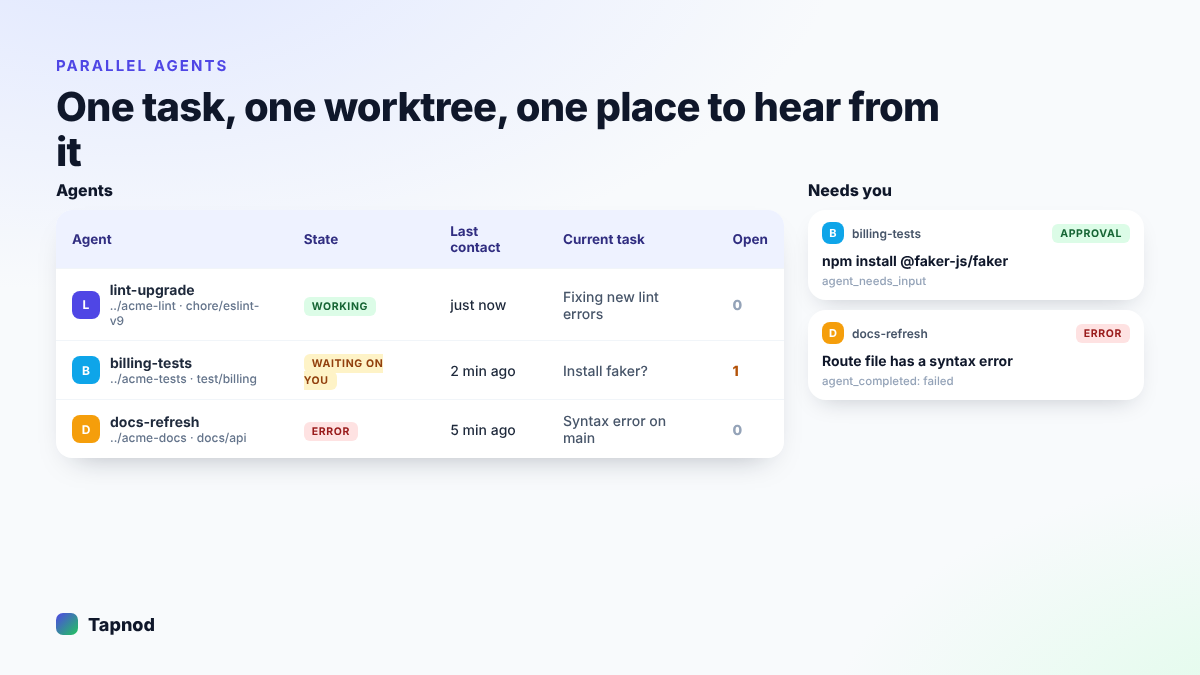
Picture a Friday cleanup sprint. A developer starts three sessions in three worktrees: lint upgrade, billing tests and docs refresh. Within an hour, the billing session asks to install a fake-data library; a phone alert arrives and they approve. The lint session finishes and reports 14 fixes. The docs session fails because a route file has a syntax error on main, which turns out to be a real bug worth fixing first. By mid-afternoon two branches are merged, one bug is found, and all three worktrees are cleaned up.
Cleaning up
Parallel work leaves debris: worktrees, branches and background sessions you no longer need. List worktrees with git worktree list, remove merged ones with git worktree remove, delete merged branches, and stop idle background sessions from agent view. A clean start each morning keeps tomorrow's parallel work from tripping over today's.
Key takeaways
- Subagents parallelize inside one task; background sessions parallelize separate tasks.
- Give every parallel session its own worktree and branch.
- Cap concurrency at what you can review in a day.
- Route every session's "needs you" moment to one place.
Related guides
- Claude Code subagents: delegating inside one conversation.
- Claude Code background tasks: Ctrl+B, background sessions and agent view.
- How to monitor Claude Code sessions: spotting stuck and waiting sessions.
FAQ
Can I run multiple Claude Code instances at once?
Yes. Run separate sessions in separate terminals or worktrees, use background sessions managed in agent view, or use Remote Control's server mode to serve many sessions from one process.
How do I stop parallel sessions from conflicting?
Give each session its own git worktree and branch, and use ask rules for commands that change shared files like lockfiles.
What's the difference between subagents and parallel sessions?
Subagents are helpers inside one conversation that report back to it. Parallel sessions are separate conversations working on separate tasks.
How many parallel agents should I run?
As many as you can review in a day, usually two to four for one person.
Where Tapnod fits
Running several sessions at once? Tapnod shows which ones are working, which finished and which need you, in one inbox on your phone. Try it free.