 Tapnod
The short answer
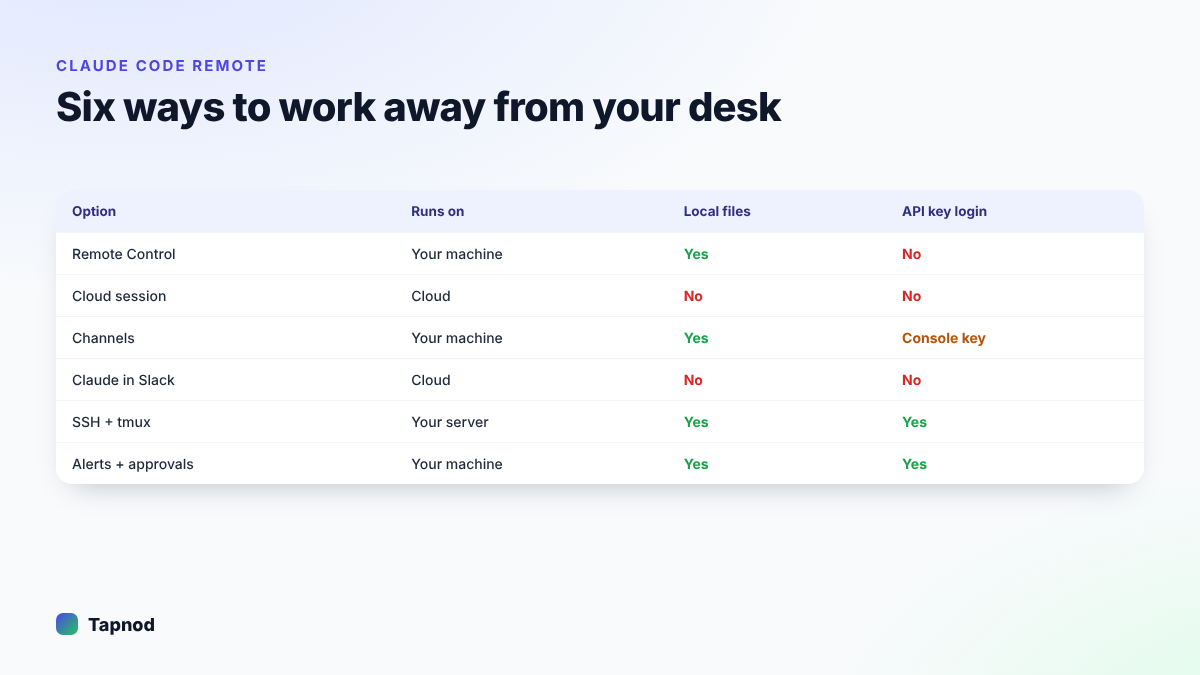
You can work with Claude Code away from your desk in six ways:
| Option | Where Claude runs | You use |
|---|---|---|
| Remote Control | Your machine | claude.ai/code or the Claude app |
| Cloud sessions | Cloud infrastructure | claude.ai/code or the Claude app |
| Channels | Your machine | Telegram, Discord or iMessage |
| Claude in Slack | Cloud | An @Claude mention in Slack |
| SSH and tmux | Your server | Any terminal app |
| Alerts and approvals | Your machine or server | Your phone, via hooks |
Pick by two questions: does the work need your local files and tools, and how much do you want to type away from a keyboard?
"claude code remote" gets about 1,600 US searches a month, and "claude code remote control" another 3,600 (Semrush, November 2026). People clearly want this, and Anthropic has shipped several overlapping answers, which is why it's confusing.
Remote Control: your session, from anywhere
Remote Control connects claude.ai/code or the Claude app to a Claude Code session on your machine. Your filesystem, MCP servers and project config stay available, and the conversation syncs across terminal, browser and phone. Permission prompts are forwarded and stay open until you answer.
Start it with claude remote-control for server mode, claude --remote-control for an interactive session that's also reachable remotely, or /remote-control inside a running session. It needs a claude.ai login on Pro, Max, Team or Enterprise; API keys don't work. Full guide: Claude Code Remote Control.
Cloud sessions: no laptop required
Cloud sessions run on cloud infrastructure, Anthropic-managed by default, using the same claude.ai/code interface. Pick a repository and describe the task. Nothing depends on your laptop being awake, which makes them ideal for starting self-contained work from your phone. They don't see your local databases, VPN or local MCP servers.
Channels: chat with your session
Channels, a research preview, push messages from Telegram, Discord or iMessage into a running local session, and Claude replies in the same chat. They work with a claude.ai login or a Console API key, and the plugins need Bun. Security rests on a sender allowlist that you set up by pairing. Setup is in Claude Code from Telegram.
Claude in Slack
Mentioning @Claude in a team channel starts a cloud session from the conversation's context. It's built for team work like turning a bug thread into a PR, on Pro and Max plans with Claude Code on the web enabled. It runs in the cloud, so it's not a way to reach the session on your own machine.
SSH and tmux: the classic
Run Claude Code inside tmux on a server or always-on desktop, then attach from any terminal app:
# on the server
tmux new -s claude
claude

# from anywhere
ssh dev@home-server -t tmux attach -t claude
It works with every login type, including API keys, Bedrock and gateways, and you see the real terminal. The cost is typing and reading diffs on a small screen.
Alerts and approvals: the lightweight option
Often you don't want a remote terminal at all. You want Claude to keep working and reach you only when it's blocked. Hooks do that with any login type: a Notification hook with permission_prompt and idle_prompt matchers, sending to a push service, a webhook or an agent inbox. See Claude Code notifications.
Compare them
| Remote Control | Cloud session | Channels | Slack | SSH + tmux | Alerts | |
|---|---|---|---|---|---|---|
| Local files and MCP | Yes | No | Yes | No | Yes | Yes |
| Machine must stay on | Yes | No | Yes | No | Server | Yes |
| API key login | No | No | Console key | No | Yes | Yes |
| Bedrock, Vertex, gateways | No | No | No | No | Yes | Yes |
| Approve prompts remotely | Yes | Yes | With permission relay | Yes | Yes | With an inbox |
| Typing on phone | Some | Some | Chat-style | Chat-style | A lot | Minimal |
Which to use when
- "I started something at my desk and need to leave." Remote Control, or alerts if you mostly trust the task.
- "I have an idea on the train and no laptop." A cloud session.
- "I live in Telegram and want quick back-and-forth." Channels.
- "My team discusses bugs in Slack." Claude in Slack.
- "I run Claude on a server with an API key." SSH and tmux, plus hooks for alerts.
- "I run several agents, not only Claude Code." An agent inbox that collects everyone's questions.
A worked example
Picture a developer with a desktop at home and a phone. Weekday mornings they start two tasks on the desktop with claude remote-control --spawn worktree, so each gets its own worktree. Hooks forward permission prompts as phone alerts. At the office they check progress in the Claude app during breaks, approve a dependency install, and ask one session to summarize its changes. On the commute home they start a small docs fix as a cloud session from the app, since it doesn't need the desktop.
Mixing options without chaos
Most people end up combining two or three of these. That works well if each has a clear job:
- One primary way to steer. Usually Remote Control if you're on a claude.ai plan, SSH if you aren't. This is where you have real conversations with a session.
- One way to start fresh work. Cloud sessions for tasks that don't need your machine.
- One place for alerts. Pick a single destination for "needs you" and "done" events, whether that's the Claude app, a push service or an agent inbox. Two destinations means checking two places.
The mistake to avoid is turning on every option and getting the same prompt three ways: a Remote Control push, a Telegram message and a hook alert. Decide which channel owns which kind of event and switch off the duplicates.
What remote work costs in practice
Remote setups have small ongoing costs worth knowing up front. Remote Control and Channels need your machine awake, which means a desktop that stays on or a laptop with sleep disabled while tasks run. Cloud sessions don't, but they can't see local resources. SSH needs a reachable server and some care with keys. Hooks need a few scripts in your dotfiles. None of these is heavy, but picking the option that matches your setup saves you from fighting it every day.
Security notes
- Remote Control makes outbound HTTPS calls only and opens no inbound ports. Pro and Max users can require trusted devices.
- Channels trust whoever is on the allowlist; anyone allowed can ask Claude to act on your machine.
- SSH is as safe as your key management and server hardening.
- Hooks that call webhooks should keep tokens in environment variables and use HTTPS.
FAQ
Can I use Claude Code remotely?
Yes. Use Remote Control to drive a local session from claude.ai/code or the Claude app, cloud sessions that need no laptop, Channels for chat apps, Claude in Slack, or SSH with tmux.
What's the difference between Remote Control and cloud sessions?
Remote Control runs on your machine with your local files and tools. Cloud sessions run on cloud infrastructure and don't need your computer on.
Can I use Claude Code remotely with an API key?
Remote Control needs a claude.ai subscription login. With an API key, use SSH and tmux, Channels with a Console key, or hooks that send alerts to your phone.
How do I approve Claude Code actions remotely?
With Remote Control, prompts are forwarded to the Claude app. With other setups, forward permission_prompt notifications to your phone or an inbox. See approving Claude Code actions remotely.
Where Tapnod fits
Whatever remote setup you choose, Tapnod gives Claude Code and your other agents one place to ask for decisions on your phone. See how it works.