 Tapnod
The short answer
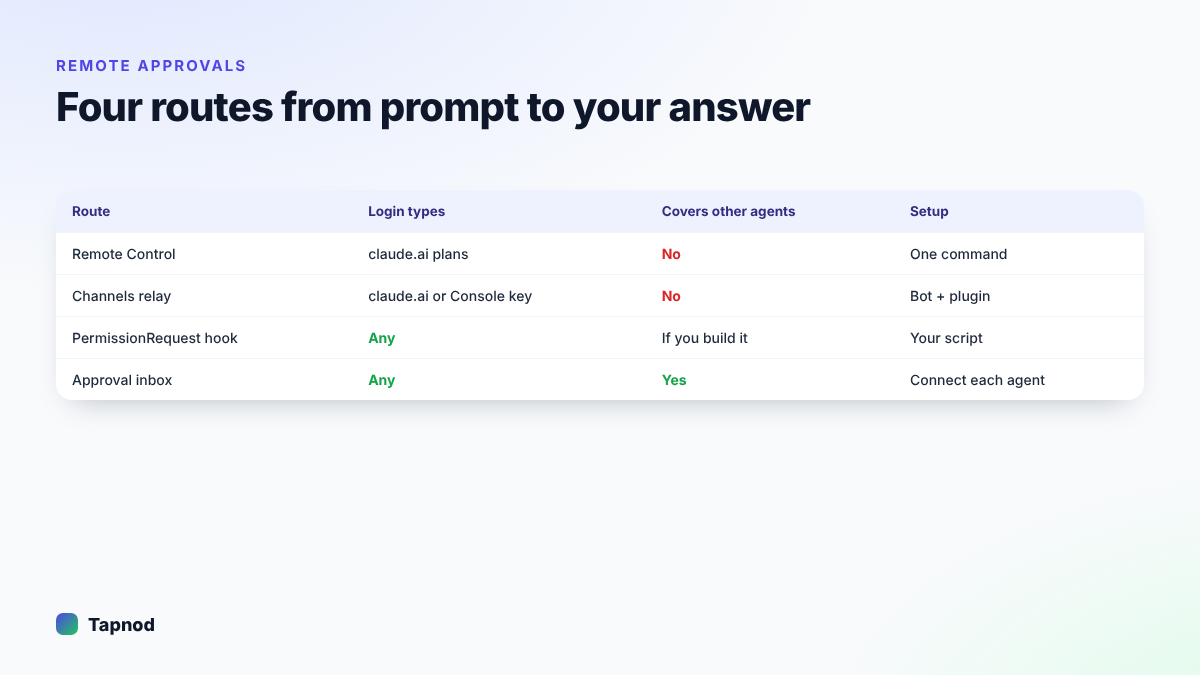
Claude Code asks for approval before actions your rules don't already allow. To answer those prompts when you're away from the terminal, you have four routes:
- Remote Control: prompts are forwarded to the Claude app or claude.ai/code and stay open until you answer.
- Channels with permission relay: channel plugins that declare it can forward prompts to a chat app like Telegram.
- A
PermissionRequesthook: your own code runs when Claude is about to ask, and can answer, or send the question somewhere else and relay the answer. - An approval inbox: hooks or the agent itself send the request to an inbox you check from your phone.
Pick by what your setup supports and how many agents you run.
"claude code approval" and "claude code human in the loop" are small searches today, around 30 and 20 a month in the US (Semrush, November 2026). They sit inside a much larger cluster of permission searches, led by "claude code dangerously-skip-permissions" at 2,900. Many people who reach for skipping permissions really want approvals that don't need them at the desk.
Route 1: Remote Control
Remote Control is the most direct option on claude.ai plans. Start with claude --remote-control or run /remote-control in a session. Permission prompts and AskUserQuestion questions are forwarded to your connected device and stay open until you answer. Turn on Push when actions required in /config so your phone alerts you.
Limits: it needs a Pro, Max, Team or Enterprise login (no API keys), a direct connection to the Anthropic API, and your machine awake. Setup in Claude Code Remote Control.
Route 2: Channels with permission relay
Channels push messages from Telegram, Discord or iMessage into a running session. Channel servers that declare the permission relay capability can also forward permission prompts, so you can approve or deny from the chat. The sender allowlist decides who can do that, so pair only accounts you'd trust with approving actions on your machine. See Claude Code from Telegram.
Route 3: a PermissionRequest hook
PermissionRequest runs when Claude Code is about to ask you for permission. A hook that prints a decision with "behavior": "allow" answers for you. That makes two patterns possible:
Auto-answer a narrow case. Anthropic's example allows only ExitPlanMode, so leaving plan mode doesn't need a click.
Relay to a person. The hook sends the request elsewhere, waits for an answer within its timeout, and prints the decision. Command and HTTP hooks have long default timeouts, so a short wait for a phone tap is possible, but keep it bounded and fall back to the normal prompt if nobody answers:
#!/usr/bin/env bash
# .claude/hooks/relay-approval.sh  (sketch: send, wait up to 90s, else fall back)
req=$(cat)
id=$(post_to_approval_service "$req")         # your function: returns a request id
for i in $(seq 1 18); do
  answer=$(check_approval "$id")             # your function: approved | denied | pending
  if [ "$answer" = approved ]; then
    echo '{"hookSpecificOutput":{"hookEventName":"PermissionRequest","decision":{"behavior":"allow"}}}'
    exit 0
  fi
  [ "$answer" = denied ] && { echo "Denied by reviewer" >&2; exit 2; }
  sleep 5
done
exit 0   # no answer: fall through to the normal prompt
Exit code 2 on a PermissionRequest hook denies the permission. Exiting 0 with no output leaves the normal prompt in place. Keep the matcher narrow, such as Bash, so you're not relaying every edit.
Route 4: an approval inbox
If you run several agents, approvals from each tool's own app add up fast. An inbox collects them: Claude Code's permission_prompt notifications, other agents' questions, and results, all in one queue with approve and reply on each card. Answers flow back over MCP, webhooks or polling, depending on how each agent connects. The pattern is explained in the agent inbox.
Compare the routes
| Remote Control | Channels relay | PermissionRequest hook | Inbox | |
|---|---|---|---|---|
| Setup | One command | Bot plus plugin | Your script | Connect each agent |
| Login types | claude.ai plans only | claude.ai or Console key | Any | Any |
| Shows full session | Yes | Chat only | No | Card with context |
| Covers other agents | No | No | Only if you build it | Yes |
| Best for | One Claude Code session | Chat-first people | Custom routing | Several agents |
Decide what deserves an approval
Remote approvals work only if there are few enough of them to read properly. Reduce the noise first:
| Action | Suggested rule |
|---|---|
| Tests, lint, type checks, read-only git | Allow |
| File edits on a feature branch | acceptEdits mode |
git push, package installs |
Ask |
| Migrations, deploys, anything touching prod | Ask, and require a clear summary |
| Credential files, destructive commands | Deny |
With routine actions allowed, the prompts that reach your phone are the ones worth a few seconds of thought. Our guide to Claude Code permissions has the rule syntax.
What a good remote approval shows
You'll approve better from a phone if the request includes the exact command or file, the project and branch, one line on why, and whether it can be undone. Ask Claude to include a short reason before risky commands in your CLAUDE.md; it makes every remote prompt easier to judge.
Keeping a record of approvals
Remote approvals are fast, which makes a record more important, not less. Log who approved what and when, along with the exact command. A PreToolUse hook that appends Bash commands to a file covers what ran; your approval channel should cover who said yes. When something goes wrong a week later, that pair of records turns a guessing game into a two-minute lookup. See building an audit trail for AI agent decisions.
A worked example
Picture a developer who runs Claude Code on a desktop at home and travels often. Routine commands are allowed, pushes and installs ask. On Remote Control-capable days, prompts arrive in the Claude app. On their work laptop, which uses an API key through a gateway, Remote Control isn't available, so a Notification hook sends prompts to an inbox and a PermissionRequest hook relays answers for Bash prompts. Different routes, same habit: risky actions wait for a person, and the person can answer from anywhere.
Key takeaways
- Remote Control forwards prompts to your phone on claude.ai plans.
- Channels can relay prompts when the plugin supports it; the allowlist decides who can approve.
PermissionRequesthooks can auto-answer narrow cases or relay to a person.- Allow routine actions first so remote approvals stay few and meaningful.
Related guides
- Claude Code permissions: rule syntax and the order rules are checked in.
- Approve Claude Code from your phone: the quickest setup on a claude.ai plan.
FAQ
How do I approve Claude Code actions from my phone?
Use Remote Control, which forwards permission prompts to the Claude app, or send prompts to your phone with hooks and answer through an inbox or relay.
Can a hook approve Claude Code permission prompts?
Yes. A PermissionRequest hook can print an allow decision. Scope its matcher narrowly so you don't approve everything.
What happens if I don't answer a remote approval?
Permission prompts stay open until answered with Remote Control. In your own relay, decide a timeout and fall back to the normal prompt or a denial.
Do remote approvals work with API key logins?
Remote Control doesn't, but hooks and inbox-based approvals work with any login type.
Where Tapnod fits
Tapnod is an approval inbox for Claude Code and your other agents: each request arrives as a card you approve, reject or reply to from your phone. Start free.