 Tapnod
The short answer
gotoHuman is a web app where teams review and approve what their AI agents and automations produce. You create review templates with fields, send review requests through its SDK, API or MCP server, and reviewers work through them in an inbox; answers return to your workflow by webhook. It's a good fit for structured reviews of AI-generated content.
Teams look for alternatives when they want something closer to their framework, an inbox built around coding agents, deeper mobile use, or a different price point. The main options:
| Alternative | Best for |
|---|---|
| Tapnod | Many agents, including coding agents, answered from a phone |
| LangGraph Agent Inbox | LangGraph-only stacks |
| Zapier Human in the Loop | Workflows already in Zapier |
| n8n human review | Self-hosted automation |
| Framework features | Single agents with your own UI |
| Slack-based approvals | Teams that live in Slack |
"gotohuman" gets about 110 US searches a month at a keyword difficulty of 28 (Semrush, November 2026). Most of those are people evaluating it, which is why a fair comparison is useful.
What gotoHuman does
From its public docs and SDK:
- Review templates: define fields for the content to review and the input you want back.
- Requests from code: a Python and TypeScript SDK, an API, and an MCP server for agents.
- Inbox: reviewers see pending reviews and approve, edit or add input.
- Webhooks: answers flow back to your workflow to continue it.
- Integrations: used with automation tools and agent frameworks.
- Free plan: available; check gotoHuman's site for current paid tiers.
from gotohuman import GotoHuman

gotoHuman = GotoHuman()  # reads GOTOHUMAN_API_KEY and agent ID from env
review = gotoHuman.create_review("YOUR_REVIEW_TEMPLATE_ID")
review.set_review_data({"ai_social_media_post": draft_text})
# send the request; see the SDK docs for the current method name
Where teams look elsewhere
| Need | Why an alternative may fit better |
|---|---|
| Coding agents like Claude Code and Codex | Their questions and permission prompts don't map neatly to templates |
| Many agents, mixed message types | Results and errors matter as much as reviews |
| Mobile-first answering | Reviewers approve from phones throughout the day |
| No per-review setup | Teams want agents to send ad-hoc questions without templates |
| Self-hosting | Some teams can't use a cloud review service |
Alternative 1: Tapnod
An inbox where agents send questions, plans, results and errors, and people approve, comment, reply or choose Later. Agents connect through one ready-made prompt, MCP, signed webhooks or polling. It includes agent monitoring (last contact, active agents, waiting decisions), swipe and Tasks views, teams, shared HTML dashboards, and a web app plus Android PWA with notifications.
Choose it if you run several agents, especially coding agents, and want to answer from your phone. Pricing: Free plan with 2 active agents and 300 events a month; Pro $6/month; Team $19/month.
Alternative 2: LangGraph Agent Inbox
LangChain's open-source UI for paused LangGraph threads. Choose it if all your agents are LangGraph and reviewers work at a desk. See LangGraph Agent Inbox.
Alternative 3: Zapier Human in the Loop
Request Approval and Collect Data steps inside Zaps. Choose it if your AI workflows already run in Zapier and reviewers have Zapier access. See Zapier human in the loop.
Alternative 4: n8n human review
Approvals for AI tool calls through channels like Slack, plus wait and form nodes. Choose it if you self-host automation and want approvals inside the same tool. See n8n human in the loop.
Alternative 5: framework features
LangGraph interrupts, LangChain middleware, OpenAI Agents SDK approvals, Google ADK confirmation. Choose it if you have one agent and will build your own review UI.
Alternative 6: Slack-based approvals
Bots that post approval buttons in channels. Choose it if your team lives in Slack and volume is low. Busy channels bury requests, so use dedicated channels. See Slack approval workflows for AI agents.
Running two tools side by side
You don't have to pick one. A practical split many teams land on: content reviews with custom forms stay in a review platform, while operational traffic from agents, such as questions, approvals for commands, results and errors, goes to an agent inbox. Keep the split clear so reviewers know which place handles what.
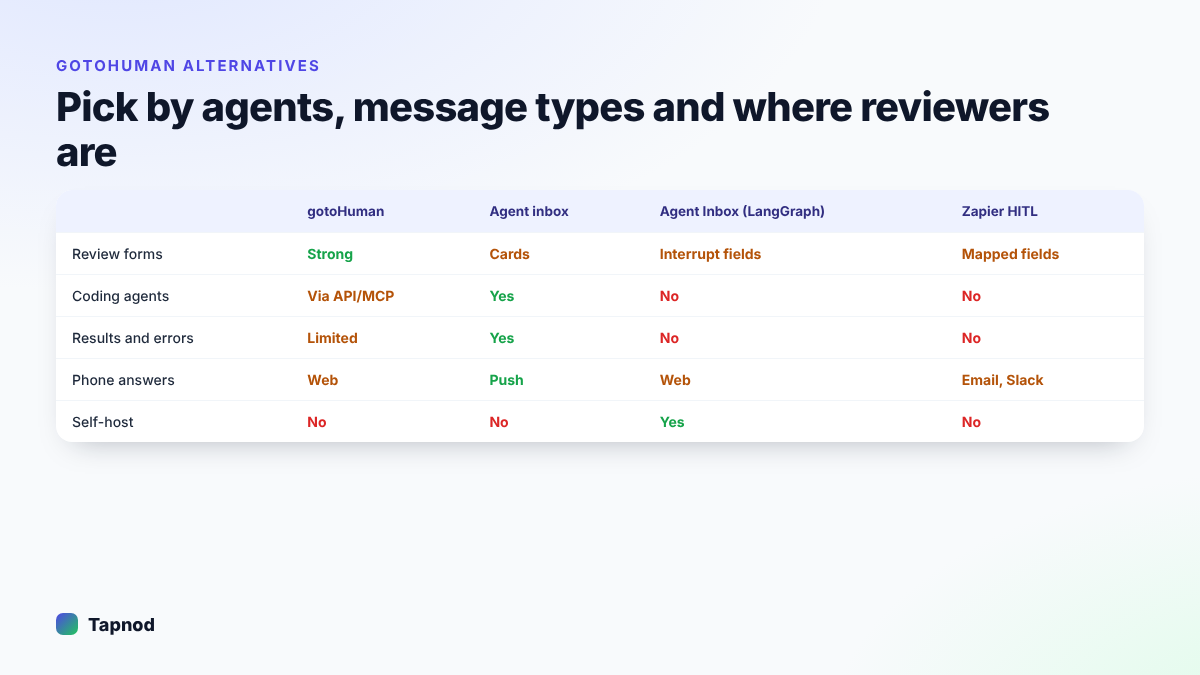
Comparison table
| gotoHuman | Tapnod | Agent Inbox | Zapier HITL | n8n | |
|---|---|---|---|---|---|
| Structured review forms | Strong | Cards with actions | Interrupt fields | Mapped fields | Forms |
| Coding agents | Via API or MCP | MCP, prompt, webhooks | No | No | No |
| Results and errors | Limited | Yes | No | No | Workflow-dependent |
| Mobile | Web | Web + Android PWA, notifications | Web | Email, Slack | Chat apps |
| Monitoring | Limited | Last contact, waiting | Thread list | Zap history | Execution log |
| Self-host | No | No | Yes | No | Yes |
Questions to settle before switching
Switching review tools is cheap at the start and expensive later, so settle a few things first:
- Who reviews. If reviewers are marketers or support staff checking drafts, template-based forms help them. If they're engineers answering agent questions, quick cards and replies matter more.
- Volume. A few dozen reviews a day suits almost any tool. Hundreds a day needs filtering, routing and keyboard or swipe shortcuts.
- Where answers go. gotoHuman continues workflows by webhook. Make sure any alternative can return answers the way your agents expect: webhook, polling or MCP.
- Data handling. Check where review content is stored and for how long, especially for customer data.
Cost of each approach
Pricing models differ. Review platforms and agent inboxes usually charge per plan or seat with a free tier; automation platforms tie human steps to paid plans; framework features are free but cost engineering time for delivery and UI. Compare on the total, including the hours you'd spend building notifications and a mobile view yourself.
How to decide
- List your agents and where they run. Mixed frameworks and coding agents point to an inbox; one workflow tool points to its built-in step.
- List message types you need. If you only review content, a review platform fits. If agents also send questions, plans and errors, an inbox fits.
- Check where reviewers are. Phones push you toward strong mobile support.
- Run a one-week trial with real agents and count time to answer.
A worked example
Picture an agency using gotoHuman to review AI-drafted client posts, which works well with templates. They add Claude Code agents for client websites and find themselves checking terminals for permission prompts. They keep gotoHuman for content reviews and connect their coding agents to an agent inbox for questions and approvals, so each tool does what it's best at.
Key takeaways
- gotoHuman is strong for template-based reviews of AI-generated content.
- Alternatives fit better for coding agents, mixed message types or mobile-first teams.
- Framework and automation-platform features suit single-tool setups.
- Trial with real agents before deciding.
FAQ
What is gotoHuman?
A web app for reviewing and approving AI agent outputs and actions, with review templates, an inbox, an SDK, an API, an MCP server and webhooks.
Does gotoHuman have a free plan?
Yes, it offers a free plan. Check its website for current paid tiers.
What is a good gotoHuman alternative for coding agents?
An agent inbox that connects over MCP or hooks, so Claude Code, Codex and similar agents can send questions and approvals without templates.
Can I use gotoHuman and another tool together?
Yes. Many teams use a review platform for content and an agent inbox for operational questions and approvals.
Where Tapnod fits
Tapnod is the inbox for teams running many agents: questions, plans, results and errors, answered from your phone. Compare it free.