 Tapnod
The short answer
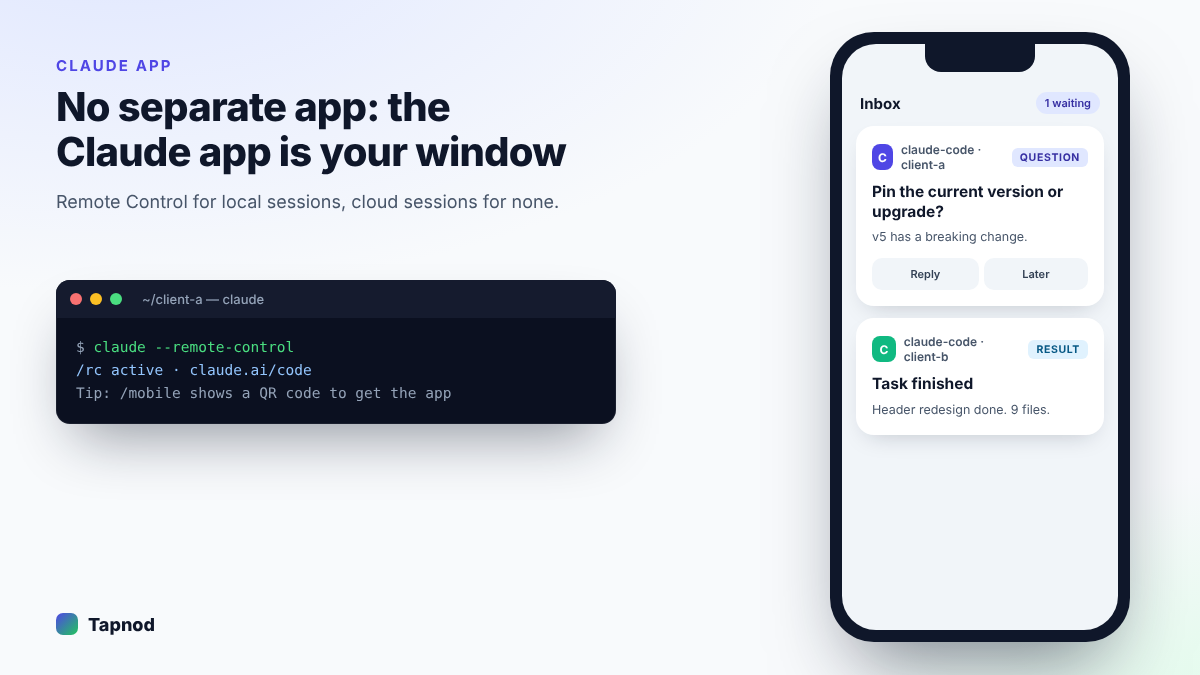
There's no separate app called "Claude Code" in the app stores. Claude Code on mobile runs through the Claude app for iOS and Android. From it you can connect to a Claude Code session on your own computer with Remote Control, or use cloud sessions through the claude.ai/code interface. Together, those cover most of what people want from a "Claude Code app": checking progress, answering questions, approving commands and starting new tasks.
"claude code mobile app" gets about 390 US searches a month at a keyword difficulty of 57 (Semrush, November 2026). The question behind most of these searches is simple: can I keep my coding agent moving when I leave my desk? The answer is yes, with some conditions.
What the Claude app does for Claude Code
| Capability | How |
|---|---|
| Continue a session on your computer | Remote Control |
| Start work without your computer | Cloud sessions |
| Approve permission prompts | Forwarded to the app with Remote Control |
| Answer Claude's questions | Forwarded with Remote Control |
| Get pushes when actions are needed | "Push when actions required" in /config |
| Send photos and files | Attach in the app; Claude Code downloads them to your machine |
| Change model or effort | /model sonnet, /effort high with an argument |
What it doesn't do
- Run Claude Code on the phone itself. The phone is a window into a session on your computer, or into a cloud session.
- Work with API-key logins for Remote Control. You need a claude.ai login on Pro, Max, Team or Enterprise.
- Run local-only commands such as
/pluginor/resumefrom mobile. - Keep a sleeping laptop working. Remote Control needs your machine awake and the
claudeprocess running.
Getting started
# on your computer, in your project
claude --remote-control

# don't have the app yet? inside Claude Code:
/mobile
/mobile shows a QR code that opens the right app store for your phone. After installing and signing in with the same account, open the session from the app or scan the session's QR code. Then turn on Push when actions required in /config.
If the Claude app doesn't fit your setup
Some setups can't use Remote Control: API keys, LLM gateways, Amazon Bedrock, Google Cloud or Microsoft Foundry. Alternatives:
| Alternative | What you get |
|---|---|
| SSH terminal app plus tmux | The real terminal on your phone, any login |
| Channels with Telegram, Discord or iMessage | Chat with your session from a messaging app |
| Notification hooks to a push service | Alerts for prompts and finished tasks |
| An agent inbox | Approvals and questions from Claude Code and other agents in one app |
Channels work with a claude.ai login or a Console API key. Hooks work with any login.
Third-party apps
You'll also find third-party apps and open-source projects that wrap Claude Code for mobile. Some are well built; evaluate them like any tool that touches your code: where does the session run, what credentials does the app hold, and who can see your conversation? First-party Remote Control keeps code execution on your machine and doesn't open inbound ports, which is a good baseline to compare against.
Remote Control vs cloud sessions in the app
Both live in the same claude.ai/code interface inside the app, which confuses people. The difference is where the work happens.
| Remote Control session | Cloud session | |
|---|---|---|
| Runs on | Your computer | Cloud infrastructure, Anthropic-managed by default |
| Sees your local files, tools and MCP servers | Yes | No |
| Needs your computer on | Yes | No |
| Good for | Continuing work you started at the desk | Starting something new from your phone |
| Output | Changes on your machine | Changes in a repository, often a PR |
A simple rule: if the task needs anything that only exists on your machine, such as a local database, a VPN or private tools, use Remote Control. If it only needs the repository, a cloud session frees you from keeping a laptop awake.
Push notifications in the app
The app's value depends on notifications. Two toggles in /config on your computer control them: Push when actions required, for prompts and questions, and Push when Claude decides, which Claude typically uses when a long task finishes. There's no per-event configuration beyond those, and pushes pause while you're typing at the connected terminal. For more control over which events reach you, add hooks alongside the app.
Is the Claude app enough
| If you | The Claude app is |
|---|---|
| Use Claude Code on a claude.ai plan from one machine | Enough |
| Run Claude Code with an API key or gateway | Not enough; use SSH, Channels or hooks |
| Run several machines | Workable; server mode helps |
| Run Claude Code plus other agents | One of several apps to check; consider one inbox |
Reading code on a phone
Even with a good app, a phone screen limits what you should do from it. Good uses: approving commands you recognize, answering clarifying questions, telling Claude to continue or stop, starting small scoped tasks. Poor uses: reviewing large diffs, debugging complex failures, changing settings. A tablet with a keyboard moves the line a fair way, which is why some people keep one for agent supervision.
A worked example
Picture a freelancer working on two client projects from a laptop. Both run Claude Code with Remote Control. On a train, the Claude app shows both sessions. One asks whether to update a dependency with a breaking change; they reply "no, pin the current version and note it". The other finishes and pushes a notification. They read the summary and leave the diff for the evening. Two sessions moved forward in five minutes of phone time.
Before you rely on it
Run one real task through the app before a day you depend on it. Start a session with Remote Control, leave the room, wait for a prompt, approve it from the phone and check the result at your desk. Ten minutes of testing tells you whether notifications arrive on time and whether your permission rules leave the right prompts.
Key takeaways
- There's no separate "Claude Code" app; the Claude app covers it on iOS and Android.
- Remote Control lets the app steer sessions on your machine; cloud sessions need no machine.
- API keys and gateways need alternatives like SSH, Channels or hooks.
- Use the phone for decisions, and a bigger screen for review.
Related guides
- Claude Code Remote Control: how the app connects to a session on your machine.
- Approve Claude Code from your phone: a five-minute setup, start to finish.
- Control Claude Code from Telegram: the chat-app alternative that also works with a Console key.
- Codex vs Claude Code remote control: how the two mobile experiences compare.
FAQ
Is there a Claude Code app for iPhone?
Claude Code works through the Claude app on iPhone, which connects to sessions on your computer with Remote Control and to cloud sessions.
Is there a Claude Code app for Android?
Yes, the same Claude app on Google Play. See Claude Code on Android for notification tips.
Can I run Claude Code directly on my phone?
Not as a local process. The app connects to a session running on your computer or in the cloud.
Does the Claude app work with API key logins for Claude Code?
Not for Remote Control, which needs a claude.ai subscription login. Use SSH, Channels or hooks instead. More options in Claude Code on mobile.
Where Tapnod fits
If you want one app for Claude Code and every other agent you run, Tapnod collects their questions and approvals in a single inbox on Android and the web. Try it free.