 Tapnod
The short answer
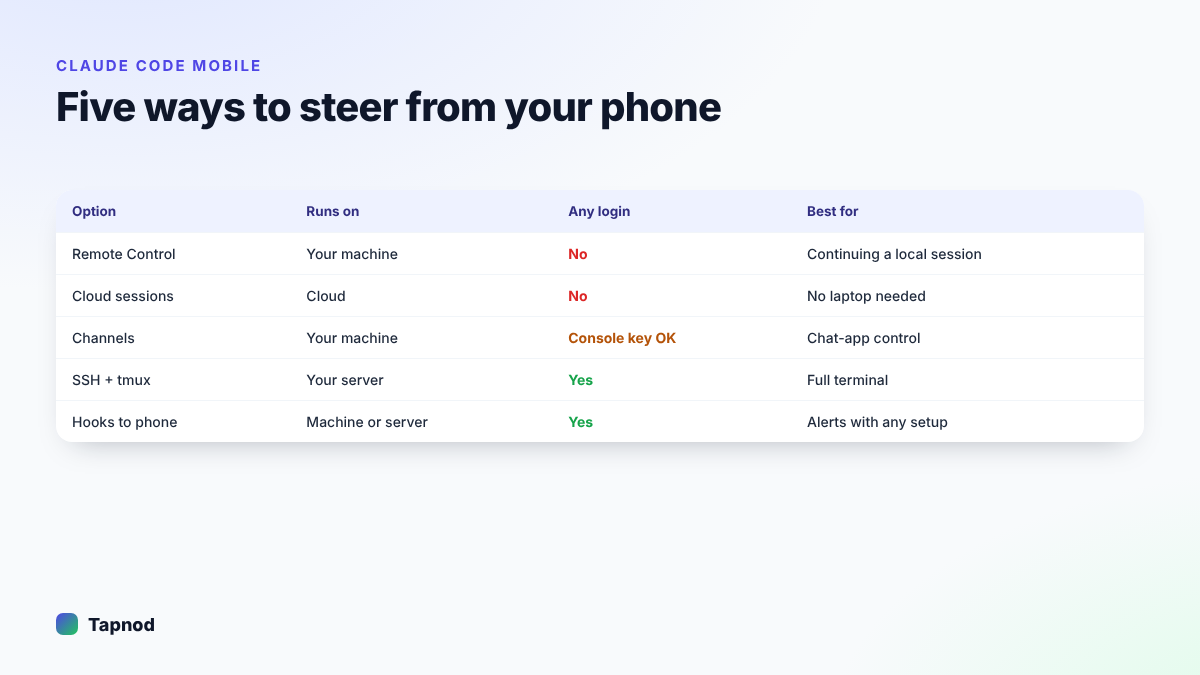
Claude Code on mobile comes down to one idea: the work runs on a computer or in the cloud, and your phone is where you steer and decide. In 2026 you have five ways to do that:
| Option | Code runs on | Best for |
|---|---|---|
| Remote Control in the Claude app | Your machine | Continuing a local session |
| Cloud sessions | Cloud infrastructure | Starting work with no laptop |
| Channels | Your machine | Chatting with a session from Telegram, Discord or iMessage |
| SSH with tmux | Your server | Any login type, full terminal |
| Hooks to your phone | Your machine or server | Alerts and approvals with any setup |
Most people combine two: one way to steer, one way to be alerted.
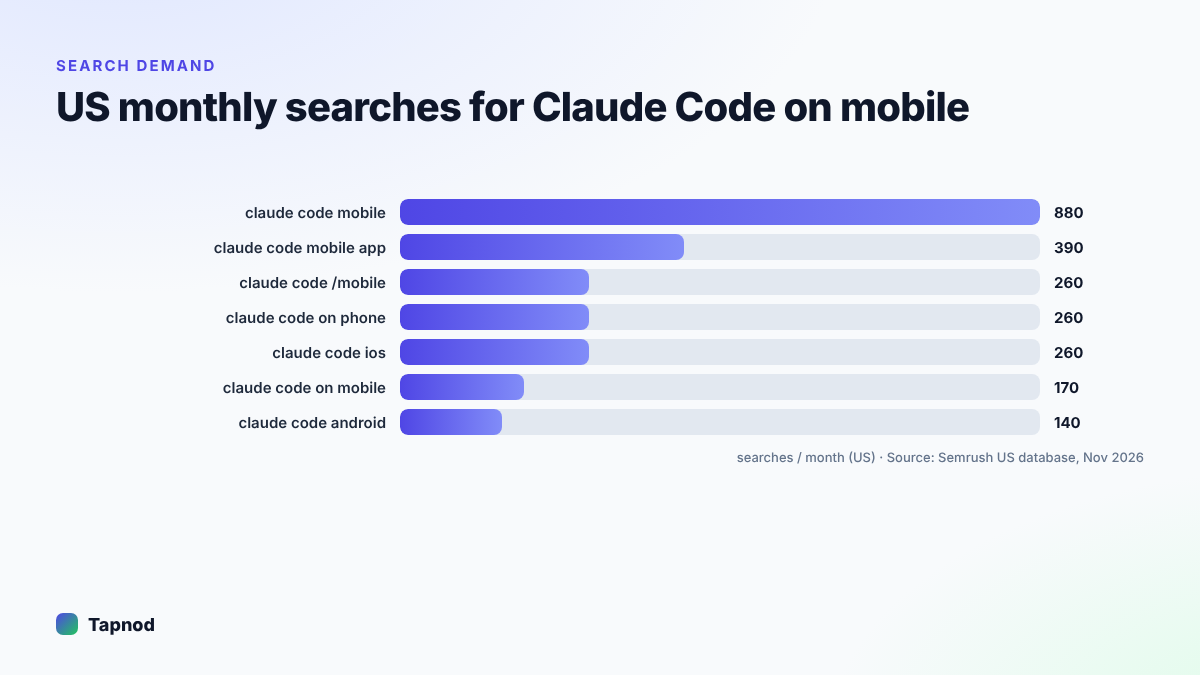
"claude code mobile" gets about 880 US searches a month at a keyword difficulty of 56, the largest single mobile query, with "claude code mobile app" at 390 and "claude code on mobile" at 170 (Semrush, November 2026). This is the overview page; we link to step-by-step guides for each option.
What actually works from a phone
With Remote Control, the conversation syncs across terminal, browser and phone. From the phone you can:
- Send instructions and replies, with
@autocompleting files from your local project. - Approve or deny permission prompts, which stay open until you answer.
- Answer Claude's questions.
- Attach photos and files.
- Run commands that take an argument, such as
/model sonnet,/effort high,/rename, and/config key=value. - Check MCP server status with
/mcp, which returns a text summary in the mobile app.
Commands that only run in the terminal interface, such as /plugin and /resume, stay at the desk.
The options in one line each
Remote Control connects the Claude app to a session on your machine; needs a claude.ai plan and the machine awake. Full guide.
Cloud sessions run on cloud infrastructure from the same claude.ai/code interface; no laptop needed, no local tools.
Channels bring Telegram, Discord or iMessage into a running session; research preview, allowlist-based. Telegram guide.
SSH and tmux attach to a terminal session on a server; works with every login type.
Hooks forward permission_prompt, idle_prompt and other events to your phone; works with every setup. Notifications guide.
Notifications, the part that makes mobile work
Mobile steering is only useful if you know when to look. With Remote Control, run /config and enable Push when actions required for prompts and questions, and Push when Claude decides for Claude's own judgment, usually when a long task finishes. Pushes pause while you're typing at the connected terminal.
For finer control, hooks let you choose exactly which events reach you and how. A sensible split: permission prompts and questions as urgent pushes, finished tasks as quiet ones, errors somewhere in between.
Security on mobile
| Concern | What to know |
|---|---|
| Where code runs | On your machine with Remote Control; your phone doesn't execute it |
| Network exposure | Remote Control uses outbound HTTPS and opens no inbound ports |
| Device trust | Pro and Max users can require trusted devices; Team and Enterprise owners can enforce it |
| Lost phone | Your Claude account controls access; sign out sessions and change your password |
| Chat channels | Anyone on a channel's allowlist can direct your session |
A phone makes approving easy, which is exactly why your permission rules should still deny the dangerous things. Keep deny rules for credential files and destructive commands whatever device you approve from.
A recommended configuration
For a developer on a claude.ai plan with one main machine:
{
  "remoteControlAtStartup": true,
  "permissions": {
    "allow": ["Bash(npm run test *)", "Bash(npm run lint *)", "Bash(git diff *)", "Bash(git status)"],
    "ask": ["Bash(git push *)", "Bash(npm install *)"],
    "deny": ["Read(./.env*)", "Read(~/.ssh/**)"]
  }
}
Put this in ~/.claude/settings.json. remoteControlAtStartup connects every interactive session automatically; it's honored in user settings but ignored when set to true in a project file. Then enable push in /config.
For API-key or gateway setups, replace Remote Control with SSH for steering and a Notification hook for alerts.
Teams and mobile
On Team and Enterprise plans, an Owner enables Remote Control in admin settings, and custom roles may need the Claude Code remote control permission. Agree on two things as a team: which actions anyone may approve from a phone, and which need a second look at a desk. Production-adjacent actions usually belong in the second group.
Phone or tablet
A phone is ideal for quick decisions; a tablet with a keyboard handles real review. If you often supervise agents while away from your desk, a tablet running the Claude app beside a browser with your pull request is the most comfortable setup. Either way, your permission rules and alerts are the same, so switching devices costs nothing.
Mobile-friendly habits
- Write prompts that finish cleanly: a goal, a scope and a stopping point.
- Ask for summaries before big approvals: files changed, commands next, risks.
- Use "later" freely. A deferred decision costs less than a wrong one.
- Keep sessions few. Two or three you can follow beat six you can't.
- Review diffs at a screen. The phone decides direction; the desk reviews code.
A worked example
Picture a founder who codes in the morning and takes meetings in the afternoon. Every session connects to Remote Control automatically. Before the first meeting they start two tasks: a bug fix and a test backfill. Between meetings, pushes arrive for a package install and a question about test naming; both take seconds. One cloud session gets started from the phone for a copy change on the website. At 18:00 they sit down to review three finished branches.
Test the setup once
Before a day when you'll depend on it, rehearse. Start a task, walk away, wait for a prompt, answer it from the phone, then check the result at your desk. It takes ten minutes and shows you whether alerts arrive quickly and whether your rules leave only the prompts you want.
Key takeaways
- Claude Code on mobile means steering and deciding from your phone while work runs elsewhere.
- Remote Control is the main option on claude.ai plans; SSH and hooks cover other setups.
- Notifications are what make mobile work: urgent for prompts, quiet for finished tasks.
- Keep deny rules in place, since approving from a phone is easy.
Related guides
- Is there a Claude Code mobile app: what the Claude app can and can't do.
- Claude Code on Android: settings that make alerts arrive on time.
- Claude Code remote: all six remote options side by side.
FAQ
Can I use Claude Code on my phone?
Yes. Use the Claude app with Remote Control to steer a session on your computer, cloud sessions for work without your computer, Channels for chat apps, SSH with tmux, or hooks for alerts.
What can I do in Claude Code from mobile?
Send instructions, approve prompts, answer questions, attach files, and run commands that take arguments, such as /model. Local-only commands like /plugin need the terminal.
Is Claude Code on mobile secure?
With Remote Control, code runs on your machine, the connection is outbound-only, and you can require trusted devices. Keep deny rules for sensitive files regardless.
What's the best mobile setup for API-key users?
SSH with tmux for steering, plus a Notification hook that sends prompts to your phone. See how to use Claude Code on mobile for step-by-step options.
Where Tapnod fits
When Claude Code is one of several agents, Tapnod gives you one mobile inbox for all of their questions, approvals and results. Start free with two agents.